
TL;DR
This tutorial walks through building a CloudQuery Policy that detects publicly accessible databases across AWS, Azure, and GCP. You will get copy-paste ClickHouse SQL covering 9 database types across 3 cloud providers, screenshots of the full setup process, and a breakdown of how violation details and related resource views work.
CloudQuery Policies let you write ClickHouse SQL queries that flag infrastructure violations across all your cloud providers. We recently launched this feature, and this post shows how to put it to work.
We’re going to build a multi-cloud database security policy that detects databases with public network access enabled. The policy covers AWS RDS, seven Azure database types (Redis, SQL Server, PostgreSQL, MySQL, and three Cosmos DB variants), and GCP Cloud SQL. By the end, you’ll have a working policy you can paste directly into your own CloudQuery Platform instance.
What you need to follow along:
- A CloudQuery Platform account with active syncs running for at least one cloud provider
- SQL knowledge (ClickHouse dialect, though standard SQL covers most of what you’ll write)
- Optional: A Slack workspace or webhook endpoint for alerts
How Policies Work
Policies are ClickHouse SQL queries that run against CloudQuery’s normalized tables. Your sync jobs populate tables like aws_rds_db_instances, azure_redis_caches, and gcp_sql_instances. Policies query these tables on a schedule and flag any rows matching your violation criteria.
Policies are detective controls, not preventive ones. They’re not blocking deploys or scanning IaC. They’re checking what’s actually running in your cloud right now, including resources created through the console, by third-party tools, or by IaC that’s since drifted.
Every resource in CloudQuery has normalized metadata columns (_cq_platform_id, _cq_account, _cq_region, _cq_name) that work the same way across all providers. That’s what makes multi-cloud policies possible.
Step 1: Configure Your Policy
Go to Policies in the sidebar and click Add new policy:
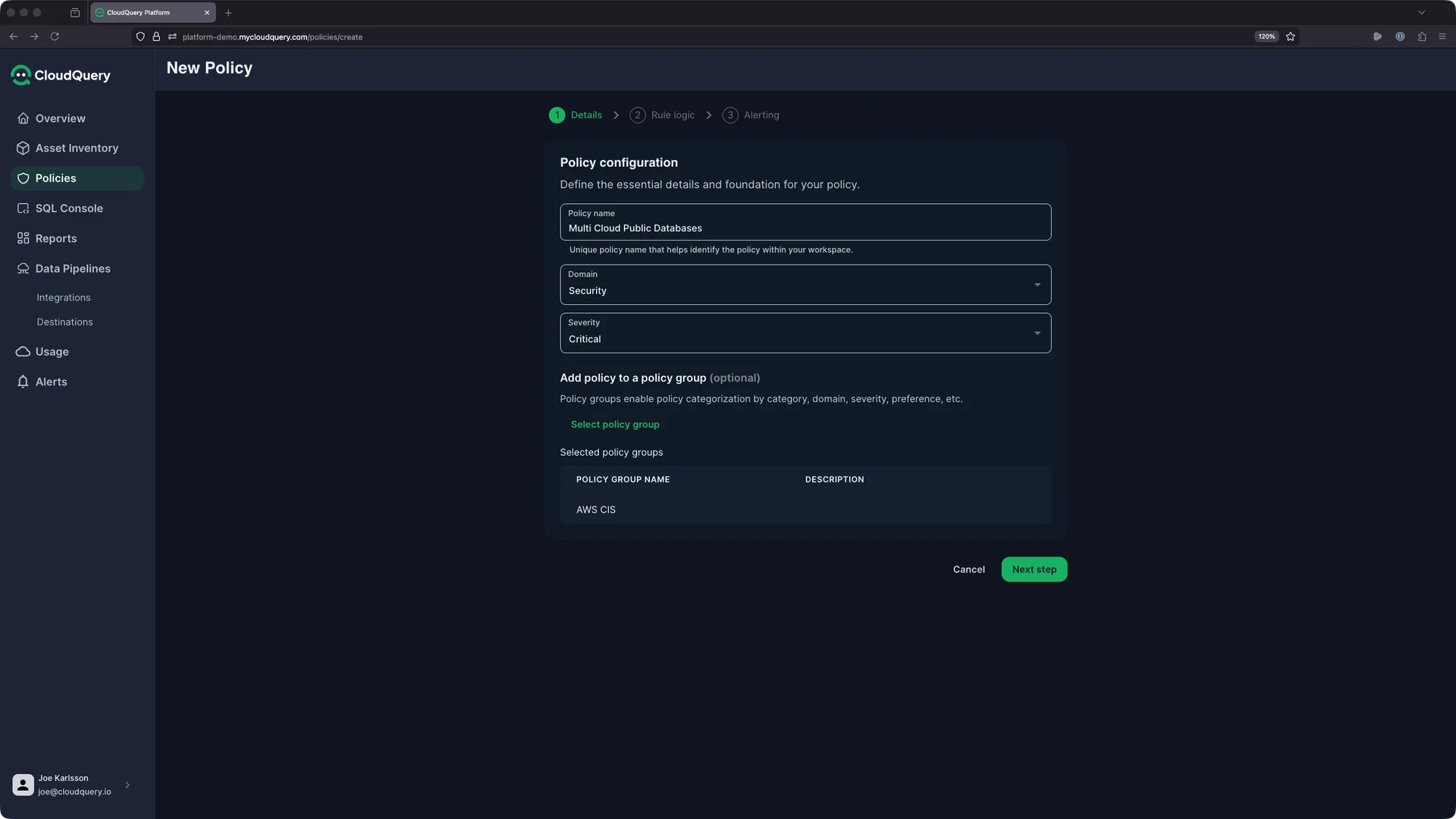
Fill in the basics:
- Policy name:
Multi Cloud Public Databases - Domain: Security
- Severity: Critical (publicly accessible databases are high-risk by default)
- Policy group: Optional. Groups help organize related policies. Here we’ve added it to an “AWS CIS” group, but you could create a “Database Security” group or whatever matches your team’s structure
Severity affects how violations appear in the dashboard and how alerts get routed, so set it based on actual risk to your environment. A public database in production is probably Critical. A missing tag on a dev instance is more like Medium.
Click Next step to move to the rule logic.
Step 2: Write the SQL Query
The rule logic screen shows a library of 235+ pre-built queries you can select from, tagged by cloud provider and category:
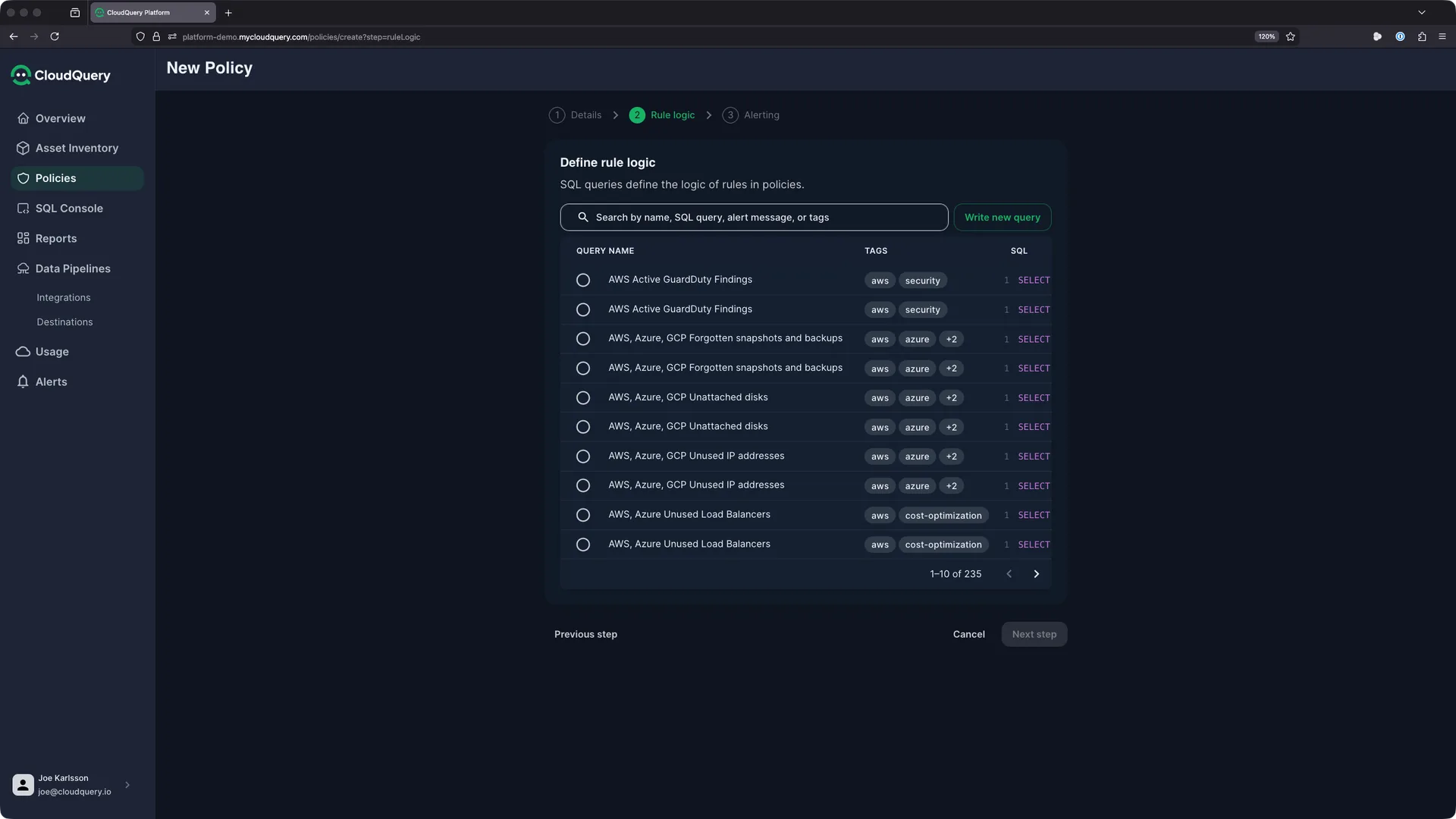
We’re writing a custom query, so click Write new query. Let’s build it up provider by provider.
Starting with AWS RDS
Let’s start with AWS since it has the simplest pattern. AWS RDS exposes a native publicly_accessible boolean column, so no JSON parsing is needed:
WITH resource_type_labels AS (
  SELECT resource_type_label, resource_type FROM cloud_assets
  WHERE resource_type = 'aws_rds_db_instances'
  LIMIT 1
),
aws_rds_public AS (
  SELECT
    _cq_platform_id,
    coalesce(nullif(_cq_account_name, ''), _cq_account)
      as subscription,
    _cq_region as region,
    _cq_name as name,
    'aws_rds_db_instances' as resource_type,
    tags as tags
  FROM aws_rds_db_instances
  WHERE publicly_accessible = 1
    AND db_instance_status = 'available'
)
SELECT _cq_platform_id, subscription, region, name, tags,
  l.resource_type_label as database_type,
  lower(concat(
    coalesce(subscription, ''),
    coalesce(region, ''),
    coalesce(name, ''),
    coalesce(database_type, ''),
    coalesce(tags, '')
  )) as search_string
FROM aws_rds_public a
LEFT JOIN resource_type_labels l ON a.resource_type = l.resource_type
Here’s what each part does:
resource_type_labelsCTE: Fetches a human-readable label from thecloud_assetsmetadata table. This gives you “RDS DB Instance” instead ofaws_rds_db_instancesin the violation listaws_rds_publicCTE: Filters to instances wherepublicly_accessible = 1and the instance is currently running (db_instance_status = 'available'). Thecoalesce(nullif(...))pattern handles accounts that have a display name vs. an account ID- Final SELECT: Joins the label, standardizes output columns, and builds a
search_stringfor the Policies UI search and filter
This pattern repeats across every provider and database type. The only things that change are the table name, the WHERE clause, and occasionally the column names.
Adding Azure Databases
Azure databases store their configuration in a JSON properties column, so the WHERE clause uses ClickHouse’s JSONExtractString function. Here’s the pattern for azure_redis_caches:
redis_caches AS (
  SELECT
    _cq_platform_id,
    coalesce(nullif(_cq_account_name, ''), _cq_account) as subscription,
    _cq_region as region,
    _cq_name as name,
    'azure_redis_caches' as resource_type,
    tags as tags
  FROM azure_redis_caches
  WHERE JSONExtractString(
    coalesce(properties, '{}'), 'publicNetworkAccess'
  ) = 'Enabled'
)
The same JSONExtractString pattern works for most Azure database types. The one exception is azure_cosmos_sql_databases, which uses a boolean field (enablePublicIpAccess) instead of a string, so it needs JSONExtractBool:
WHERE JSONExtractBool(
  coalesce(properties, '{}'), 'enablePublicIpAccess'
) = 1
For azure_sql_servers and azure_postgresql_servers, there’s an additional check against firewall rules. A server might have publicNetworkAccess disabled but still have overly permissive firewall rules:
open_firewall_ranges AS (
  SELECT _cq_parent_id, _cq_id
  FROM azure_sql_server_firewall_rules
  WHERE (JSONExtractInt(properties, 'startIpAddress')
    BETWEEN 11000 AND 11999)
    OR (JSONExtractInt(properties, 'endIpAddress')
    BETWEEN 11000 AND 11999)
),
sql_servers AS (
  SELECT ...
  FROM azure_sql_servers
  LEFT JOIN open_firewall_ranges AS ranges
    ON ranges._cq_parent_id = azure_sql_servers._cq_id
  WHERE JSONExtractString(
    coalesce(azure_sql_servers.properties, '{}'),
    'publicNetworkAccess'
  ) = 'Enabled'
    OR ranges._cq_parent_id IS NOT NULL
)
This catches servers where either public access is enabled OR a firewall rule has overly permissive IP ranges. Adjust the BETWEEN bounds to match the IP range encoding in your environment.
The full Azure portion of the policy repeats this pattern across all seven database types, joined with UNION ALL. You’ll find the complete query in the appendix.
Adding GCP Cloud SQL
GCP Cloud SQL stores its configuration in a nested JSON settings column, so you need to chain two JSON extraction calls. GCP also uses labels instead of tags:
gcp_sql_public AS (
  SELECT
    _cq_platform_id,
    coalesce(nullif(_cq_account_name, ''), _cq_account)
      as subscription,
    _cq_region as region,
    _cq_name as name,
    'gcp_sql_instances' as resource_type,
    labels as tags
  FROM gcp_sql_instances
  WHERE JSONExtractString(
    coalesce(
      JSONExtractRaw(settings, 'ipConfiguration'), '{}'
    ),
    'ipv4Enabled'
  ) = 'true'
    AND state = 'RUNNABLE'
)
The JSONExtractRaw(settings, 'ipConfiguration') call extracts the nested ipConfiguration object, and then JSONExtractString(..., 'ipv4Enabled') pulls the public IP flag from it. The state = 'RUNNABLE' filter excludes stopped instances.
Combining Into One Policy
To create a multi-cloud policy, combine all the individual checks with UNION ALL. Each block follows the same pattern, the same output columns, and gets merged into a single result set. The Policies dashboard then shows all violations together regardless of provider.
Test before you save: Use the SQL Console in CloudQuery Platform to run your query first. Paste it in, execute it, and verify you see the violations you expect. If the result set is empty and you know you have public databases, check that your sync jobs are populating the right source tables. You can verify by running SELECT count(*) FROM aws_rds_db_instances (or the relevant table) to confirm data is present.
Step 3: Configure Alerts
After defining the rule logic, you can optionally set up alerting. CloudQuery supports Slack channel notifications natively, and custom webhooks for integrations with Jira, Linear, PagerDuty, or whatever your team uses for incident management.
Pick the notification channel that matches your incident response workflow. Security violations like public databases should probably go to a dedicated security alerts channel rather than a general notifications channel.
Understanding Your Violations
Once the policy is saved and has run at least once, the Policies dashboard gives you a bird’s-eye view:
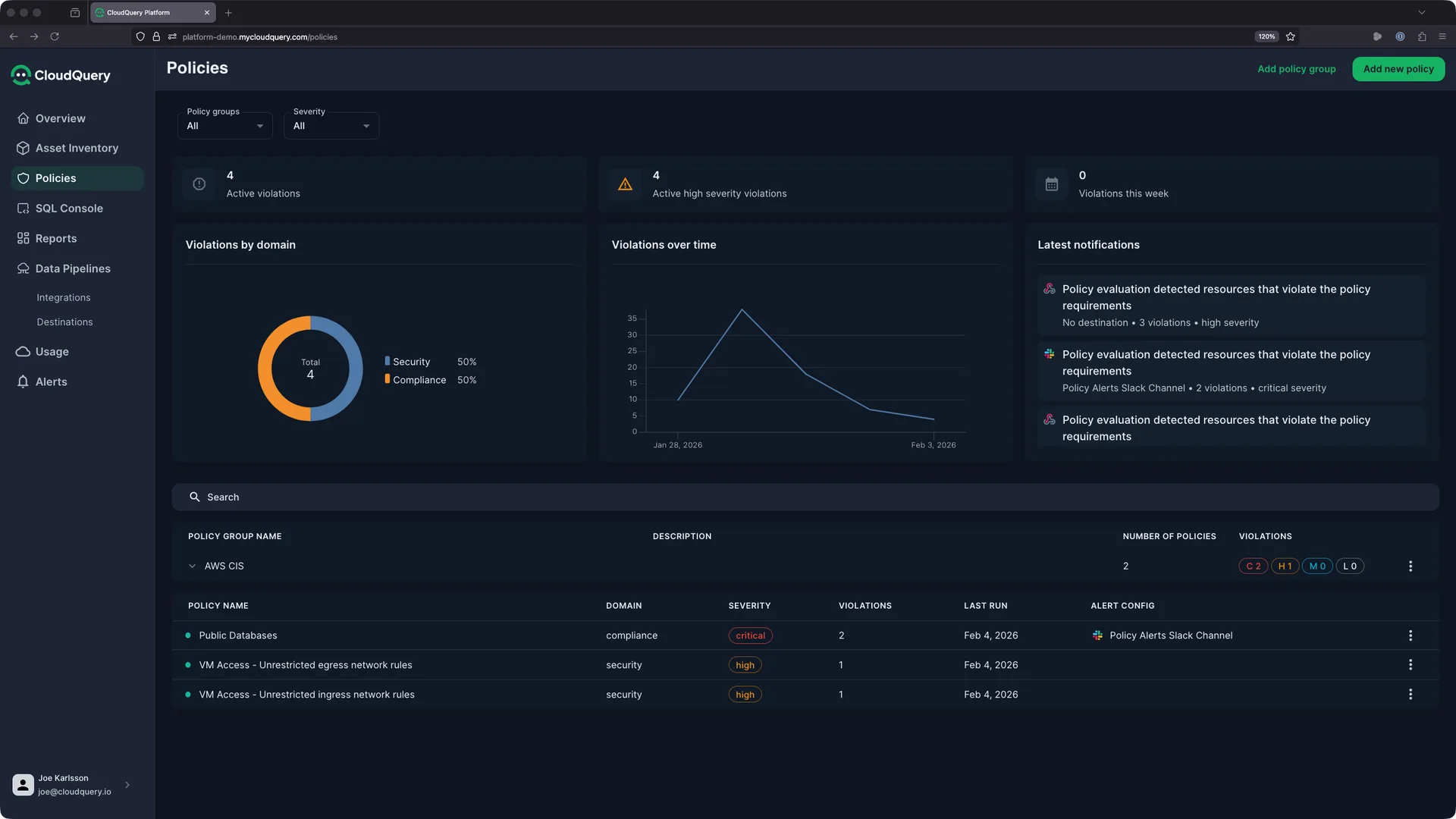
The dashboard shows active violations, severity breakdown, a trend graph over time, and recent notifications. You can filter by policy group, severity, and domain. The violations-over-time graph is especially useful after deployments. A spike there tells you something changed.
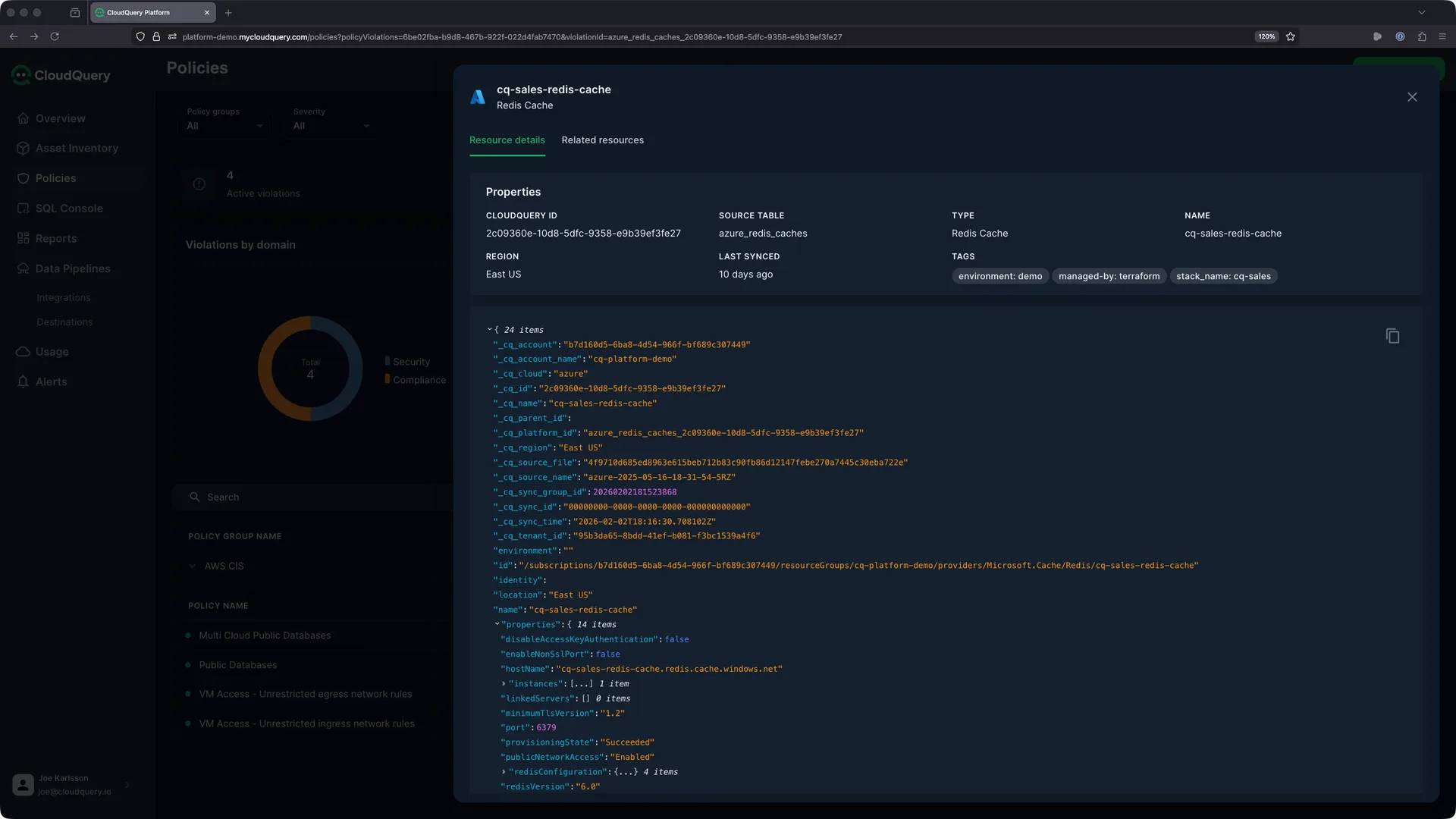
Click into a specific policy to see the list of violating resources. Click any resource to open the detail panel:
What the Resource Detail Shows You
The Resource details tab shows everything CloudQuery synced for that resource: the full JSON properties from the cloud provider API, CloudQuery metadata (_cq_platform_id, _cq_account, _cq_region, sync timestamps), and resource tags. In this screenshot, you can see "publicNetworkAccess": "Enabled" right in the properties. That’s what triggered the violation.
The Related resources tab is where things get more interesting. CloudQuery maps relationships between resources, so for a violating Redis cache you can see the network resources it’s deployed in (VNet, subnet, network security groups), the services consuming it (app services, VMs, functions), the IAM context (role assignments, service principals with access), and the broader infrastructure context (resource group, cost allocation).
This matters because remediation is rarely about flipping a switch. When you disable public access on a database, you need to know what depends on it. In the screenshot, the tags tell us this cache is managed-by: terraform and belongs to stack_name: cq-sales. So the fix should go through a Terraform PR to the sales team’s infrastructure repo, not a manual console change.
A Remediation Workflow
Here’s how this plays out in practice:
- Policy flags
cq-sales-redis-cachewith public access in East US - Check Related Resources and find
sales-apiapp service as a consumer - Verify the app service can use a private endpoint instead
- Identify the owner: tags show
team: sales,managed-by: terraform - Open a PR to add a private endpoint and disable public access
- Notify the sales team via Slack with the full context from the violation
Without the related resources view, steps 2-4 would require you to manually go through the Azure portal, cross-reference resource groups, and dig through IAM assignments. The policy violation gives you the “what’s wrong,” and the related resources give you the “what to do about it.”
Customizing the Policy
A few ways to adapt this to your environment:
Add exclusions for databases that are intentionally public (an API cache backing a public service, maybe):
WHERE publicly_accessible = 1
  AND tags NOT LIKE '%exception:approved-public%'
  AND tags NOT LIKE '%environment:dev%'
Adjust the firewall IP ranges in the Azure blocks to match your actual network. The BETWEEN bounds in the firewall rule checks define which IP ranges you consider overly permissive. Update these values to match the ranges relevant to your environment.
Extend to more resource types. The same pattern works for AWS ElastiCache, AWS DocumentDB, GCP Memorystore, or any other database service that CloudQuery syncs. Check the CloudQuery Hub for the full list of tables available per provider.
What to Build Next
Now that you have your first policy running, here are some directions to take it:
- Tag compliance: Flag resources missing required tags (
CostCenter,Team,Environment). Same query pattern, different WHERE clause - Encryption checks: Detect unencrypted databases, storage accounts, or EBS volumes
- Cost waste: Find unattached disks, stopped VMs still accruing charges, oversize instances
- Organize with policy groups: Group policies by compliance framework (CIS, NIST, SOC 2) or by team responsibility (SecOps, FinOps, Platform)
- Route alerts by severity: Send
Criticalviolations to PagerDuty,Mediumto a Slack channel,Lowto a weekly digest
The CloudQuery Platform has 235+ pre-built queries in the rule library. Browse those for ideas, or write your own using the pattern from this tutorial. To get started, contact us today.
See It in Action
Watch how to create a CloudQuery Policy from scratch - from writing the ClickHouse SQL query to configuring alerts and reviewing violations:
Frequently Asked Questions
How Do I Test My Policy Query Before Enabling Alerts?
Use the SQL Console in CloudQuery Platform to run your query directly against your synced tables. Verify the result set includes all required output columns (_cq_platform_id, subscription, region, name, tags, database_type, search_string) and matches the violations you expect.
How Often Do Policies Evaluate My Infrastructure?
Policies evaluate on your sync schedule. If your sync runs every hour, policies evaluate hourly against the latest synced data. You can check when a policy last ran from the Policies dashboard.
Can I Exclude Specific Resources From a Policy?
Yes. Add exclusion criteria to your SQL WHERE clause:
WHERE publicly_accessible = 1
  AND tags NOT LIKE '%exception:approved-public%'
  AND tags NOT LIKE '%environment:dev%'
This is useful for databases that are intentionally public, like an API cache serving public traffic.
What Happens When a Resource Stops Violating a Policy?
Violations auto-resolve. When the next policy evaluation finds the resource no longer matches the query criteria, the violation is marked as resolved with a timestamp.
What Cloud Providers Are Supported?
CloudQuery supports 70+ source integrations. If your provider is synced to CloudQuery tables, you can write policies against those tables. The three major cloud providers (AWS, Azure, GCP) have the deepest coverage, but you can write policies against any synced data, including SaaS applications like GitHub, Okta, or Kubernetes.
Table Reference
Every CloudQuery table this policy queries and what property it checks. You’ll need these tables synced for the policy to return results.
| Provider | Database Type | CloudQuery Table | Public Access Check |
|---|---|---|---|
| AWS | RDS (MySQL, PostgreSQL, MariaDB, Oracle, SQL Server) | aws_rds_db_instances | publicly_accessible = 1 |
| Azure | Redis Cache | azure_redis_caches | properties.publicNetworkAccess = 'Enabled' |
| Azure | SQL Server | azure_sql_servers | properties.publicNetworkAccess = 'Enabled' OR open firewall rules |
| Azure | PostgreSQL | azure_postgresql_servers | properties.publicNetworkAccess = 'Enabled' OR open firewall rules |
| Azure | MySQL | azure_mysql_servers | properties.publicNetworkAccess = 'Enabled' |
| Azure | Cosmos DB (SQL) | azure_cosmos_sql_databases | properties.enablePublicIpAccess = true |
| Azure | Cosmos DB (Cassandra) | azure_cosmos_cassandra_clusters | properties.publicNetworkAccess = 'Enabled' |
| Azure | Cosmos DB (MongoDB) | azure_cosmos_mongo_db_databases | properties.publicNetworkAccess = 'Enabled' |
| GCP | Cloud SQL (MySQL, PostgreSQL) | gcp_sql_instances | settings.ipConfiguration.ipv4Enabled = true |
The Azure SQL Server and PostgreSQL checks also query their firewall rule tables (azure_sql_server_firewall_rules and azure_postgresql_server_firewall_rules) to catch overly permissive IP ranges.
Appendix: The Complete Multi-Cloud Policy
Here’s the full policy query covering AWS RDS, Azure (Redis, SQL Server, PostgreSQL, MySQL, Cosmos DB variants), and GCP Cloud SQL. Copy this into your policy’s rule logic:
Note: This query only returns results for database types you’re actively syncing in CloudQuery. If you’re not syncing GCP, the GCP blocks won’t return results and won’t cause errors. Remove any blocks for providers you don’t use to keep the query clean.
-- AWS RDS Instances
WITH resource_type_labels AS (
  SELECT resource_type_label, resource_type FROM cloud_assets
  WHERE resource_type = 'aws_rds_db_instances'
  LIMIT 1
),
aws_rds_public AS (
  SELECT
    _cq_platform_id,
    coalesce(nullif(_cq_account_name, ''), _cq_account) as subscription,
    _cq_region as region,
    _cq_name as name,
    'aws_rds_db_instances' as resource_type,
    tags as tags
  FROM aws_rds_db_instances
  WHERE publicly_accessible = 1
    AND db_instance_status = 'available'
)
SELECT _cq_platform_id, subscription, region, name, tags,
  l.resource_type_label as database_type,
  lower(concat(
    coalesce(subscription, ''),
    coalesce(region, ''),
    coalesce(name, ''),
    coalesce(database_type, ''),
    coalesce(tags, '')
  )) as search_string
FROM aws_rds_public a
LEFT JOIN resource_type_labels l ON a.resource_type = l.resource_type

UNION ALL

-- Azure Redis Caches
WITH resource_type_labels AS (
  SELECT resource_type_label, resource_type FROM cloud_assets
  WHERE resource_type = 'azure_redis_caches'
  LIMIT 1
),
redis_caches AS (
  SELECT
    _cq_platform_id,
    coalesce(nullif(_cq_account_name, ''), _cq_account) as subscription,
    _cq_region as region,
    _cq_name as name,
    'azure_redis_caches' as resource_type,
    tags as tags
  FROM azure_redis_caches
  WHERE JSONExtractString(coalesce(properties, '{}'), 'publicNetworkAccess') = 'Enabled'
)
SELECT _cq_platform_id, subscription, region, name, tags,
  l.resource_type_label as database_type,
  lower(concat(
    coalesce(subscription, ''),
    coalesce(region, ''),
    coalesce(name, ''),
    coalesce(database_type, ''),
    coalesce(tags, '')
  )) as search_string
FROM redis_caches c
LEFT JOIN resource_type_labels l ON c.resource_type = l.resource_type

UNION ALL

-- Azure SQL Servers (with firewall rule checks)
WITH resource_type_labels AS (
  SELECT resource_type_label, resource_type FROM cloud_assets
  WHERE resource_type = 'azure_sql_servers'
  LIMIT 1
),
open_firewall_ranges AS (
  SELECT _cq_parent_id, _cq_id
  FROM azure_sql_server_firewall_rules
  WHERE (JSONExtractInt(properties, 'startIpAddress') BETWEEN 11000 AND 11999)
    OR (JSONExtractInt(properties, 'endIpAddress') BETWEEN 11000 AND 11999)
),
sql_servers AS (
  SELECT
    _cq_platform_id,
    coalesce(nullif(azure_sql_servers._cq_account_name, ''), azure_sql_servers._cq_account) as subscription,
    azure_sql_servers._cq_region as region,
    azure_sql_servers._cq_name as name,
    'azure_sql_servers' as resource_type,
    azure_sql_servers.tags as tags
  FROM azure_sql_servers
  LEFT JOIN open_firewall_ranges AS ranges ON ranges._cq_parent_id = azure_sql_servers._cq_id
  WHERE JSONExtractString(coalesce(azure_sql_servers.properties, '{}'), 'publicNetworkAccess') = 'Enabled'
    OR ranges._cq_parent_id IS NOT NULL
)
SELECT _cq_platform_id, subscription, region, name, tags,
  l.resource_type_label as database_type,
  lower(concat(
    coalesce(subscription, ''),
    coalesce(region, ''),
    coalesce(name, ''),
    coalesce(database_type, ''),
    coalesce(tags, '')
  )) as search_string
FROM sql_servers s
LEFT JOIN resource_type_labels l ON s.resource_type = l.resource_type

UNION ALL

-- Azure PostgreSQL Servers (with firewall rule checks)
WITH resource_type_labels AS (
  SELECT resource_type_label, resource_type FROM cloud_assets
  WHERE resource_type = 'azure_postgresql_servers'
  LIMIT 1
),
open_firewall_ranges AS (
  SELECT _cq_parent_id, _cq_id
  FROM azure_postgresql_server_firewall_rules
  WHERE (JSONExtractInt(properties, 'startIpAddress') BETWEEN 11000 AND 11999)
    OR (JSONExtractInt(properties, 'endIpAddress') BETWEEN 11000 AND 11999)
),
postgresql_servers AS (
  SELECT
    _cq_platform_id,
    coalesce(nullif(azure_postgresql_servers._cq_account_name, ''), azure_postgresql_servers._cq_account) as subscription,
    azure_postgresql_servers._cq_region as region,
    azure_postgresql_servers._cq_name as name,
    'azure_postgresql_servers' as resource_type,
    azure_postgresql_servers.tags as tags
  FROM azure_postgresql_servers
  LEFT JOIN open_firewall_ranges AS ranges ON ranges._cq_parent_id = azure_postgresql_servers._cq_id
  WHERE JSONExtractString(coalesce(azure_postgresql_servers.properties, '{}'), 'publicNetworkAccess') = 'Enabled'
    OR ranges._cq_parent_id IS NOT NULL
)
SELECT _cq_platform_id, subscription, region, name, tags,
  l.resource_type_label as database_type,
  lower(concat(
    coalesce(subscription, ''),
    coalesce(region, ''),
    coalesce(name, ''),
    coalesce(database_type, ''),
    coalesce(tags, '')
  )) as search_string
FROM postgresql_servers p
LEFT JOIN resource_type_labels l ON p.resource_type = l.resource_type

UNION ALL

-- Azure MySQL Servers
WITH resource_type_labels AS (
  SELECT resource_type_label, resource_type FROM cloud_assets
  WHERE resource_type = 'azure_mysql_servers'
  LIMIT 1
),
mysql_servers AS (
  SELECT
    _cq_platform_id,
    coalesce(nullif(azure_mysql_servers._cq_account_name, ''), azure_mysql_servers._cq_account) as subscription,
    azure_mysql_servers._cq_region as region,
    azure_mysql_servers._cq_name as name,
    'azure_mysql_servers' as resource_type,
    azure_mysql_servers.tags as tags
  FROM azure_mysql_servers
  WHERE JSONExtractString(coalesce(azure_mysql_servers.properties, '{}'), 'publicNetworkAccess') = 'Enabled'
)
SELECT _cq_platform_id, subscription, region, name, tags,
  l.resource_type_label as database_type,
  lower(concat(
    coalesce(subscription, ''),
    coalesce(region, ''),
    coalesce(name, ''),
    coalesce(database_type, ''),
    coalesce(tags, '')
  )) as search_string
FROM mysql_servers m
LEFT JOIN resource_type_labels l ON m.resource_type = l.resource_type

UNION ALL

-- Azure Cosmos SQL Databases
WITH resource_type_labels AS (
  SELECT resource_type_label, resource_type FROM cloud_assets
  WHERE resource_type = 'azure_cosmos_sql_databases'
  LIMIT 1
),
cosmos_sql_databases AS (
  SELECT
    _cq_platform_id,
    coalesce(nullif(_cq_account_name, ''), _cq_account) as subscription,
    _cq_region as region,
    _cq_name as name,
    'azure_cosmos_sql_databases' as resource_type,
    tags as tags
  FROM azure_cosmos_sql_databases
  WHERE JSONExtractBool(coalesce(properties, '{}'), 'enablePublicIpAccess') = 1
)
SELECT _cq_platform_id, subscription, region, name, tags,
  l.resource_type_label as database_type,
  lower(concat(
    coalesce(subscription, ''),
    coalesce(region, ''),
    coalesce(name, ''),
    coalesce(database_type, ''),
    coalesce(tags, '')
  )) as search_string
FROM cosmos_sql_databases s
LEFT JOIN resource_type_labels l ON s.resource_type = l.resource_type

UNION ALL

-- Azure Cosmos Cassandra Clusters
WITH resource_type_labels AS (
  SELECT resource_type_label, resource_type FROM cloud_assets
  WHERE resource_type = 'azure_cosmos_cassandra_clusters'
  LIMIT 1
),
cosmos_cassandra_clusters AS (
  SELECT
    _cq_platform_id,
    coalesce(nullif(_cq_account_name, ''), _cq_account) as subscription,
    _cq_region as region,
    _cq_name as name,
    'azure_cosmos_cassandra_clusters' as resource_type,
    tags as tags
  FROM azure_cosmos_cassandra_clusters
  WHERE JSONExtractString(coalesce(properties, '{}'), 'publicNetworkAccess') = 'Enabled'
)
SELECT _cq_platform_id, subscription, region, name, tags,
  l.resource_type_label as database_type,
  lower(concat(
    coalesce(subscription, ''),
    coalesce(region, ''),
    coalesce(name, ''),
    coalesce(database_type, ''),
    coalesce(tags, '')
  )) as search_string
FROM cosmos_cassandra_clusters c
LEFT JOIN resource_type_labels l ON c.resource_type = l.resource_type

UNION ALL

-- Azure Cosmos MongoDB Databases
WITH resource_type_labels AS (
  SELECT resource_type_label, resource_type FROM cloud_assets
  WHERE resource_type = 'azure_cosmos_mongo_db_databases'
  LIMIT 1
),
cosmos_mongo_db_databases AS (
  SELECT
    _cq_platform_id,
    coalesce(nullif(_cq_account_name, ''), _cq_account) as subscription,
    _cq_region as region,
    _cq_name as name,
    'azure_cosmos_mongo_db_databases' as resource_type,
    tags as tags
  FROM azure_cosmos_mongo_db_databases
  WHERE JSONExtractString(coalesce(properties, '{}'), 'publicNetworkAccess') = 'Enabled'
)
SELECT _cq_platform_id, subscription, region, name, tags,
  l.resource_type_label as database_type,
  lower(concat(
    coalesce(subscription, ''),
    coalesce(region, ''),
    coalesce(name, ''),
    coalesce(database_type, ''),
    coalesce(tags, '')
  )) as search_string
FROM cosmos_mongo_db_databases m
LEFT JOIN resource_type_labels l ON m.resource_type = l.resource_type

UNION ALL

-- GCP Cloud SQL Instances
WITH resource_type_labels AS (
  SELECT resource_type_label, resource_type FROM cloud_assets
  WHERE resource_type = 'gcp_sql_instances'
  LIMIT 1
),
gcp_sql_public AS (
  SELECT
    _cq_platform_id,
    coalesce(nullif(_cq_account_name, ''), _cq_account) as subscription,
    _cq_region as region,
    _cq_name as name,
    'gcp_sql_instances' as resource_type,
    labels as tags
  FROM gcp_sql_instances
  WHERE JSONExtractString(
    coalesce(JSONExtractRaw(settings, 'ipConfiguration'), '{}'),
    'ipv4Enabled'
  ) = 'true'
    AND state = 'RUNNABLE'
)
SELECT _cq_platform_id, subscription, region, name, tags,
  l.resource_type_label as database_type,
  lower(concat(
    coalesce(subscription, ''),
    coalesce(region, ''),
    coalesce(name, ''),
    coalesce(database_type, ''),
    coalesce(tags, '')
  )) as search_string
FROM gcp_sql_public g
LEFT JOIN resource_type_labels l ON g.resource_type = l.resource_type
Joe Karlsson
Developer Marketing Engineer at CData, leading developer growth for the managed MCP platform that connects AI agents to live enterprise data. Writing about databases, self-hosting, and the things I build. Runs a 60+ container Proxmox homelab with AI-powered automations.
cat newsletter.md
Works on My Machine is my newsletter: thoughts and reactions on tech writing, AI, homelab builds and open source, plus whatever I'm working on. It goes out when I have something to say.
Free, no spam, unsubscribe anytime. Read past issues.
Related Posts
Jan 4, 2026
Find Commits by Departed Employees Across All Repos with SQL
Identify code changes made by employees who left your organization. Cross-reference git commit authors against your identity provider to find commits needing review.
Jan 4, 2026
Find EOL Docker Images, Missing Licenses, and Stale CODEOWNERS Across Thousands of repos with SQL
Query your Dockerfiles, CODEOWNERS, and package.json files across all repos with SQL. No cloning, no custom scripts - just SQL queries that find EOL images, missing licenses, and outdated dependencies in seconds.
Jan 4, 2026
Query Your Dockerfiles with SQL: Find EOL Node 18 Images Across All repos
Node 18 reached end-of-life. Find every Dockerfile using Node 18 base images across your organization with a single SQL query - no cloning repos required.