---
title: "Node Client-Server Communication Guide"
description: "Node client-server communication based on Ilya Grigorik’s High-Performance Browser Networking, with examples of XHR, SSE, WebSockets and HTTP/2."
url: https://www.joekarlsson.com/blog/complete-guide-node-client-server-communication/
---
Jul 23, 2016 (Updated Nov 12, 2026 ) | 7 min read | [Web Dev](https://www.joekarlsson.com/blog/category/web-dev/)
# Complete Guide To Node Client-Server Communication
**Blog** Node client-server communication based on Ilya Grigorik’s High-Performance Browser Networking, with examples of XHR, SSE, WebSockets and HTTP/2.
**Corrections**
- **Nov 12, 2026:** The `ws` package has no `end` event; it’s `close`. Several string literals had a raw line break inside the quotes, a syntax error.
This post uses outdated Node.js patterns (CommonJS, \`var\`). Core concepts like WebSockets and SSE remain relevant, but use ES modules and the Fetch API in modern applications.
**TL;DR** I implemented every major client-server communication method in Node.js - XHR, Server-Sent Events, WebSockets, and HTTP/2 - with working code examples and a breakdown of when to use each one.
On this page
1. [WebSocket Client-Server Demo](https://www.joekarlsson.com/blog/complete-guide-node-client-server-communication/#websocket-client-server-demo)
2. [Stream Updates with Server-Sent Events (SSE)](https://www.joekarlsson.com/blog/complete-guide-node-client-server-communication/#stream-updates-with-server-sent-events-sse)
3. [Server-Sent Events vs. WebSockets](https://www.joekarlsson.com/blog/complete-guide-node-client-server-communication/#server-sent-events-vs-websockets)
4. [XMLHttpRequest (XHR)](https://www.joekarlsson.com/blog/complete-guide-node-client-server-communication/#xmlhttprequest-xhr)
> **Note:** This post was written in 2016. The core concepts of client-server communication (WebSockets, SSE, XHR) are still relevant, but the code examples use outdated patterns (CommonJS `require()`, `var`). For modern Node.js, use ES modules and the Fetch API.
**[1](https://www.joekarlsson.com/blog/complete-guide-node-client-server-communication/#mn-w-1)** Nov 2026 The chimera.labs link now lands on O’Reilly’s home page. Grigorik’s book is free to read at hpbn.co.
After reading [High-Performance Browser Networking](http://chimera.labs.oreilly.com/books/1230000000545/index.html) by Ilya Grigorik, I was inspired to implement all of the client-server [1](https://www.joekarlsson.com/blog/complete-guide-node-client-server-communication/#mn-1) communication techniques outlined in his book in Node and JavaScript. This post covers the following forms of client-server connection:
**[1](https://www.joekarlsson.com/blog/complete-guide-node-client-server-communication/#mn-w-1)** Nov 2026 The chimera.labs link now lands on O’Reilly’s home page. Grigorik’s book is free to read at hpbn.co.
- XMLHttpRequest
- Server-Sent Events
- WebSocket
- HTTP/2
- Server to server
You can check out the complete source code for each implementation [here](https://github.com/JoeKarlsson/complete-guide-to-client-server-communication).
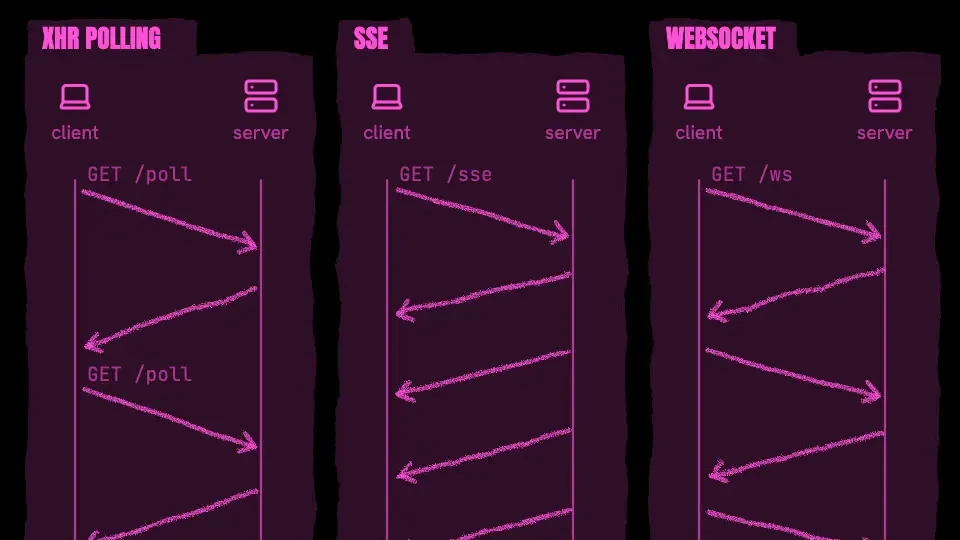
Before we begin, I should note that there is no one best protocol or API for client/server communication. Every non-trivial application will require a mix of different transports based on a variety of requirements: interaction with the browser cache, protocol overhead, message latency, reliability, type of data transfer, and more. Some protocols may offer low-latency delivery (e.g., Server-Sent Events, WebSocket), but may not meet other important criteria, such as the ability to use the browser cache or support efficient binary transfers in all cases. Here is a visualization to help illustrate how XHR, SSE, and WebSockets differ in their implementations.
_Diagram: Three browser transports compared. XHR polling: the client sends GET /poll, the server answers once, and the client has to ask again for every update. Server-sent events: the client sends GET /sse once, and the server keeps streaming events back over that one connection, one way only. WebSocket: the client sends GET /ws once to open the connection, and then client and server send messages both ways whenever they like._
- **[2](https://www.joekarlsson.com/blog/complete-guide-node-client-server-communication/#mn-w-2)** Nov 2026 It is now. Fetch can stream a response body through the Streams API, and every major browser has supported it since January 2019.
**XHR** is optimized for “transactional” request-response communication: the client sends the full, well-formed HTTP request to the server, and the server responds with a full response. There is no support for request streaming, and until the Streams API is available [2](https://www.joekarlsson.com/blog/complete-guide-node-client-server-communication/#mn-2), no reliable cross-browser response streaming API.
**[2](https://www.joekarlsson.com/blog/complete-guide-node-client-server-communication/#mn-w-2)** Nov 2026 It is now. Fetch can stream a response body through the Streams API, and every major browser has supported it since January 2019.
- **SSE** enables efficient, low-latency server-to-client streaming of text-based data: the client initiates the SSE connection, and the server uses the event source protocol to stream updates to the client. The client can’t send any data to the server after the initial handshake.
- **WebSocket** is the only transport that allows bidirectional communication over the same TCP connection (Figure 17-2): the client and server can exchange messages at will. As a result, WebSocket provides low latency delivery of text and binary application data in both directions.
| Feature | XMLHttpRequest | Server-Sent Events | WebSocket |
| --- | --- | --- | --- |
| Request streaming | no | no | yes |
| Response streaming | limited | yes | yes |
| Framing mechanism | HTTP | event stream | binary Framing |
| Binary data transfers | yes | no (Base64) | limited |
| Compression | yes | yes | limited |
| Application transport protocol | HTTP | HTTP | WebSocket |
| Network transport protocol | TCP | TCP | TCP |
* * *
## [WebSocket Client-Server Demo](https://github.com/JoeKarlsson/complete-guide-to-client-server-communication/tree/master/client-server-sockets)
**[3](https://www.joekarlsson.com/blog/complete-guide-node-client-server-communication/#mn-w-3)** The WebSocket Protocol enables two-way communication between a client running untrusted code in a controlled environment to a remote host that has opted-in to communications from that code.[RFC 6455, December 2011](https://www.rfc-editor.org/rfc/rfc6455)
WebSockets is a technology, based on the _ws_ protocol, that makes it possible to establish a continuous full-duplex connection stream [3](https://www.joekarlsson.com/blog/complete-guide-node-client-server-communication/#mn-3) between a client and a server. A typical WebSocket client would be a user’s browser, but the protocol is platform-independent. It is the closest API to a raw network socket in the browser. Except a WebSocket connection is also much more than a network socket, as the browser abstracts all the complexity behind a simple API and provides a number of additional services:
**[3](https://www.joekarlsson.com/blog/complete-guide-node-client-server-communication/#mn-w-3)** The WebSocket Protocol enables two-way communication between a client running untrusted code in a controlled environment to a remote host that has opted-in to communications from that code.[RFC 6455, December 2011](https://www.rfc-editor.org/rfc/rfc6455)
- Connection negotiation and same-origin policy enforcement
- Interoperability with existing HTTP infrastructure
- Message-oriented communication and efficient message framing
- Subprotocol negotiation and extensibility
This is a demo showing a demo of a client connecting to a WebSocket server and sharing data. Here is the server.js of a WebSocket.
```javascript
'use strict';
const WebSocketServer = require('ws').Server;
const wss = new WebSocketServer({ port: 8081 });
wss.on('connection', (ws) => {
ws.on('message', (message) => {
console.log(`received: ${message}`);
});
ws.on('close', () => {
console.log('Connection ended...');
});
ws.send('Hello Client');
});
```
Here is the client.js of a WebSocket.
```javascript
console.log('open: ');
var ws = new WebSocket('ws://127.0.0.1:8081');
ws.onopen = function (event) {
console.log('Connection is open ...');
ws.send('Hello Server');
};
ws.onerror = function (err) {
console.log('err: ', err);
};
ws.onmessage = function (event) {
console.log(event.data);
document.body.innerHTML += event.data + '
';
};
ws.onclose = function () {
console.log('Connection is closed...');
};
```
* * *
## [Stream Updates with Server-Sent Events (SSE)](https://github.com/JoeKarlsson/complete-guide-to-client-server-communication/tree/master/server-side-events)
SSEs are sent over traditional HTTP. That means they do not require a special protocol or server implementation to get working. WebSockets on the other hand, require full-duplex connections and new Web Socket servers to handle the protocol. In addition, Server-Sent Events have a variety of features that WebSockets lack by design such as automatic reconnection, event IDs, and the ability to send arbitrary events.
## Server-Sent Events vs. WebSockets
Why would you choose Server-Sent Events over WebSockets? One reason SSEs have been kept in the shadow is that later APIs like WebSockets provide a richer protocol to perform bi-directional, full-duplex communication. Having a two-way channel is more attractive for things like games, messaging apps, and for cases where you need near real-time updates in both directions. However, in some scenarios data doesn’t need to be sent from the client. You simply need updates from some server action. A few examples would be friends’ status updates, stock tickers, news feeds, or other automated data push mechanisms (e.g. updating a client-side Web SQL Database or IndexedDB object store). If you’ll need to send data to a server, XMLHttpRequest is always a friend.
Here is the server.js of our Server-Sent Event, we will be sending out data to the client every 5 seconds with an updated timestamp via SSE.
```javascript
'use strict';
const http = require('http');
const fs = require('fs');
http
.createServer((req, res) => {
debugHeaders(req);
if (req.headers.accept && req.headers.accept == 'text/event-stream') {
if (req.url == '/events') {
sendSSE(req, res);
} else {
res.writeHead(404);
res.end();
}
} else {
res.writeHead(200, { 'Content-Type': 'text/html' });
res.write(fs.readFileSync(__dirname + '/index.html'));
res.end();
}
})
.listen(8000);
const sendSSE = (req, res) => {
res.writeHead(200, {
'Content-Type': 'text/event-stream',
'Cache-Control': 'no-cache',
Connection: 'keep-alive',
});
const id = new Date().toLocaleTimeString();
setInterval(() => {
constructSSE(res, id, new Date().toLocaleTimeString());
}, 5000);
constructSSE(res, id, new Date().toLocaleTimeString());
//res.end();
};
const constructSSE = (res, id, data) => {
res.write('id: ' + id + '\n');
res.write('data: ' + data + '\n\n');
};
const debugHeaders = (req) => {
console.log('URL: ' + req.url);
for (let key in req.headers) {
console.log(key + ': ' + req.headers[key]);
}
console.log('\n\n');
};
```
And here is the client.js which is referenced by the index.html on the client-side. Notice how the client never sends out a formal request for data with SSE’s. Once the initial connection has been made with the server then the plain text data can be sent to the client as needed!
```javascript
var source = new EventSource('/events');
source.onmessage = function (e) {
document.body.innerHTML += e.data + '
';
};
```
* * *
## [XMLHttpRequest (XHR)](https://github.com/JoeKarlsson/complete-guide-to-client-server-communication/tree/master/xhr)
XMLHttpRequest (XHR) is a browser-level API that enables the client to script data transfers via JavaScript. XHR made its first debut in Internet Explorer 5, became one of the key technologies behind the Asynchronous JavaScript and XML (AJAX) revolution, and is now a fundamental building block of nearly every modern web application.
> XMLHTTP changed everything. It put the “D” in DHTML. It allowed us to asynchronously get data from the server and preserve document state on the client… The Outlook Web Access (OWA) team’s desire to build a rich Win32 like application in a browser pushed the technology into IE that allowed AJAX to become a reality. - Jim Van Eaton Outlook Web Access: A catalyst for web evolution
_Diagram: Polling versus long polling. With polling, the client sends GET /poll on a fixed interval, so an update that lands on the server waits until the next poll to reach the client. With long polling (Comet), the client sends GET /comet and the server holds the request open until it has an update, answers right away, and the client immediately asks again._
Here I am running a simple Express server with a simple route to send requested data to the Client.
```javascript
'use strict';
var express = require('express');
var app = express();
app.use(express.static(`${__dirname}/public`));
app.get('/api', function (req, res) {
res.send(new Date().toLocaleTimeString());
});
app.listen(3000);
```
Here is the javascript file linked to my index.html on the client-side. I am using the baked-in XHR methods as opposed to jQuery since I love to use vanilla JavaScript whenever possible.
```javascript
'use strict';
function reqListener(data) {
document.body.innerHTML += this.responseText + '
';
}
setInterval(function () {
var oReq = new XMLHttpRequest();
oReq.addEventListener('load', reqListener);
oReq.open('GET', '/api');
oReq.send();
}, 3000);
```
* * *
**[4](https://www.joekarlsson.com/blog/complete-guide-node-client-server-communication/#mn-w-4)** Nov 2026 HTTP/3 became a standard in June 2022 (RFC 9114). It carries HTTP over QUIC, which runs on UDP instead of TCP.
In my Github repo, I cover two more use cases not referenced here, server to server communications and HTTP/2. If you are curious about those forms of communication check it out. One word about HTTP/2 before wrapping up. HTTP/2 is the future of Client-Server communication [4](https://www.joekarlsson.com/blog/complete-guide-node-client-server-communication/#mn-4), but it is a protocol built on top of HTTP/1.1 which means that all of these forms of communicating will be still be relevant in the future, just the means that they are transmitted will be updated.
**[4](https://www.joekarlsson.com/blog/complete-guide-node-client-server-communication/#mn-w-4)** Nov 2026 HTTP/3 became a standard in June 2022 (RFC 9114). It carries HTTP over QUIC, which runs on UDP instead of TCP.
As you can see there are a ton of different ways you can send data between a client and a server. Once you have your data flowing, you will probably want to make sure your front-end is fast too. I wrote a post on [building high performance React applications](https://www.joekarlsson.com/talks/building-high-performance-react-applications/) that covers the rendering side of things. Before working on this project, I had no idea how many different ways were available in vanilla JavaScript for moving data around. If you have any questions, contact me.
Cite this Chicago and BibTeX
Chicago
Karlsson, Joe. 2016. “Complete Guide To Node Client-Server Communication.” Joe Karlsson (blog), July 23, 2016. https://www.joekarlsson.com/blog/complete-guide-node-client-server-communication/.
BibTeX
```
@misc{karlsson2016communication,
author = {Karlsson, Joe},
title = {Complete Guide To Node Client-Server Communication},
year = {2016},
month = jul,
howpublished = {joekarlsson.com},
url = {https://www.joekarlsson.com/blog/complete-guide-node-client-server-communication/}
}
```
## Works on My Machine
Get the next post by email. My newsletter covers homelab builds, AI tools and open source, and it goes out when I have something to say.
It’s free, and you can unsubscribe anytime. You’ll get an email to confirm first.

Joe
Karlsson
Technology is better when it's weird and it's yours. Everything I write about runs in my house.
[More about me →](https://www.joekarlsson.com/about/)
[Bluesky](https://bsky.app/profile/joekarlsson.com) | [LinkedIn](https://www.linkedin.com/in/joekarlsson/) | [GitHub](https://github.com/JoeKarlsson)