Note: TL;DR: We built an MCP server that lets any AI agent directly query your cloud inventory using natural language. Your existing CloudQuery Asset Inventory data now powers Claude Desktop, Cursor, and custom workflows to generate real dashboards, tables, and reports from actual infrastructure data.
CloudQuery already makes it easy for you to interrogate your cloud data using complex searches or SQL. Today, we’re releasing a Model Context Protocol (MCP) server, making it possible to ask questions about your cloud asset inventory using an LLM.
Whether you’re running a quick check for public S3 buckets or want to check whether a particular team is following the correct tagging approach, using natural language is a fast and easy way to quickly get information about your cloud infrastructure and makes this data accessible to teams that may not be used to writing their own SQL code - but that’s just one of the use cases for our MCP server.
We all know AI agents are everywhere now. Cursor writes your code. Custom workflows handle deployments. But here’s what we keep seeing: for platform teams looking to use agentic AI with their cloud infrastructure, these agents are operating blind.
They don’t have the context they need, because they can’t see your actual infrastructure. They don’t know which EC2 instances are running, what S3 buckets exist, or whether your security groups make sense.
We built CloudQuery’s Model Context Protocol (MCP) server to fix this gap.
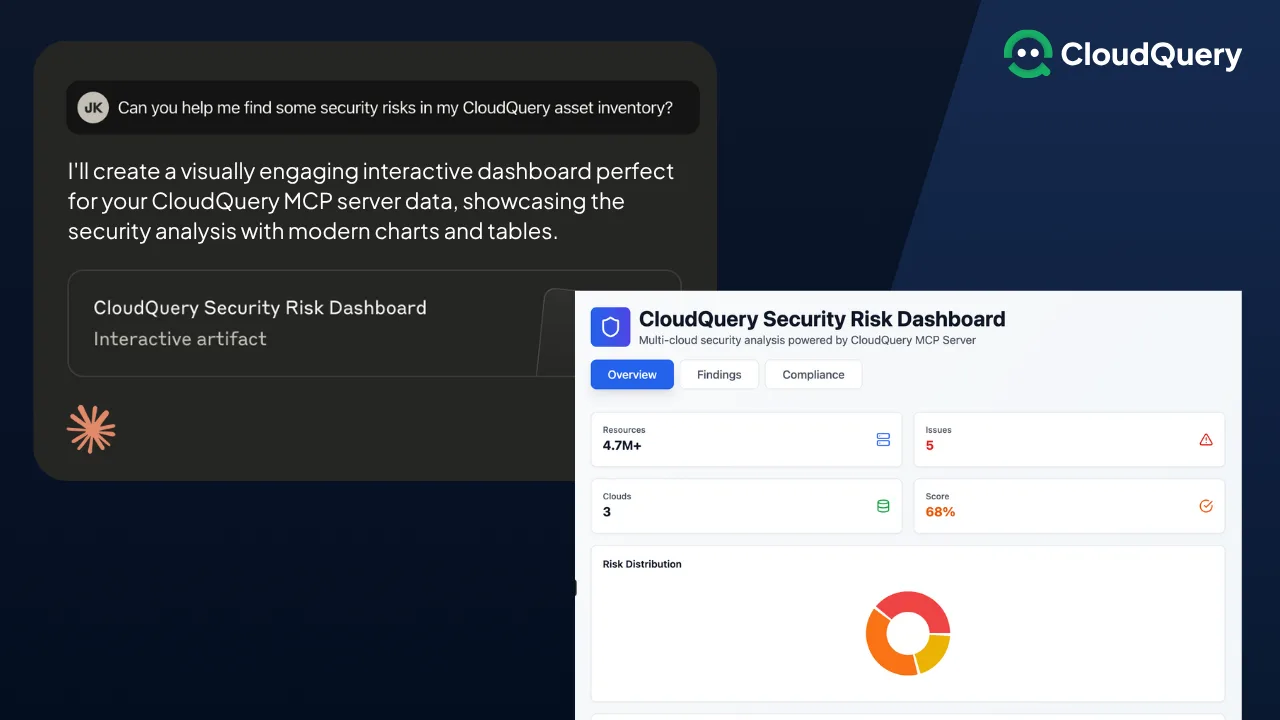
The CloudQuery MCP server gives AI agents a performant, trusted database that they can query in a structured way. This allows them to work autonomously, making recommendations or decisions based on real-life cloud data. Connect the CloudQuery MCP server to your favorite LLM to run security, governance, or FinOps analysis that makes an immediate impact in a fraction of the time.
With CloudQuery, AI agents can now perform complex cloud infrastructure tasks with:
- Access to proper, accurate context
- Stop stuffing manual exports into prompts and overflowing your context window
- No more writing wrappers or custom functions to hit Cloud APIs directly
What We Built
We made CloudQuery speak directly to any AI agent that supports MCP. Your existing cloud inventory data becomes instantly available to:
- Claude Desktop
- Cursor
- Agentic AI frameworks such as CrewAI or Langchain
- Custom agent workflows
- Any LLM supporting MCP
No wrappers. No maintenance overhead. No stale data.
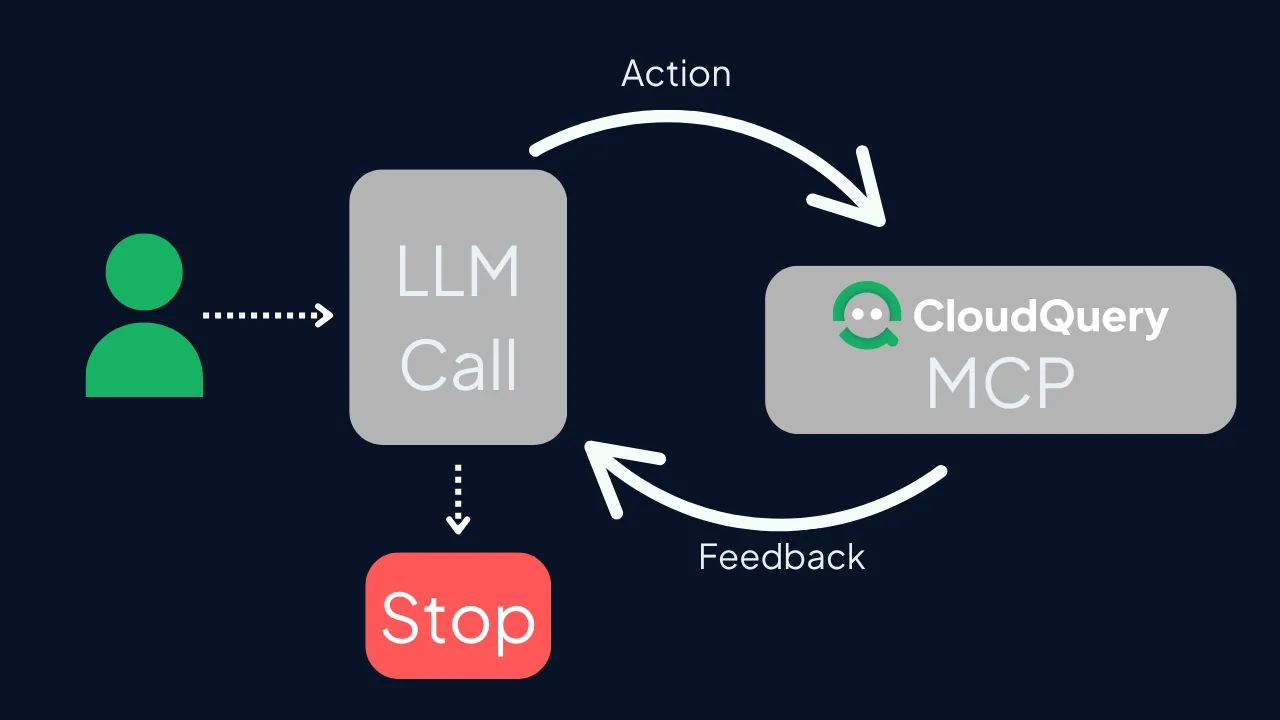
We already sync your entire multi-cloud asset inventory. Now your agents can query it directly using natural language.
How to get started analyzing your cloud asset inventory with AI
You need Claude Desktop, Cursor, or any MCP-compatible environment. That’s it.
Install our MCP server from GitHub. Connect it to your existing CloudQuery instance. Start asking questions in natural language.
The same cloud inventory data powering your current analytics now works with your AI workflows. No additional setup required.
How Our Community Is Already Using This
Since we released the MCP server, our users have been doing things that honestly surprised us. Here are some ways we’ve seen them using it:
Security Teams Going Beyond Manual Audits
One platform team asked: “Show me all EC2 instances with public IPs that don’t have security groups restricting SSH access, then create a dashboard showing trends over the past 6 months.”
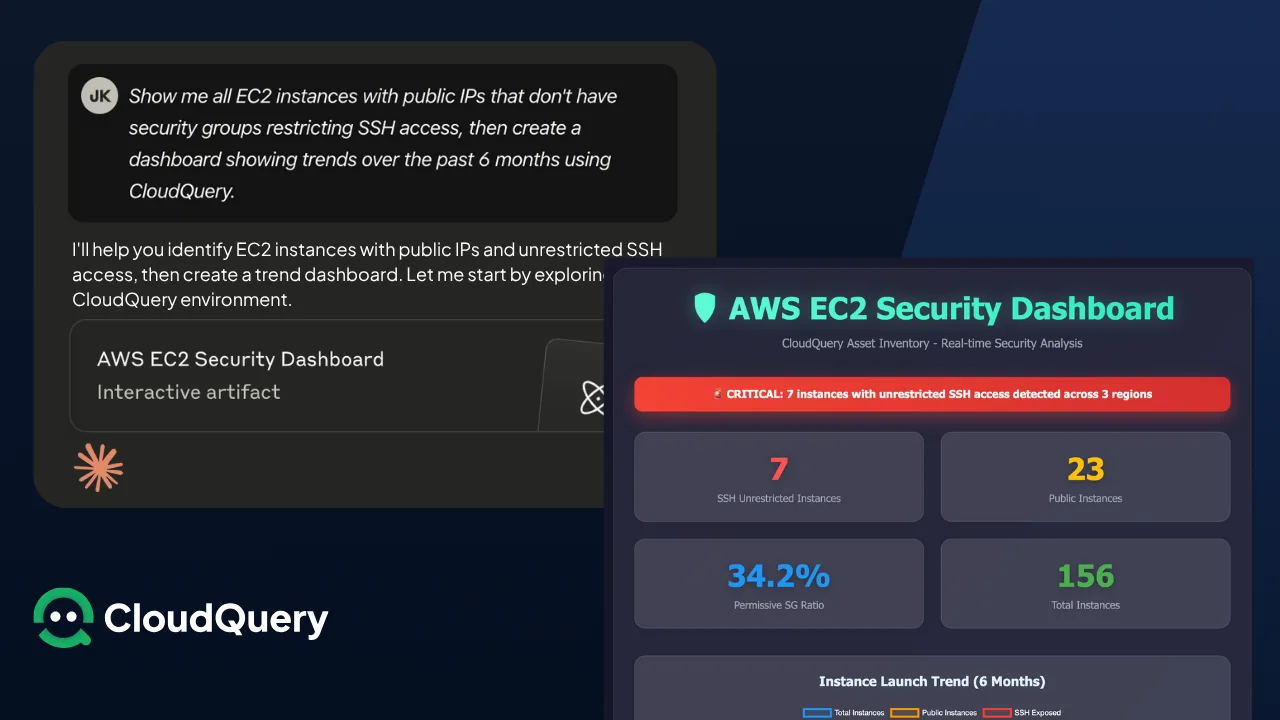
Their agent pulled actual instance data, generated visualizations, and created an automated report. No more manual security reviews.
FinOps Teams Mixing Security and Cost Data
“Generate a table showing which S3 buckets lack encryption, include their monthly costs, and create a pie chart showing cost distribution by team ownership.”
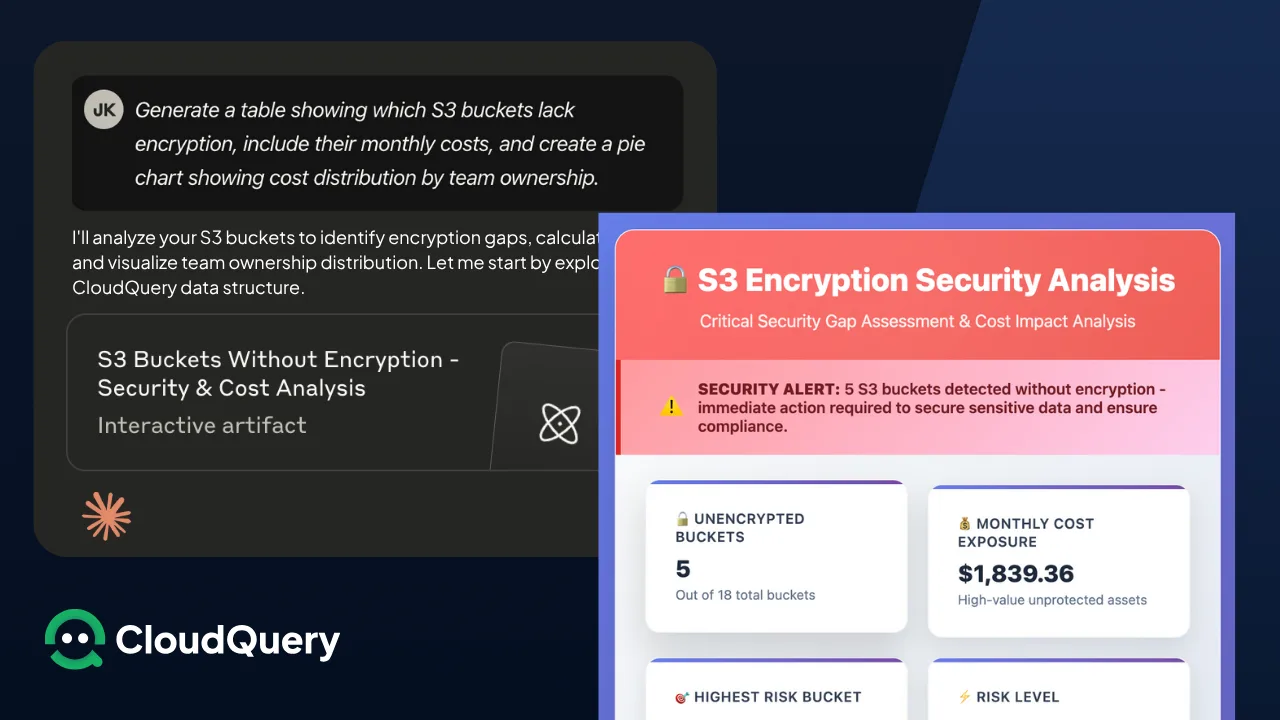
The agent combined security posture with cost analysis, outputting formatted tables and charts. Security and finance finally had the same data.
Infrastructure Teams Automating Cleanup Reports
“Create a report of orphaned resources across all clouds, include cost impact, and generate charts showing resource waste by region and team.”
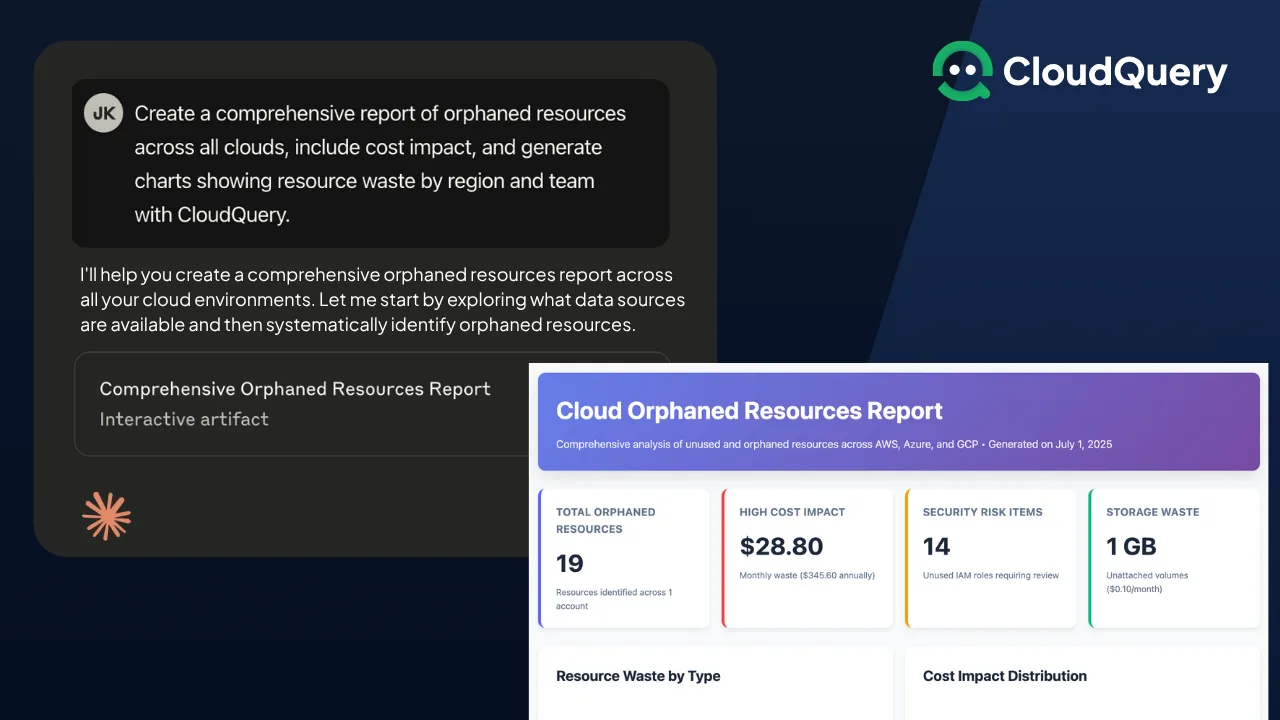
The agent produced multi-page reports with embedded graphs. Manual resource audits became automated intelligence.
The limit isn’t our MCP server. The limit is what you can think to ask for.
What’s Coming Next
This MCP server starts something bigger. We’re building toward autonomous agents that can:
- Identify and fix misconfigurations in real-time
- Provide cost optimization recommendations with full context
- Correlate security threats across your entire cloud footprint
- Turn compliance reporting into conversations
Your agents will stop guessing about your infrastructure. They’ll know.
Start Today
Get the MCP server: https://github.com/cloudquery/mcp-releases
Need help with specific workflows? Contact the CloudQuery team
We Want Your Input
We’re actively building new capabilities. Tell us:
- How are you using AI agents with infrastructure right now?
- What use cases need cloud inventory context most?
- What MCP server features would change your workflows?
Share your thoughts: Community discussions

Joe Karlsson
Developer Marketing Engineer at CData, leading developer growth for the managed MCP platform that connects AI agents to live enterprise data. Writing about databases, self-hosting, and the things I build. Runs a 60+ container Proxmox homelab with AI-powered automations.
cat newsletter.md
I write a weekly newsletter about databases, self-hosting, and whatever I'm building.
Subscribe on Substack →Related Posts
Jun 3, 2025
Cloud Centers of Excellence (Part 1): Building Effective Cloud Governance Through Strategic Organization
Discover how to build a successful Cloud Center of Excellence (CCOE) to drive cloud governance, security, and innovation across your enterprise. Learn key structures, roles, and strategies in Part 1 of our 5-part implementation series.
Oct 29, 2025
6 Cloud CMDB Best Practices for Platform Engineers (2026 Guide)
Cloud CMDB best practices for multi-account environments - automated discovery, tiered sync strategies, SQL-based querying, and historical data retention for compliance.
Oct 24, 2025
The Real-Time Cloud CMDB - Why Ephemeral Infrastructure Killed Traditional Discovery
Traditional CMDBs miss most ephemeral resources because containers live just minutes. Modern cloud CMDBs use tiered sync strategies (15-30 min for critical, hourly for important, daily for baseline). Compare approaches, costs, and learn why ephemeral infrastructure killed traditional discovery.