How We Handle Billion-Row ClickHouse Inserts With UUID Range Bucketing

Blog How we stopped ClickHouse memory blowups on billion-row inserts of cloud config data with an Insert-Splitter that buckets rows by UUID range.
- : I called the
8,9,AorBcharacter the UUIDv4 version bit. Those are the variant bits. The version digit of a UUIDv4 is always4.
TL;DR ClickHouse loads entire working sets into memory before spilling to disk, and when you’re inserting billions of rows, that means OvercommitTracker starts killing queries. Our solution? An algorithm we call Insert-Splitter with UUID range bucketing. It breaks big inserts into smaller, evenly distributed chunks that play nicely with ClickHouse’s memory model, reducing peak memory usage by ~75%.
On this page
Co-authored with Mariano Gappa at CloudQuery.
At CloudQuery, we’ve been on a journey with ClickHouse for a couple of months. We recently wrote about our experience with our first 6 months of ClickHouse Apr 8, 2025Six Months with ClickHouse at CloudQuery: The Good, The Bad, and the Unexpected as our database of choice for CloudQuery. While it’s changed how we process data at scale, we’re still learning how to use it effectively and discovering ways to work around some of its rough edges.
One of those rough edges involves handling extremely large data volumes, particularly during bulk insert operations. As we’ve scaled our platform to handle and analyze more and more cloud configuration data, we’ve had to develop creative solutions to the memory challenges that come with processing billions of rows of data.
To give you a sense of what we’re dealing with, a single CloudQuery customer can generate:
- 6 billion rows synced per month
- Data from 2,500 cloud accounts (1,900 AWS accounts + 600 Azure subscriptions)
- Configuration from 800+ Kubernetes clusters managing around 400,000 pods
- 6-7 million rows of real-time data at any given moment
- 4 TB of new data ingested monthly
The culprit behind our memory issues was ClickHouse memory explosions during large INSERT operations. And we’re not alone - this is a widespread issue that many engineers have encountered. Our solution is a technique we call Insert-Splitter with UUID-range bucketing that reduced peak memory usage without schema surgery or external message queues.
 Why ClickHouse Should Be Your Next DatabaseWhy I think ClickHouse is worth learning in the first place, written a year before we hit this.
ClickHouse is an amazing columnar database for analytical workloads1, but it has an Achilles’ heel: memory management during large operations. When handling operations like GROUP BY, ORDER BY, or bulk inserts, ClickHouse materializes the entire working set in memory before spilling to disk - a design choice that can lead to significant memory pressure and query failures.
This behavior is well-documented across the ClickHouse community. According to ClickHouse’s official blog, ClickHouse requires specific settings like max_bytes_before_external_group_by and max_bytes_before_external_sort to enable disk spilling for memory-intensive operations. Without these explicit configurations, ClickHouse tries to hold everything in RAM.
Important Note: Even after tuning these memory settings, we still experienced difficulties preventing ClickHouse from killing queries under heavy memory pressure. Despite attempts to configure ClickHouse to spill operations to disk with settings like
max_bytes_before_external_group_by, queries may still fail with memory errors. In our experience, tuning these parameters helped, but was less effective than implementing theInsertSplittersolution described below.
The ChistaDATA knowledge base explains that while ClickHouse does have a spill-to-disk mechanism, it only activates once allocated memory is already exhausted, which is often too late for large operations. This explains why, by default, you’ll often encounter memory limits before the spill mechanism kicks in.
A deeper issue, highlighted in this GitHub issue, is that ClickHouse’s thresholds for spilling data aren’t dynamically adjusted based on current memory consumption. Even more concerning, this GitHub issue notes that when data is finally spilled to disk and generates many temporary files, ClickHouse still allocates significant memory before merging these files, potentially leading to secondary memory pressure.
The errors you’ll see look something like:
Memory limit (for query) exceeded: would use 29.1 GiB
(attempt to allocate 4.00 MiB for AggregatingTransform),maximum: 9.31 GiB.
Or this beauty:
Memory limit (for query) exceeded: would use 10.2 GiB
(attempt to allocate 128.00 MiB for HashTable), maximum: 9.3 GiB.
After digging through GitHub issues, documentation, and our own painful experiences, we identified two root causes:
-
Full materialization before spilling: ClickHouse loads the entire working set into RAM before considering external processing or disk spilling. As confirmed by a Stack Overflow discussion, some memory-saving optimizations “are not implemented yet” and require explicit configuration.
-
Over sized insert blocks: ClickHouse client drivers batch rows into memory blocks before sending them to the server, with default settings handling ~1 million rows per block. According to ClickHouse’s benchmarks, even modest workloads can consume 7+ GB of RAM per server, while poorly configured clients can create single blocks that require dozens of gigabytes, triggering memory limit exceptions that terminate your queries.
Real community examples show how widespread this problem is. In this GitHub issue, users reported memory explosions with a single 29 GiB block during inserts on a 64 GB node. Another issue showed failures during ad-hoc GROUP BY operations on 9 billion rows, while this issue detailed problems with HDFS external table scans.
In our case, we were seeing memory explosions when users synced large cloud environments. One customer with 1,900+ AWS accounts would trigger a memory spike every time they synced their S3 buckets. Not ideal.
We explored several approaches before landing on our final solution:
| Approach | Memory Reduction | Pros | Cons |
|---|---|---|---|
Tune max_memory_usage + external spill |
20-60% | Simple configuration change | Ineffective, risk of disk thrashing |
| Time-window UNION ALL batching | 70-90% | Works ad-hoc | Manual, error-prone |
| Kafka-engine + Materialized Views | 70-90% | Streaming scale | Additional infrastructure |
| Schema/partition refactoring | Up to 95% | Extremely effective | Requires schema changes and back fills |
| Insert-Splitter (our approach) | 75-93% | Deterministic, integrates with retries | Needs routing logic |
The standard advice is to simply enable asynchronous inserts with async_insert=1, but this wasn’t enough for our use case. Even with async inserts enabled, data is still “immediately written into an in-memory buffer first” before being flushed to disk when certain thresholds are met, meaning the initial memory spike can still occur. As documented in this GitHub issue, engineers have observed “memory usage continuously grows when handling frequent inserts… The memory doesn’t get released even after data is successfully inserted” when using async_insert. The problem is that while async_insert helps with batching, it doesn’t solve the fundamental issue of over sized blocks requiring substantial memory during the processing phase before they reach the background insertion queue.
We also considered using Kafka as a buffer, but adding tens of thousands in infra costs and another piece of infrastructure to maintain just to solve a memory problem felt excessive. We couldn’t change our schemas easily because we support hundreds of different cloud resources, each with different structures.
We needed a solution that:
- Worked with existing schemas
- Required minimal configuration changes
- Could be implemented at the application level
- Was deterministic and reliable
The basic algorithm is surprisingly simple:
function InsertSplitter(sourceTable, destinationTable, uuidField, rowsPerInsert):
    // Estimate total rows to process
    totalRows = COUNT(*) FROM sourceTable

    // Calculate number of buckets needed (power of 2)
    bucketsNeeded = nextPowerOfTwo(totalRows / rowsPerInsert)

    // Generate UUID range boundaries for even distribution
    uuidRanges = generateEvenUUIDRanges(bucketsNeeded)

    // Process each bucket with separate INSERT statements
    for each (startUUID, endUUID) in uuidRanges:
        INSERT INTO destinationTable
        SELECT * FROM sourceTable
        WHERE uuidField BETWEEN startUUID AND endUUID
Note: the above is an oversimplified SELECT query. This algorithm is meant to work with arbitrary queries.
Critical Implementation Detail: To actually get the memory win, your
WHERE ... BETWEEN bucket_start AND bucket_endfilter must live in the innermost SELECT that feeds each INSERT. If you push that predicate into an outer wrapper (for example, after a window function or in a parent query), ClickHouse will materialize the full result set before splitting, and you’ll lose all the memory savings.
The magic happens in the generateEvenUUIDRanges function. Since CloudQuery assigns a UUID to every row, we can use these UUIDs to split our data. But UUIDs aren’t straightforward in ClickHouse. They have specific constraints in their format, and ClickHouse has quirky sorting behavior.
The actual implementation of the algorithm is probably too boring to mention here (you can probably ask your favourite AI to do it for you), but before you autocomplete away you should know about these two quirks we found:
- In ClickHouse UUIDs2 are sorted by their second half. This is important because the UUID ranges look unintuitive.
- Random UUIDs (UUIDv4) have “variant bits” that make the first character of the fourth group one of
8,9,AorB. That character happens to be exactly at the beginning of the section that is used for sorting, which makes the ranging algorithm slightly trickier.
For example, with 4 buckets, our ranges would look like this:
Example with 4 buckets:

Bucket 1: '00000000-0000-0000-0000-000000000000' to 'ffffffff-ffff-ffff-8fff-ffffffffffff'
Bucket 2: '00000000-0000-0000-9000-000000000000' to 'ffffffff-ffff-ffff-9fff-ffffffffffff'
Bucket 3: '00000000-0000-0000-a000-000000000000' to 'ffffffff-ffff-ffff-afff-ffffffffffff'
Bucket 4: '00000000-0000-0000-b000-000000000000' to 'ffffffff-ffff-ffff-ffff-ffffffffffff'
How do we know our distribution is even? This is where our validation query comes in. We wrote a ClickHouse query that generates synthetic UUIDs and tests our bucketing strategy. For our solution to work, we needed even distribution of UUIDs across buckets, with a maximum deviation of 2% between the fullest and emptiest buckets. In our tests with 100,000 random UUIDs across up to 1,024 buckets, we consistently observed less than 0.5% deviation.
We got a deviation of 0.000886 (less than 0.01%), with a total of 1,000,000 UUIDs processed in 0.157 seconds using just 159.80 KiB of memory.
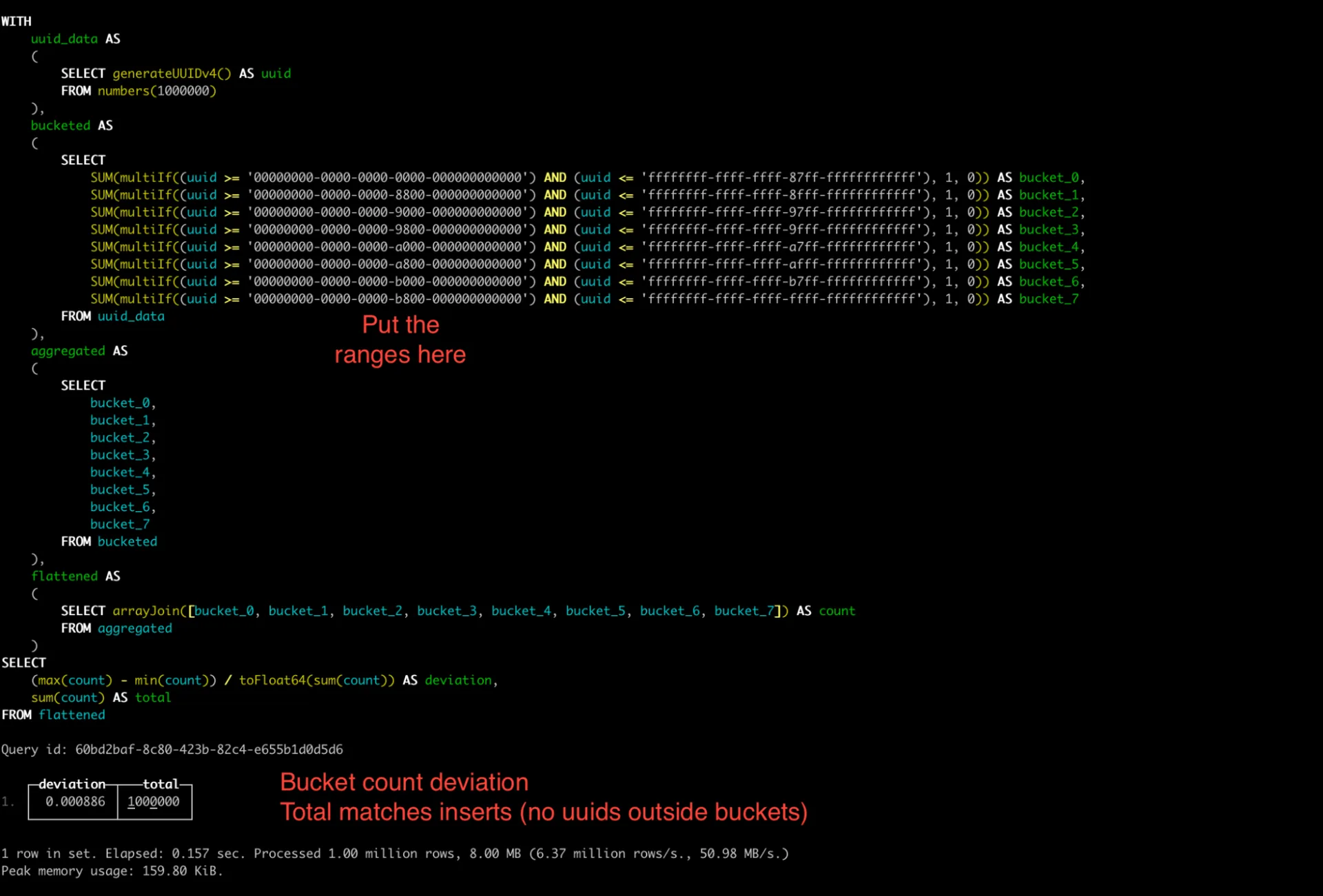
We processed 1 million rows in just 0.157 seconds, using just 159.80 KiB of memory. The system achieved a 6.37 million rows per second processing rate with 50.98 MB/s throughput.
Theories are nice, but you’re probably wondering: Does this actually work in prod? We’ve deployed the Insert-Splitter in production.
Here’s a representative example from one of our larger customer syncs:
Before Implementation (Single Insert):
Elapsed: 22.615s
Read: 26,023,275 rows (8.47 GB)
After Implementation (Split into 4 Inserts):
Elapsed: 5.850s
Read: 6,552,525 rows (2.13 GB)

Elapsed: 5.998s
Read: 6,585,311 rows (2.14 GB)

Elapsed: 5.813s
Read: 6,593,492 rows (2.15 GB)

Elapsed: 5.556s
Read: 6,548,458 rows (2.13 GB)Each insert now reads about 75% less data (from 8.47 GB to ~2.15 GB per operation), without sacrificing overall performance. The total processing time remained virtually the same (22.6s vs 23.2s if run sequentially), while gaining the ability to process the chunks in parallel if needed.
Selection of query to stop or kill is performed by either global or user overcommit trackers depending on what memory limit is reached.ClickHouse's memory overcommit docs
This approach also eliminated the memory explosions and “OvercommitTracker killed query3” errors that were previously impacting us during large syncs. The Insert-Splitter algorithm has proven to be both deterministic and reliable, with consistently even distribution across buckets just as our testing predicted.
Selection of query to stop or kill is performed by either global or user overcommit trackers depending on what memory limit is reached.ClickHouse's memory overcommit docs
The Insert-Splitter algorithm with UUID-range bucketing has changed how we handle massive data volumes in CloudQuery. By breaking one giant operation into multiple deterministic chunks, we’ve tamed ClickHouse’s memory explosions without resorting to schema changes or additional infrastructure.
- Memory explosions stem from one giant pipeline. Split it.
- Insert-Splitter with UUID bucketing gives deterministic, manageable chunks.
- Always optimize your ClickHouse schema design first. Proper sort keys, partitioning strategies, and compression codecs can dramatically reduce memory requirements.
- Monitor your parts count and merge processes. Too many small parts can degrade performance and increase memory pressure.
- Consider resource allocation carefully. Memory-intensive operations like JOINs, GROUP BY’s, and ORDERs may require specialized handling in ClickHouse.
- Test thoroughly at scale - what works for small datasets can break catastrophically at cloud-scale data volumes.
We’d love to hear how others are solving similar problems. Have you encountered ClickHouse memory issues? Do you have other approaches we haven’t considered?
Next time you face memory limits, remember: You don’t have to solve the whole problem at once. Just split it into smaller pieces.
Works on My Machine
Get the next post by email. My newsletter covers homelab builds, AI tools and open source, and it goes out when I have something to say.
It’s free, and you can unsubscribe anytime. You’ll get an email to confirm first.
If you liked this post, consider sharing it on Hacker News, Bluesky, LinkedIn, or X.

Joe
Karlsson
Technology is better when it's weird and it's yours. Everything I write about runs in my house.
More about me →