TL;DR
Two years after my first homelab post, I went from a $200 ThinkServer with 15 containers to a full server rack with two Dell R730s, dual NVIDIA GPUs, 10G networking, VLANs, 60+ containers, and a full observability stack. The rack draws about 380W and costs $53/month in electricity. Here is every phase of that evolution - what drove each upgrade, what it cost, and what I learned the hard way.
Look, when I wrote my original homelab post a couple years ago, the pitch was dead simple. Buy a cheap used server off Facebook Marketplace. Install Proxmox. Run some containers. Done. The ThinkServer cost me $200, ran about 15 containers, and I genuinely thought that was the end of the story.
That is not how homelabs work.

What actually happened over the next two years was an unplanned evolution driven entirely by curiosity and the specific kind of brain damage that makes you think “I should rebuild my entire home network from scratch” at 11 PM on a Tuesday. Each phase started with one question or one frustration, and somehow always ended with new hardware in the rack and a higher electricity bill.
This post is the full story of that evolution: what drove each upgrade, what it actually cost (including electricity - we’re going to talk about electricity a lot), what went wrong, and what I’d do differently. If you’re running a single homelab server right now and you’re getting that itch - the “what if I just added one more thing” itch - this is one version of where that leads.

The ThinkServer Hits a Wall
The original setup was genuinely great. A Xeon E3-1226 v3 with 4 cores, 32GB of RAM, 2TB of storage. Proxmox running LXC containers. Plex, the *arr stack, Pi-Hole, download clients. For six months it handled everything without complaint.
Then I got ambitious. You know how it goes.
First it was Plex transcoding. Two people streaming at once and the quad-core Xeon started choking. GPU-accelerated transcoding would fix that, but the ThinkServer didn’t have a PCIe slot that could fit anything useful. Then I saw Frigate - real-time AI object detection on security camera feeds. Sounds incredible, right? Four CPU cores cannot do real-time neural network inference while simultaneously running 15 other services. Not happening.
And then there was Home Assistant. I’d been reading about it for months, watching YouTube videos, browsing the subreddit during lunch breaks. But I deliberately left it out of the original post because I didn’t want to mix home automation with public-facing services on a machine with zero network segmentation. No VLANs, no firewall rules, just everything on one flat network. That felt wrong.
The ThinkServer didn’t fail spectacularly. It just ran out of room. And once you start seeing what’s possible with more compute, more GPU VRAM, more network bandwidth - well. The itch starts.
Going Enterprise: The First Dell R730
The jump from consumer to enterprise hardware was driven by one thing: I needed a GPU in my server. Real PCIe slots. Proper power delivery. A chassis that could actually dissipate heat from a workstation graphics card without melting.
Why the R730?
I spent weeks reading r/homelab threads, watching ServeTheHome reviews, and comparing spec sheets. Kept coming back to the Dell PowerEdge R730 for four reasons:
ECC RAM. Error-correcting memory actually matters when your server runs 24/7 for months without rebooting. A single random bit flip in regular RAM can crash a container or - worse - silently corrupt data. ECC catches those errors before they cause problems. It’s the kind of thing you don’t appreciate until you’ve lost data to it exactly once.
iDRAC. This is the feature that ruins you for everything else. It’s a dedicated management controller built into the server - completely independent of the main OS. I can reboot the server from my phone while I’m at the grocery store. Watch the BIOS POST screen from bed. Mount a virtual ISO to reinstall the OS remotely. When the server kernel panics at 2 AM, I don’t have to walk up to the attic. Think of it like a KVM switch that’s permanently attached.
Dual PSU. One power supply dies? Server keeps running. In a datacenter that’s table stakes. In my attic it means a dead PSU is an Amazon order, not a 3 AM emergency.
PCIe expansion. Enough slots for GPUs, 10G network cards, and whatever I decide I need six months from now.
Where to find enterprise hardware for cheap
Here’s the economics that make all of this possible: enterprise hardware depreciates like a luxury car. Companies lease thousands of R730s, run them for 3-5 years, and then dump them when the lease ends and newer hardware arrives. A barebones R730 chassis can show up on eBay for $300-500. But if you want one configured with specific CPUs, RAM, and drives - ready to rack and run - expect to pay more. I bought mine from Server Design Lab fully configured for about $1,850 each. Still a fraction of the $15,000+ sticker price new, but not the “$300 eBay special” you see in Reddit posts.
Best places I’ve found: eBay (sort by newly listed - the good deals go fast), r/homelabsales on Reddit, specialty refurbishers like Server Design Lab, and local IT surplus liquidators. If you’re near any city with tech companies, there’s probably a warehouse within driving distance selling rack servers by the pallet.
The GPU lesson nobody warned me about
Here’s something I learned the expensive way: you cannot just drop a desktop gaming GPU into a 2U rack server.
I know. Obvious in retrospect. But when you’ve spent years building desktop PCs where basically any GPU fits in basically any case, it doesn’t occur to you that rack servers are a completely different universe. Desktop GPUs are designed for full-height PCIe slots with side-panel fans blowing directly onto them. Rack servers are 3.5 inches tall. The airflow goes front-to-back through a carefully engineered wind tunnel. A full-size RTX 4090 physically will not fit. Period.
For the R730, you need cards under a specific length and height - typically workstation or datacenter class GPUs. NVIDIA Quadro, NVIDIA RTX (the professional ones), Tesla. Not GeForce. I burned a weekend figuring this out before finding cards that actually worked.
The power bill arrives
The ThinkServer drew maybe 80W at idle. Cute. Barely noticeable on the electric bill.
The R730 with dual Xeon E5-2698 v4 processors? That’s 40 cores per CPU. 80 cores total.
Performance was unreal. And then the electricity bill showed up.
I have a Home Assistant smart plug tracking the entire rack’s power draw in real time. The full numbers are in the power section below, but the short version: $53/month in electricity. A regular desktop PC idles at 60-100W. I’m running 3-4 desktops worth of power, 24/7, in my attic, in Minnesota.

Two Servers and a Rack
Why did I need a second R730?
GPU time-sharing. I wanted to run local AI models (Ollama for LLMs, Immich ML for photo face recognition, Frigate for security camera object detection) alongside Plex transcoding and Tdarr video encoding. Trying to run all of that on one GPU simultaneously is a recipe for CUDA out-of-memory crashes and angry family members wondering why Plex stutters every time Frigate detects a squirrel.
Two GPUs on two hosts solved it cleanly:
- prxbox1 got a Quadro RTX 4000 (8GB VRAM) - dedicated to Frigate NVR running real-time object detection across 4 security cameras, plus a Tdarr distributed transcoding worker
- prxbox2 got an RTX A4000 (16GB VRAM) - the big one, handling Plex hardware transcoding, Immich ML photo processing, Tdarr encoding, and Ollama for running local LLMs entirely on-device
The 16GB card was the important investment. Running a decent local LLM eats VRAM fast, and 8GB fills up the moment you’re also running photo ML and video transcoding on the same GPU.
I knew nothing about server racks

Seriously. Embarrassingly little. I didn’t know 19 inches was a standard width. I was measuring my R730s with a tape measure trying to figure out what kind of enclosure would hold them. Turns out this has been standardized since the 1920s (telephone industry, originally) and everything - mounting holes, unit height, rail depth - follows the same spec worldwide.
The mental model that finally made it click for me: a server rack is just a desktop computer where every component lives in its own chassis. Your desktop has a CPU, GPU, RAM, storage, network card, and power supply all crammed into one box. A rack separates all of that:
- Compute = the Dell R730 servers (CPU + RAM + GPU)
- Storage = Synology DS918+ on the bottom shelf
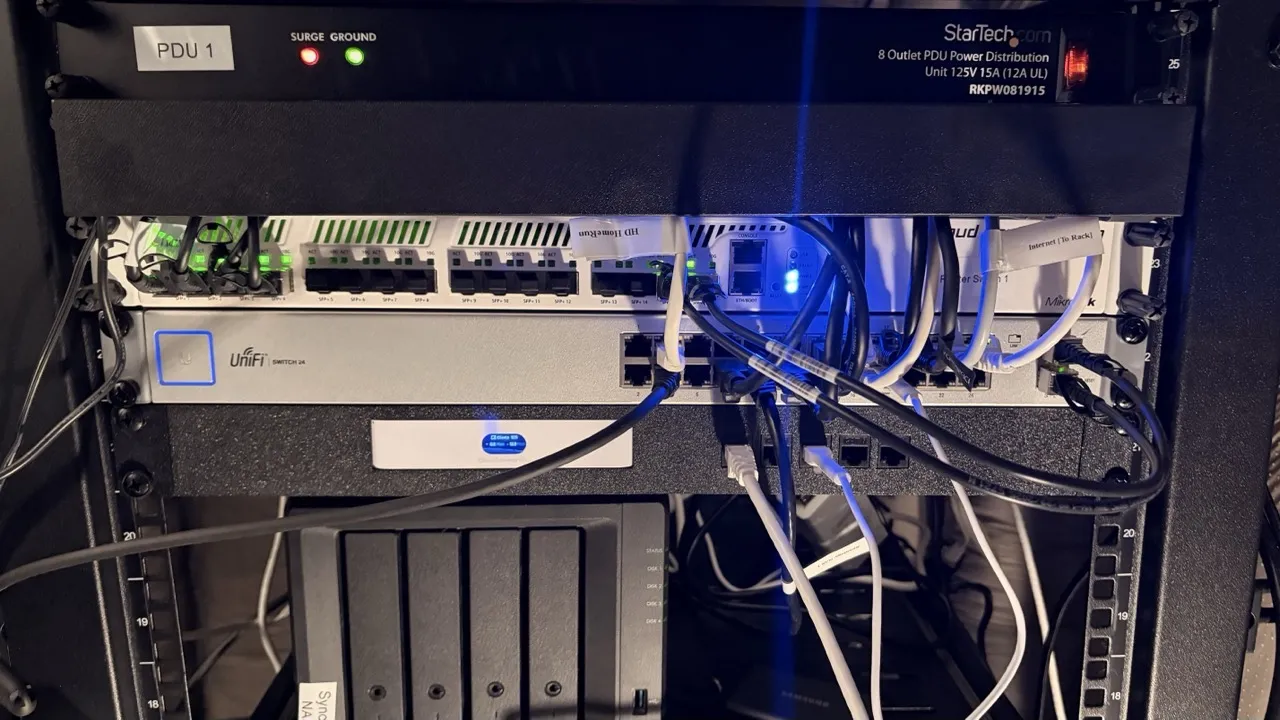
- Networking = MikroTik CRS317 for 10G backbone + UniFi US-24 for 1G devices
- Power = PDU (power distribution) + two UPS units (battery backup so a power blip doesn’t kill everything)
- Management = iDRAC ports on each server
Same building blocks. Physically separated. Independently replaceable. Once I thought about it that way, the whole thing stopped being intimidating and started making sense.
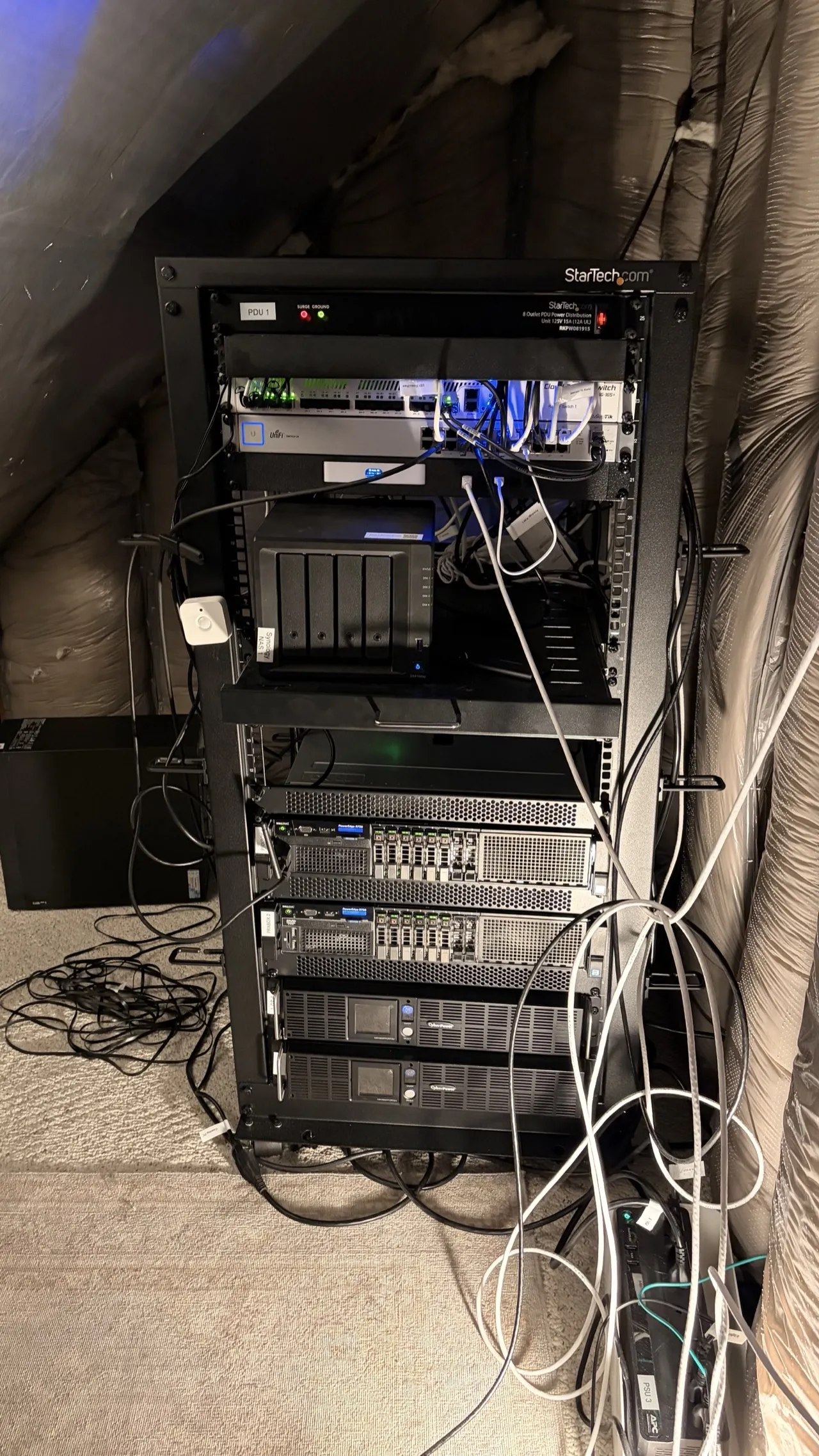
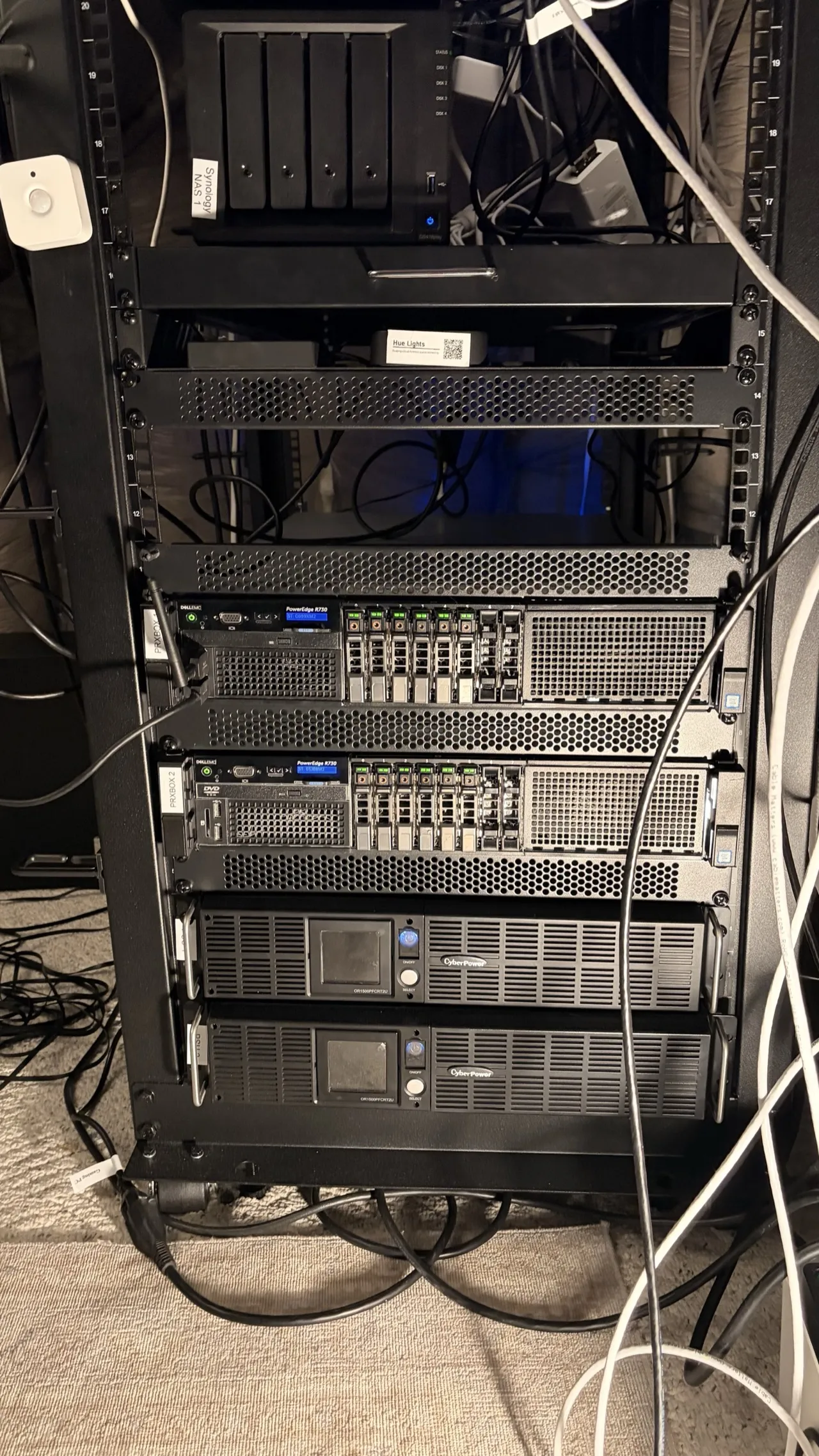
Here’s the actual rack layout:
StarTech 25U Rack
+----------------------------------+
|   StarTech PDU                   |  1U
+----------------------------------+
|   MikroTik CRS317 (10G Switch)  |  1U
+----------------------------------+
|   UniFi US24 (24-port 1G)       |  1U
+----------------------------------+
|   UniFi Cloud Gateway Ultra      |  shelf
|   Synology NAS (4-bay)          |  shelf
+----------------------------------+
|          (empty - future NAS)    |
+----------------------------------+
|   Dell R730 - prxbox1            |  2U
|   (Quadro RTX 4000, 8GB)        |
+----------------------------------+
|   Dell R730 - prxbox2            |  2U
|   (RTX A4000, 16GB)             |
+----------------------------------+
|          UPS                     |  2U
+----------------------------------+
|          UPS                     |  2U
+----------------------------------+
10G networking between hosts
Each R730 has dual 10Gb SFP+ ports bonded via LACP to the MikroTik switch. That’s 20Gbps aggregate bandwidth per host. A single TCP connection won’t saturate both links (LACP distributes traffic by flow hash, not by individual packet), but when 30+ containers on each host are all hitting the NAS simultaneously - media files, log writes, backup streams - both links stay busy.
I wrote a Python script to manage the MikroTik bonding configuration programmatically because clicking through web UIs to configure network infrastructure felt wrong. That turned into its own blog post about implementing MikroTik’s proprietary binary protocol from scratch.
Enterprise RAM in 2026: the worst time to buy
I need to talk about this because it caught me off guard. Enterprise DDR4 ECC RAM has gotten significantly more expensive since I started this project, and the timing couldn’t be worse.
The AI boom did this. Every company building GPU clusters and inference servers needs massive amounts of ECC memory, and that demand is competing directly with the secondhand market that homelabbers depend on. DDR4 ECC sticks that were $40-80 a couple years ago are now running $200-400 new for 32GB RDIMMs - a 3-4x increase. It’s bad enough that it has its own Wikipedia article. The supply of used enterprise RAM dried up because the same companies that used to surplus it are now keeping older servers running longer to meet AI compute demand, or the RAM gets pulled and resold at inflated prices to AI startups who need it yesterday.
prxbox1 has 125GB, prxbox2 has 128GB. Filling those DIMM slots was genuinely painful on the wallet. I picked the worst possible time to be upgrading enterprise servers as a hobby. But it’s still a hobby, and it’s still fun, so here we are.
There’s not a great way to mitigate this. You can watch r/homelabsales for deals, buy in bulk when you find good prices, or accept DDR5 ECC when you eventually move to newer platforms (where supply is healthier). But for DDR4 ECC right now? Budget for it on day one. Don’t treat it as a “I’ll upgrade later” afterthought, because later is more expensive - and with DDR4 production winding down in favor of DDR5, it’s only going in one direction.
“I Wanted to Learn Networking”
That was the entire motivation for this phase. Six words. I wanted to understand networking properly - VLANs, firewall rules, routing, subnets, all of it. So I did what any reasonable person would do.
I tore down my entire home network and rebuilt it from scratch.
The setup
UniFi Cloud Gateway Ultra as the router, DHCP server, and WiFi controller. Two UniFi U7 Pro access points for whole-home WiFi 7 with 802.11r fast roaming - one upstairs, one main floor. Devices hand off between APs as I walk through the house without dropping connections. My partner doesn’t notice, which is the highest compliment network infrastructure can receive.
VLANs: or, why your smart plug shouldn’t talk to your NAS
Here’s the thing about IoT devices. They’re manufactured by companies you’ve never heard of, running firmware that rarely gets security patches, phoning home to servers in countries you can’t identify on a map. I have maybe 40 of these things in my house. I do not want any of them to have network access to my NAS full of family photos and financial documents.
VLANs create separate virtual networks that can’t talk to each other unless I explicitly write a firewall rule allowing it:
- Default LAN (192.168.0.0/24) - trusted devices: servers, my workstation, phones
- Guest (192.168.20.0/24) - internet access only, can’t see anything local
- IoT (192.168.30.0/24) - smart home devices, can only reach Home Assistant and DNS
- Cameras (192.168.40.0/24) - security cameras, can only reach Frigate and Home Assistant
A compromised smart plug can’t reach my NAS. A camera can’t exfiltrate data to the internet. A guest can’t scan my local network. Each VLAN is its own isolated world with strictly controlled exits.
Here’s how the network is structured:
Internet
  |
  v
Fiber ONT (bridge mode)
  |
  v
UniFi Cloud Gateway Ultra (Router / DHCP / WiFi Controller)
  |
  +---> MikroTik CRS317 (10G Backbone)
  |       |
  |       +---> prxbox1 (2x 10G LACP = 20Gbps)
  |       +---> prxbox2 (2x 10G LACP = 20Gbps)
  |
  +---> UniFi US24 (1G switch)
  |       |
  |       +---> iDRAC1, iDRAC2, IoT devices, cameras
  |
  +---> UniFi U7 Pro AP (Upstairs)
  +---> UniFi U7 Pro AP (Main Floor)

VLANs:
  Default LAN (192.168.0.0/24)  - servers, workstation, trusted
  Guest       (192.168.20.0/24) - internet only
  IoT         (192.168.30.0/24) - can reach HA + DNS only
  Cameras     (192.168.40.0/24) - can reach Frigate + HA only
The Service Explosion
Here’s what happens when you hand someone 160 cores, 250GB+ of RAM, and 24GB of GPU VRAM.
They fill it.

The services
Not exhaustive - check my uses page for the full inventory. But here’s the landscape:
Media: Plex, Immich (self-hosted Google Photos - genuinely excellent), full *arr stack (Sonarr, Radarr, Prowlarr, Lidarr, Readarr, and a few more), Tdarr for automated video health checking and transcoding, a GPU-accelerated subtitle generator I built with Whisper AI, Audiobookshelf
Security: Frigate NVR, Vaultwarden (self-hosted Bitwarden), Authentik (SSO for every service), CrowdSec (community threat intelligence)
Home automation: Home Assistant as a full VM (not a container - it needs the supervisor for add-ons and updates), Zigbee2MQTT for local Zigbee control without any cloud dependency
AI/ML: Ollama with Open WebUI gives me a ChatGPT-like interface running entirely on local hardware. No API costs. No data leaving my network. No rate limits. I use it daily.
Monitoring: Prometheus, Grafana, Loki, Uptime Kuma, plus 41 custom health check scripts
Productivity: Paperless-NGX (scans every receipt and document, OCRs them, uses AI to categorize and tag automatically - it’s magic), Nextcloud
The Home Assistant 180
This one deserves a callout because it’s my biggest reversal from the original post.
Two years ago I deliberately avoided Home Assistant. I didn’t trust mixing home automation with other services on a single machine with no network isolation. That was a reasonable concern! And it was completely addressed by VLANs and a dedicated VM.
Now Home Assistant is the single most important piece of the entire homelab. It doesn’t just control lights - it manages server power states, monitors container health, runs the night mode system that saves me real money, and orchestrates automations I couldn’t have imagined two years ago. I wrote about that journey in my post about replacing Alexa with a private, local-first setup.
Sometimes you avoid something for valid reasons, learn enough to address those reasons, and then wonder how you ever lived without it.
The “Operations” Mindset
There’s a specific moment where a homelab stops being a hobby project and starts feeling like production infrastructure you’re personally responsible for. For me, that moment was the third time I discovered a service had been silently dead for over a week.
Third time. A week each time. Nobody noticed.
Observability
Prometheus scrapes metrics from every host and container every 15 seconds. CPU, memory, disk, network throughput, GPU utilization, VRAM usage, inlet temperature, exhaust temperature. All of it, continuously, into a time-series database.
Grafana turns that into dashboards. The main overview shows both servers at a glance - power draw, CPU load, memory pressure, GPU status, disk I/O. I check it most mornings with coffee. It’s weirdly satisfying.
Loki aggregates logs from all 60+ containers. When something breaks, I search from one Grafana panel instead of SSH-ing into individual containers and tailing log files like it’s 2003.
Uptime Kuma monitors from outside the cluster and pings me via ntfy (self-hosted push notifications) when anything goes down.
41 health check scripts
This sounds insane. I know it sounds insane. But each one is dead simple: check one thing, exit 0 if healthy, exit 1 with a message if not. Backup verification. SSL certificate expiry. Disk space thresholds. DNS resolution. Container restart detection. A wrapper runs them all via cron and sends a daily summary.
I haven’t been surprised by a silent failure in months. That peace of mind was worth the afternoon I spent writing them.
Backups
Proxmox Backup Server handles incremental backups with deduplication. The dedup ratios are wild - 90-98% for containers sharing a common base image. Most of the filesystem is identical between containers (they’re all Debian or Ubuntu under the hood), so PBS only stores unique data chunks. 60+ containers take a fraction of the storage you’d expect.
Power: The Uncomfortable Math
OK. Let’s talk about the electricity.
Here’s the real data from my Home Assistant energy monitoring plug (entity sensor.office_server_rack_energy), tracking the entire server rack through a smart power outlet:
| Metric | Value |
|---|---|
| prxbox1 power draw | 196W (Quadro RTX 4000 at 37-40W under Frigate load) |
| prxbox2 power draw | 182W (RTX A4000 at 7W when GPU is idle) |
| Total rack | ~380W continuous |
| Daily consumption | 10.45 kWh/day (9-day average) |
| Monthly cost | ~$53 at $0.17/kWh |
| Annual projection | ~$636 |
That’s metered. Not estimated.
What I did about it
Killed the third server. I had prxbox3 - the original ThinkServer from my first blog post - still running 9 containers. Migrated all of them to the two R730s (which had plenty of headroom) and powered it off. Gone. Instant savings.
Night mode. This is the automation I’m most proud of building.
Home Assistant: "Power - Night Mode System"
  |
  +--> 11 PM: Enter Night Mode
  |     +---> Stop 10 containers on prxbox2 (Tdarr, Ollama, Paperless, etc.)
  |     +---> Stop 7 containers on prxbox1 (Kometa, Dockge, etc.)
  |     +---> ~175W saved continuously
  |
  +--> 7 AM: Exit Night Mode
  |     +---> Start all stopped containers
  |     +---> Run health check verification
  |     +---> Send ntfy push notification
  |
  +--> Manual Override (phone toggle anytime)

Always running 24/7 (never stopped):
  Plex, Frigate, Immich, Home Assistant, Monitoring Stack,
  Infrastructure (reverse proxy, AdGuard, Tailscale),
  Media Automation (*arr stack, download clients)
That’s 175W saved for 8 hours every night - roughly 1.4 kWh/day, or about $7/month. If I need Ollama at 1 AM (it happens), I can override from my phone. But 95% of the time, those services have no business running while I’m sleeping.
CPU governor tuning. Both hosts run the powersave frequency governor instead of performance. With 160 total cores, there’s absurd headroom even in power-save. CPUs ramp up when a workload demands it, drop to minimum frequency when idle.
The uncomfortable truth

The R730 is an incredible value on the used market. Even configured, you’re paying a fraction of the original five-figure price, with ECC RAM, redundant power supplies, iDRAC, and expansion capabilities that consumer hardware can’t touch.
But these machines were designed for data centers with negotiated commercial electricity rates - $0.05-0.08/kWh - and industrial cooling systems. In my attic, on a residential power plan at $0.17/kWh, paying Minnesota heating costs on top of it? The economics look different. Factor in power before you buy that second server. Not after.
The Before and After
Sometimes it helps to just see the numbers side by side.
2023 (ThinkServer Era)          2026 (Server Rack Era)
========================        ========================
1x Lenovo ThinkServer           2x Dell R730 (+ThinkServer powered off)
Xeon E3 quad-core               160 cores total
32GB RAM                        250GB+ RAM total
No GPU                          2x NVIDIA GPUs (24GB VRAM)
~15 containers                  60+ containers
Flat network (no VLANs)         4 VLANs, 10G backbone
No monitoring                   Full observability stack
~80W power draw                 ~380W (with night mode savings)
$200 hardware cost              ~$7,400 total hardware
$0/yr power (negligible)        ~$636/yr power
That escalated.

What did all of this actually cost?
People always ask this, so here’s the honest breakdown:
| Item | Cost |
|---|---|
| R730 #1 (Server Design Lab, configured) | $1,857 |
| R730 #2 (Server Design Lab, configured) | $1,839 |
| ThinkServer (original post, now powered off) | $200 |
| Quadro RTX 4000 8GB (eBay) | $230 |
| RTX A4000 16GB (eBay) | $895 |
| UniFi Cloud Gateway Ultra | $129 |
| UniFi U7 Pro APs (x2) | $378 |
| UniFi US-24 (renewed) | $225 |
| StarTech rack + shelves | $375 |
| MikroTik CRS317 | $433 |
| CyberPower UPS (x2) | $778 |
| Cables, adapters, misc | ~$100 |
| Total hardware | ~$7,440 |
| Annual electricity (~$636/yr x 2 years) | ~$1,272 |
| Total cost of ownership (2 years) | ~$8,712 |
Is that a lot? Yes. But here’s the other side of the math.
The subscription kill list
Every one of these services is something I used to pay for monthly and no longer do:
| Subscription replaced | Self-hosted with | Monthly cost saved |
|---|---|---|
| Netflix + Hulu + Disney+ | Plex + *arr stack | ~$47 |
| Spotify Premium | Navidrome + Lidarr | $12 |
| iCloud 2TB + Dropbox Plus | Nextcloud + PBS | ~$22 |
| NordVPN | Tailscale + WireGuard | ~$12 |
| 1Password | Vaultwarden | $4 |
| ChatGPT Plus | Ollama + Open WebUI | $20 |
| Ring Protect Plus | Frigate | $13 |
| Audible | Audiobookshelf | $15 |
| Backblaze backup | Proxmox Backup Server | $7 |
| Total subscriptions killed | ~$152/mo ($1,824/yr) |
Subtract my $53/month electricity cost and I’m netting about $99/month in real savings.
Break-even: ~6.3 years ($7,440 hardware / $99 monthly net savings).
That’s not a fast payback. I’m not going to pretend this is a financial no-brainer. But subscription prices only go up - Netflix has raised prices three times since I started this project. And once the hardware is paid off, it’s $1,200+ per year in pure savings with no monthly bills going to seven different companies. Plus I own my data, I control my infrastructure, and nobody can cancel my favorite show or change my password manager’s pricing tier.
But honestly? It’s a hobby. Hobbies cost money. Nobody asks a golfer to justify their club membership with a break-even analysis.
The unintended ROI has been professional. Running this homelab gave me a working understanding of the full stack - deployments, hosting, infrastructure, networking, monitoring, cost optimization - that I never got from application development alone. I’m not going to get a job titled “homelab engineer.” But when I’m in a meeting scoping infrastructure costs, or collaborating with platform and DevOps teams on deployment strategy, or estimating cloud compute budgets, I actually understand what they’re talking about. I can push back on vendor pricing because I know what the underlying resources cost. I can scope cross-domain projects more accurately because I’ve touched every layer of the stack myself.
That’s been the real return. The homelab made me better at my day job in ways I didn’t expect when I bought that first ThinkServer.
What I’d Do Differently
If I were starting over tomorrow with everything I know now:
- VLANs from day one. Retrofitting network segmentation onto a running homelab means updating every single service that hardcodes an IP address. It’s a miserable weekend project that should’ve been a 10-minute setup decision.
- Monitoring before the first failure, not after the third. You don’t need 41 scripts on day one. But Uptime Kuma and basic backup verification should exist before you need them.
- GPU form factor research. Measure twice, buy once. Rack servers are not desktop cases.
- Budget for RAM upfront. The AI boom crushed the DDR4 ECC market. Prices went up, not down, and they’re not coming back.
- Document everything as you build. I have a detailed infrastructure repo now with every config, VLAN rule, and container documented. I wish I’d started it from the beginning instead of reconstructing six months of decisions from memory.
- Power costs from the very start. Not after the first bill shock.
What’s Next
The homelab is never done. I know that now. Current explorations:
- Lower-power hardware for services that don’t need 80 cores (maybe a small NUC or mini PC for lightweight containers)
- Long-term energy trending in Grafana to correlate power draw with specific workloads over months
- More self-healing automation - containers that detect their own failure and restart without waking me up
None of this was planned. I didn’t draw up a blueprint for a dual-server rack with 10G networking in 2023. Each phase started with curiosity about one thing - “I want GPU transcoding,” “I want to learn networking,” “I want to run AI locally,” “why did my power bill double?” - and ended with new hardware and new knowledge.
If you read my original homelab post and you’re wondering what comes next: this is one version of that answer. Follow the curiosity. Just keep an eye on your power bill.