TL;DR
A "simple" search bar turned into a full domain-specific language (DSL) for cloud queries. Regex melted. Peggy rescued us. Along the way we learned more about Chomsky, compilers, and a few surprises about UX.
Co-authored with Christopher Duflo at CloudQuery.
All we wanted was a box where you could type something like:
(type:ec2 AND region:us-west-2) OR "production database"…and instantly see matching assets across AWS, Azure, and GCP. Easy, right?
Turning that vision into reality meant building more than a search bar. It meant inventing a mini language - one that was intuitive for users to write, easy to validate, and flexible enough to support full-text search (FTS) and logical expressions. We thought we could hack it together with some regular expressions.
We were wrong.
Users see a search bar. Underneath, it’s a small programming language.
We wanted FTS + structured queries for our asset inventory, but what looked simple quickly became a deep parsing challenge.
Regex experiment - unreadable and fragile
At first, it worked fine for simple filters like: region:us-east-1
However, this quickly exploded the complexity:
- How do we validate nested parentheses?
- What happens when a user forgets a closing
)? - How do we differentiate “quoted strings” from field pairs?
- What about AND, OR, and NOT precedence?
- Nested logic:
(type:ec2 AND region:us-west-2)?
Plus, it was nearly impossible for human beings to read. Every tweak to support a new requirement - nested groups, quoted strings, AND/OR precedence - felt like defusing a bomb. One change would fix one edge case and break five others.
Regex excels at straight-line patterns. It shines when you want to match an email or a simple field:value pair. But once you ask it to balance tokens or obey operator precedence, things crumble. We ran into three core headaches:
- Nesting: Regex can’t reliably match balanced parentheses without insane hacks. Once you try, maintenance becomes a nightmare.
- Logical operators: Handling AND, OR, NOT in the right order forced us into nested lookarounds that barely worked.
- Opaque errors: A malformed input like
(type:ec2 ANDwould trigger a generic “no match” response. Zero guidance on what to fix.
Peggy
That’s when we discovered Peggy, a parser generator that lets you define a grammar using Parsing Expression Grammars (PEGs) and compiles it into a working parser.
Peggy clicked immediately.
Instead of juggling brittle regex patterns, we wrote formal grammar rules like:
Expression = head:Term tail:(_ ("AND" / "OR") _ Term)* { ... }Want proof? This is the AST for (type:ec2 OR type:rds) AND region=us-west-2:
{
	"kind": "and",
	"left": { "kind": "or", "...": "..." },
	"right": { "kind": "comparison", "field": "region", "value": "us-west-2" }
}
This wasn’t just easier to write - it was easier to read. Peggy gave us:
- A structured grammar we could reason about
- Syntax error feedback for invalid expressions
- An Abstract Syntax Tree (AST) to programmatically analyze and transform user input
Here’s a fundamental part of our grammar - how we handle comparison expressions like region="us-west-2" or instance_count>5:
ComparisonExpression = identifier:Identifier _ op:ComparisonOperator _ value:Value? finalSpace:_ {
    const isListValue = value && (value.kind === 'list-expression');
    const isQuotedValue = value && (value.kind === 'quoted-string');
    const hasTrailingSpace = finalSpace && finalSpace.length > 0;

    let isValueComplete = false;

    if (isListValue) {
        isValueComplete = value.complete;
    } else if (isQuotedValue) {
        isValueComplete = value.complete;
    } else {
        isValueComplete = (!!value && hasTrailingSpace);
    }

    return {
        kind: 'comparison-expression',
        identifier,
        identifierLocation: identifier.location,
        op: op.value,
        opLocation: op.location,
        value: value === null ? undefined : value,
        valueLocation: value ? value.location : undefined,
        position: location(),
        text: text(),
        complete: isValueComplete,
        context: 'value'
    }
}
This rule matches expressions like region="us-west-2" and builds a structured object with the field, operator, and value. It also tracks position information for syntax highlighting and validation, as well as completeness for conversion to a chip in the filter bar.
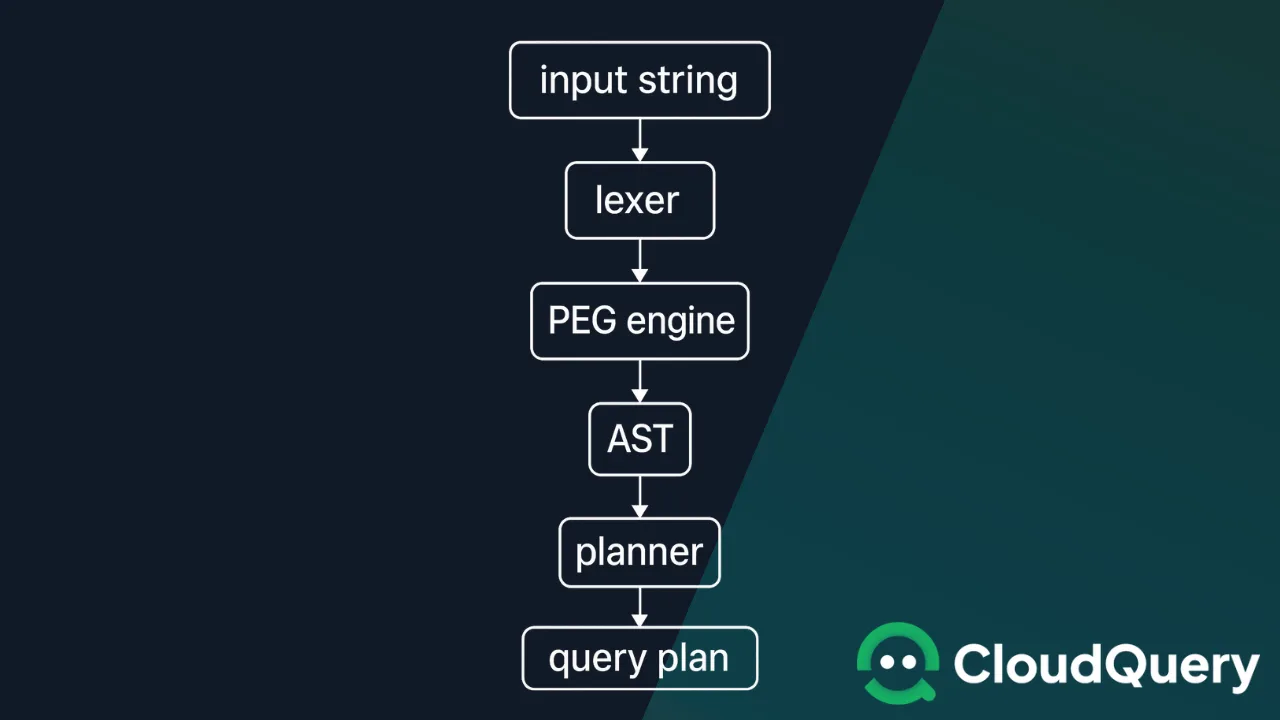
- Input String - You type your query
- Lexer - Breaks the string into tokens - identifiers, operators, parentheses, quoted strings
- PEG Engine - Peggy applies grammar rules, recognizes structures, enforces operator precedence
- AST (Abstract Syntax Tree) - Tree representation where each node is a chunk of meaning
- Planner - Walks the AST and figures out how to execute it efficiently
- Query Plan - Concrete plan (often SQL) that the engine will run
Chomsky and Compilers
By this point, it was clear: we weren’t just building a search bar. We were designing a domain-specific language (DSL) for querying cloud infrastructure.
It turns out our journey from regex to formal grammar has deep theoretical roots. In the 1950s, linguist Noam Chomsky developed a hierarchy of formal grammars that still shapes how we think about parsing and language processing today.
| Level | Nickname | What it can describe | Examples |
|---|---|---|---|
| Type 3 | Regular | Single-layer patterns, no nesting | Regex, log filters |
| Type 2 | Context-free | Balanced or nested structures | SQL, most programming languages, our PEG.js parser |
| Type 1 | Context-sensitive | Patterns that depend on nearby context | Some natural-language processors |
| Type 0 | Unrestricted | All computable structures | Full Turing-complete languages |
We jumped from Type 3 (regex) to Type 2 (PEG.js) so we could support nested parentheses, operator precedence, and clean error handling without hand-written hacks.
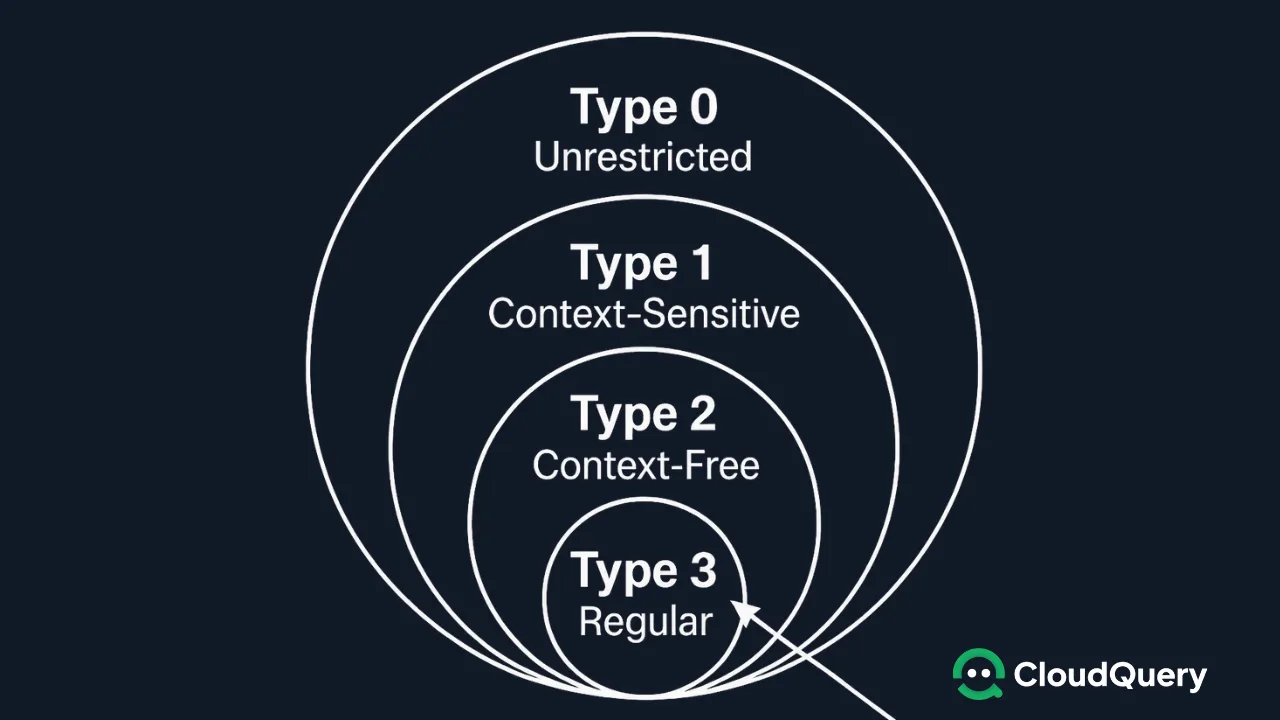
Our first approach with regex operated at Type 3 (Regular Grammar) level, which worked fine for simple field:value matching. But as soon as our users needed nested parentheses and logical operators with precedence rules, we hit a wall.
Lessons Learned
Here’s what surprised us the most: a problem that started as “let’s build a better search bar” led us straight into the intersection of computer science, linguistics, and cognitive science.
This isn’t a coincidence. The fundamental challenge of cloud infrastructure - managing complexity through abstraction - mirrors the challenges of human language itself. Both require systems that can express complex ideas through the composition of simpler elements.
Final Thoughts
What started as a UI improvement turned into a system design problem. Along the way, we rediscovered the hidden power of language theory.
- Regex is not a parser. Don’t try to write your own unless you’re doing something trivially simple.
- Use a parser generator. Tools like Peggy make it easier to define a grammar and maintain it.
- Design like a language. If your UI input is complex, it’s probably a DSL - treat it as such.
- Humanities are not optional. Understanding syntax, ambiguity, and user language is key to building better tools.
Our implementation handles various expression types:
- Simple field queries:
region=us-west-2 - Text searches:
"production database" - Logical operators:
ec2 AND production - Parenthesized groups:
(type:rds OR type:aurora) AND environment:prod - List operations:
region IN (us-west-1, us-west-2, us-east-1) - Negation:
NOT type:s3
The next time you’re tempted to reach for regex to parse complex input, remember: you might actually be building a language. Give parser generators like Peggy a look - your future self will thank you.

Joe Karlsson
Developer Marketing Engineer at CData, leading developer growth for the managed MCP platform that connects AI agents to live enterprise data. Writing about databases, self-hosting, and the things I build. Runs a 60+ container Proxmox homelab with AI-powered automations.
cat newsletter.md
I write a weekly newsletter about databases, self-hosting, and whatever I'm building.
Subscribe on Substack →Related Posts

Apr 7, 2026
My Personal Claude Code Skills Repo Accidentally Became Internal Tooling
I built a few Claude Code skills for myself because I was tired of copy-pasting the same prompts. Then my coworkers started asking questions. Here is what happened when a personal productivity tool became team infrastructure.

Sep 1, 2025
Introducing CloudQuery Insights: Cloud Intelligence That Connects the Dots
CloudQuery Insights monitors your complete asset inventory and surfaces interconnected signals across security, cost, policy, and audit data automatically.

Sep 30, 2026
My Development Setup in 2026
My development setup in 2026: Ghostty, plain zsh, Handy voice input, git worktrees for concurrent Claude Code agents, and chezmoi. What I switched and why.