TL;DR
I can't memorize lines, so I built FollowSpot, a browser teleprompter that follows my voice using a Whisper model running locally through whisper.cpp. It lets me pick the model and set up the screen exactly how I want, including a narrow column centered over the camera lens. I benchmarked five Whisper models on my M5 Max MacBook Pro with my own voice: every one kept up, tiny.en mangled tech jargon, base.en missed one more term than the bigger models, and small.en and up got 14 of 16 right.
I have the energy of a theater kid and I can’t memorize lines. I’m pretty sure something is wrong with my brain. (If anyone knows if this is a real medical disorder, please let me know). I can write a paragraph, read it twice, and lose it by the time the camera is rolling. It’s the reason I never had the guts to do theater.
Public speaking worked out anyway. In DevRel I mostly talk about things I built, so there’s nothing to memorize. I just explain the cool thing I’m working on.
Lately I’ve been making more videos, though, and some of them need tight monologues where every sentence has a job. Winging it doesn’t work there. So I built FollowSpot, a browser teleprompter that listens while I read and follows along. The speech recognition is a whisper.cpp model running on my own laptop, and my audio never leaves it.
Elgato already follows your voice. I wanted to pick the model
Voice-following teleprompters exist. Elgato’s Camera Hub has one called Voice Sync, and it runs on-device, which I appreciate. You just can’t choose what’s listening. Elgato doesn’t say which model Voice Sync uses. One developer who dug through the Mac app reports that it bundles whisper.cpp with base.en, one of the smallest Whisper models.
Browser teleprompters are worse on the privacy front. Many of the ones that follow your voice use Chrome’s Web Speech API, which sends your audio to Google unless the site has opted into Chrome’s newer on-device mode.
Meanwhile my MacBook Pro has an M5 Max in it. It can run models far bigger than base.en in real time, and in my experience a bigger local model is more accurate than anything built into a prompter app. I also had a specific picture of how I wanted the screen to look, and nothing let me set it up exactly that way. So FollowSpot takes any whisper.cpp model you point it at, from tiny.en up to large-v3-turbo.
Day to day I run medium, and I didn’t even download it. Screen Studio ships a copy, and FollowSpot picks it up automatically.
Put the words over the lens, or everyone can tell you’re reading
Keep the text narrow and centered right over the camera lens. I wish someone had told me that years ago. With a wide column, your eyes sweep left to right on every line, and viewers notice that little side-to-side scan. StudioKitGuide’s eye-line guide gives the same advice.
This is what a default wide column looks like:
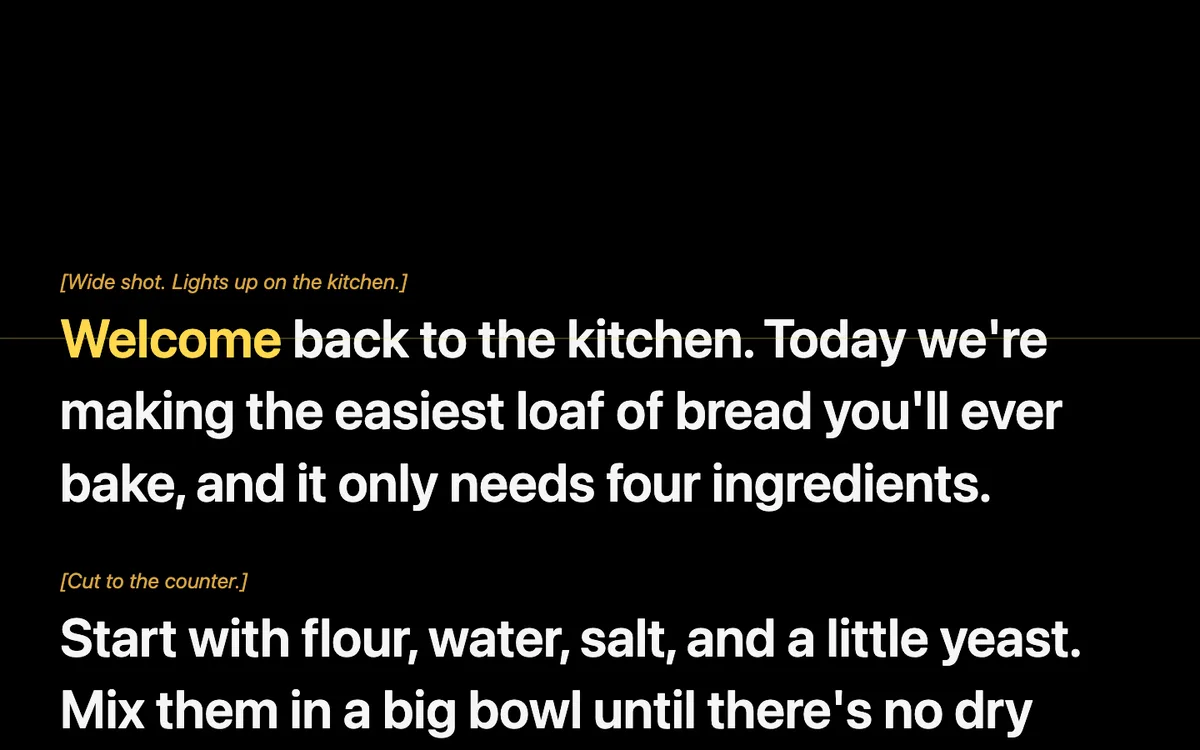
And this is how I run it, with the column at 30% of the screen, top and bottom margins, and the reading line nudged up to lens height:
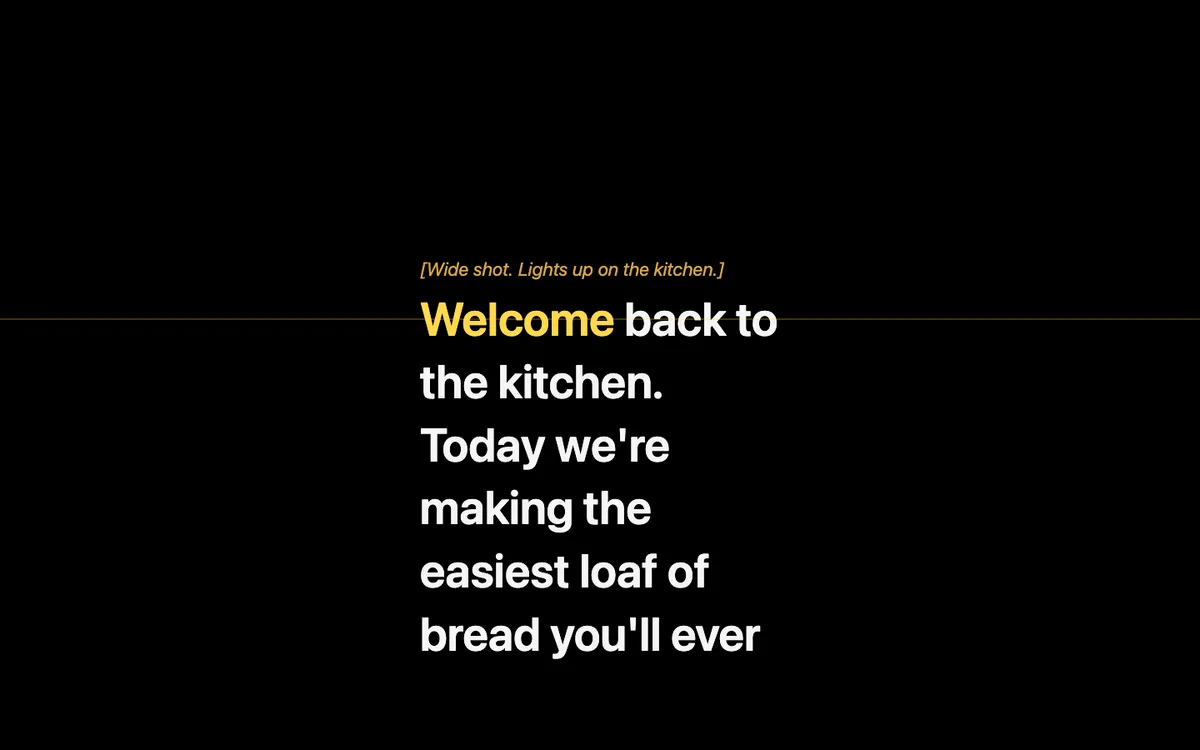
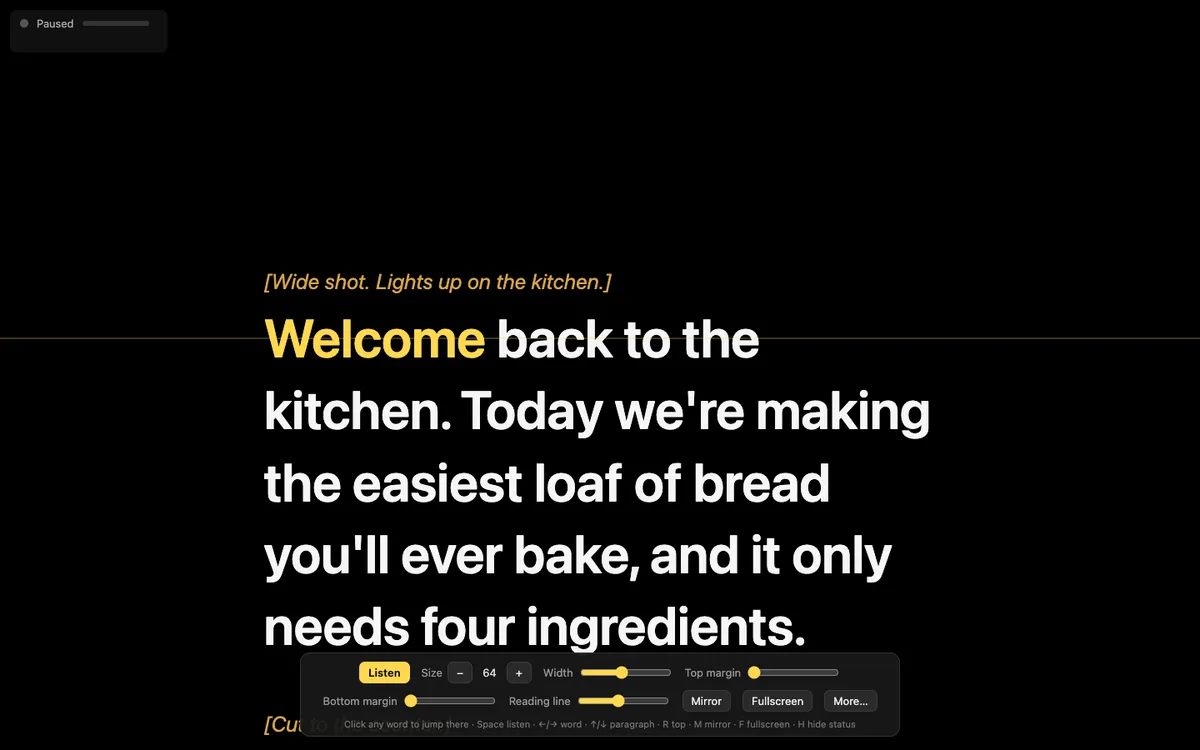
Three or four words per line means my eyes barely move. All of it is a slider in the toolbar, saved in the browser. On a beam-splitter prompter like Elgato’s, I drag the window to the prompter’s display, go fullscreen, and hit M to mirror the text.
How it keeps up when you go off script
While I’m talking, the page keeps sending the last few seconds of audio to whisper.cpp on 127.0.0.1 and fuzzy-matches what comes back against the script near my place. A flubbed word or an ad-lib doesn’t throw it off, and when I stop talking, it stops. If I blow a take, I click the word I want to restart from.
Scripts are plain Markdown, and stage directions in *[brackets]* show up dimmed so I don’t read them out loud by accident.
I benchmarked five Whisper models. On an M5 Max, all of them keep up
I wanted real numbers, so I read a paragraph from my homelab post out loud: 86 seconds, full of words like Proxmox, ThinkServer, Frigate, and VLANs. I ad-libbed a few words along the way, which turned out to be a good test by accident. Then I ran that recording through every model, using FollowSpot’s own matching code and the same listen loop the browser runs.
| Model | Size | RAM | Latency p50 / p90 | Highlight lag p50 | Tech terms right (my voice) | WER, synthetic voices (clean / noisy) |
|---|---|---|---|---|---|---|
tiny.en | 75 MB | 273 MB | 28 / 39 ms | 217 ms | 9 of 16 | 13.0% / 15.8% |
base.en | 142 MB | 373 MB | 33 / 44 ms | 172 ms | 13 of 16 | 7.9% / 12.2% |
small.en | 466 MB | 813 MB | 66 / 110 ms | 192 ms | 14 of 16 | 7.2% / 7.8% |
medium | 1.5 GB | 2.0 GB | 147 / 272 ms | 431 ms | 14 of 16 | 7.8% / 9.4% |
large-v3-turbo | 1.6 GB | 1.9 GB | 184 / 228 ms | 249 ms | 14 of 16 | 9.2% / 10.1% |
Latency is one request to whisper.cpp. Highlight lag is how long after I finished saying a word it got marked as read. Every model followed 100% of the script and never lost my place.
Speed isn’t the constraint on this laptop. Even large-v3-turbo answers in about 180 ms, which fits inside the browser’s quarter-second tick. On an older Intel machine that would be a different story.
The smallest model falls apart on jargon. tiny.en heard “Xeon E3-1226” as “Zion E3, 1, 2, 2, 6” and “ThinkServer” as “things server.” base.en fixed the Xeon and still wrote “the thing server.” Everything from small.en up got ThinkServer right. And every single model wrote “R stack” for the arr stack, which, fair.
Above small.en, I couldn’t measure a difference. On this script, small.en, medium, and large-v3-turbo all landed on 14 of 16 terms. To get word error rates I also ran four synthetic macOS voices, clean and with pink noise at 15 dB SNR, and those flattened out at the same point. The leftover errors were mostly the synthetic voices mispronouncing things (“Flex” for Plex) in ways no model could fix.
On an Apple Silicon Mac, run small.en or bigger, because the latency costs you nothing. On an older or CPU-only laptop, small.en is still the one to try first; add the -ac 512 flag from the README, which cut CPU latency about 4x in my testing. Skip tiny.en unless you’re debugging.
I stick with medium because it’s already on my machine. Honestly, small.en would do the same job on this script for less than half the RAM.
What’s still rough
It’s Mac-first. It runs on Linux if you build whisper-server from source, and I haven’t tried it on Windows at all. The launcher pins Whisper to English right now. And every number above comes from one paragraph read once on one laptop, so run it on your own scripts before you trust mine.
Try it
FollowSpot is on GitHub at JoeKarlsson/followspot, MIT licensed:
brew install whisper-cpp
git clone https://github.com/JoeKarlsson/followspot.git && cd followspot
./followspot download small.en
./followspot download vad
./followspot your-script.md
Press Space, allow the microphone, and start reading.

Joe Karlsson
Developer Marketing Engineer at CData, leading developer growth for the managed MCP platform that connects AI agents to live enterprise data. Writing about databases, self-hosting, and the things I build. Runs a 60+ container Proxmox homelab with AI-powered automations.
cat newsletter.md
I write a weekly newsletter about databases, self-hosting, and whatever I'm building.
Subscribe on Substack →Related Posts

Apr 6, 2026
My Personal Claude Code Skills Repo Accidentally Became Internal Tooling
I built a few Claude Code skills for myself because I was tired of copy-pasting the same prompts. Then my coworkers started asking questions. Here is what happened when a personal productivity tool became team infrastructure.

Aug 31, 2025
Introducing CloudQuery Insights: Cloud Intelligence That Connects the Dots
CloudQuery Insights monitors your complete asset inventory and surfaces interconnected signals across security, cost, policy, and audit data automatically.
Jul 28, 2025
We Built an MCP Server and These Are the Gotchas Nobody Talks About
Lessons we learned from building an MCP server to bridge LLMs with cloud infrastructure databases. What we learned about tool descriptions, naming, context limits, and quirks, and how we fixed them.