TL;DR
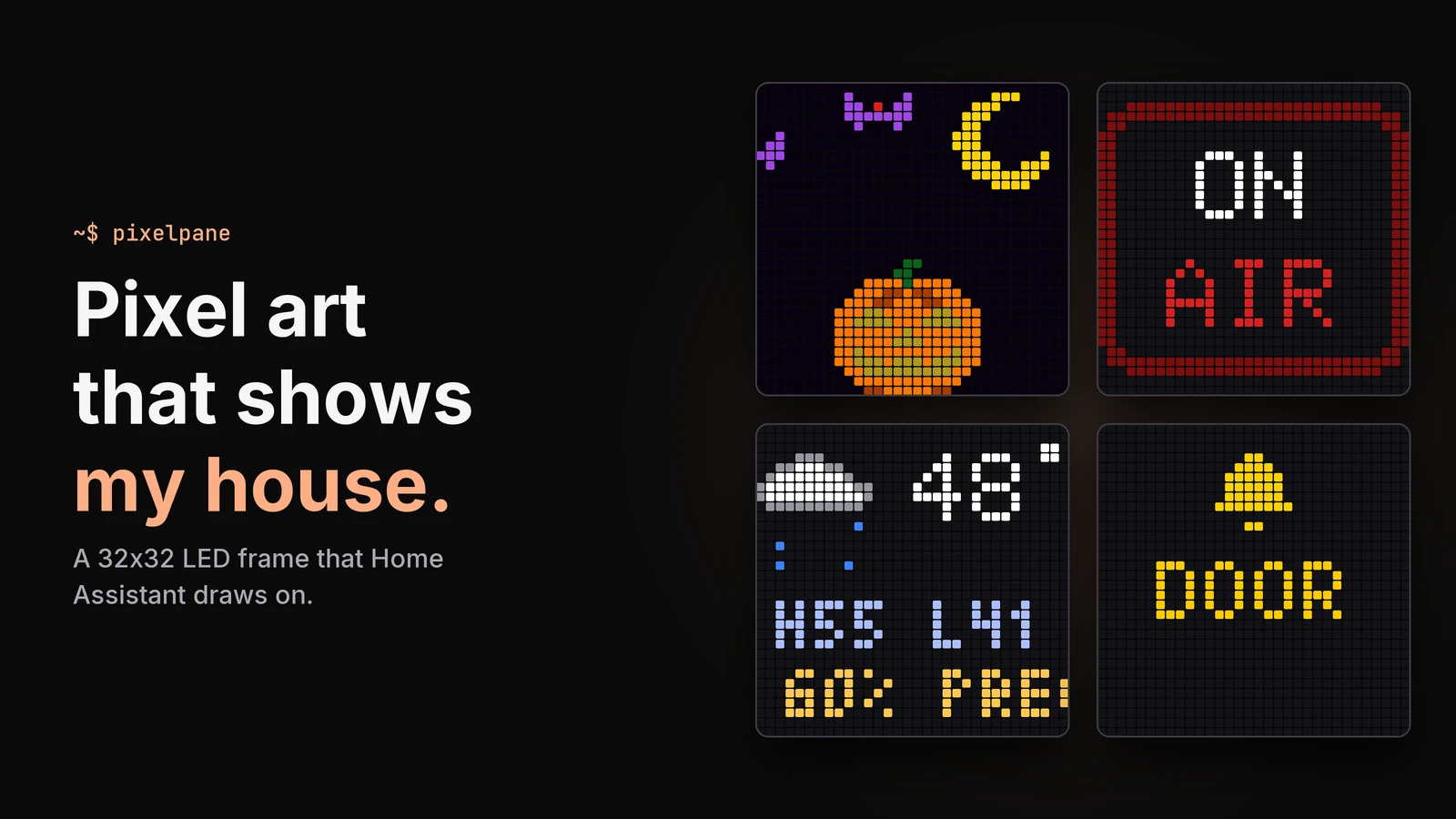
PixelPane is a 32x32 LED panel on a Raspberry Pi 3B, behind a two-way mirror in a shadow box next to my desk. Most of the time it plays pixel art that changes with the seasons. Home Assistant pushes to it, so it also shows ON AIR when my camera turns on, flashes for the doorbell, packages and laundry, and draws the weather, what is playing and my next meeting as little animated scenes. I built it instead of buying one because I wanted something I could customize and wire into my self-hosted setup. Every scene is a plugin, one Python file each, and the whole thing is open source on GitHub.
There’s a black shadow box on the shelf next to my desk. Right now it’s showing a pixel art pumpkin under a crescent moon, because it’s October. When my camera turns on for a meeting it switches to a red ON AIR sign. When someone rings the doorbell it flashes yellow. Then it goes back to the pumpkin.
It’s called PixelPane: a 32x32 RGB LED panel and a Raspberry Pi behind a two-way mirror. It’s an art project first, born from the 8-bit and 16-bit games I’ve been playing on emulators. It’s also the only home dashboard I actually look at, because it shows my house’s status as pixel art instead of a wall of numbers. I built it instead of buying one so I could customize every scene and wire it into my self-hosted setup. The software is open source on GitHub and plugin-based, and you can see more of it on the project page.
Why 32x32
As an adult I’ve fallen hard for retro gaming. The thing I love about 8-bit and 16-bit art is how much it does with almost nothing. A 32x32 grid is 1,024 pixels. That’s enough for a pumpkin with a face, a snowman, a Christmas tree with blinking lights, or a little rain cloud, but not for anything that looks like a phone screen.
Play now on the control page. The preview shows the panel’s real frames.
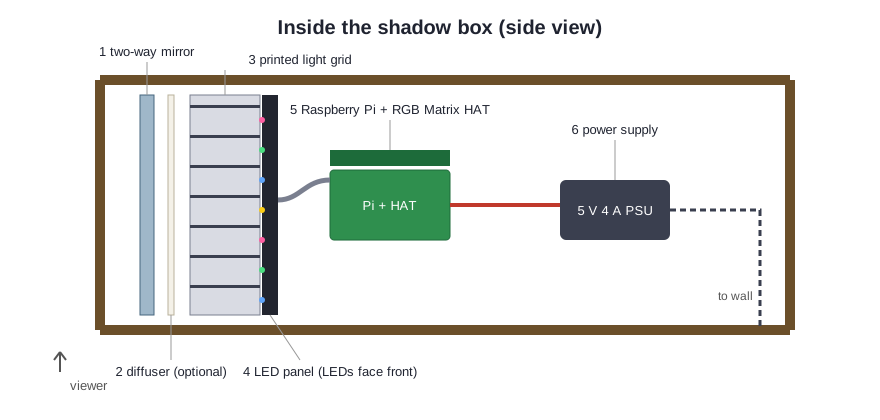
The frame is what makes it look like art. From the front it’s a dark mirror. Behind the mirror is a 3D-printed grid with one square cell per LED, then the panel, then the Pi with an Adafruit RGB Matrix HAT on its back. The grid turns each LED into a crisp square pixel instead of a fuzzy dot, and the mirror hides everything until it lights up. The full parts list and the printable grid are in the build guide.
The real board, behind the two-way mirror.
Why not just buy a Pixoo
I’ve owned a Divoom Pixoo 64, and it was fine. It’s thinner than my shadow box and has four times the pixels. But the integrations are limited, you can only customize it as far as Divoom’s app lets you, and it’s write-heavy enough that it killed at least two SD cards in two or three years. I wouldn’t fully recommend it.
Over the last couple of years I’ve gone all in on my homelab and self-hosting, and I wanted the thing on my shelf to be part of that: something I could change whenever I wanted and wire into anything in the house. Off-the-shelf frames don’t work that way. An Ulanzi TC001 running AWTRIX has great Home Assistant support for about $45 (as of October 2026), but it’s a 32x8 ticker, not a canvas. Tidbyt was the closest thing to what I wanted, and it paused manufacturing when the company joined Modal.
Building your own isn’t cheaper. The parts come to about $180 as of October 2026 (a Pi 3B, an Adafruit RGB Matrix HAT, a 32x32 panel, a 5 V 4 A supply, an SD card, a shadow box and some two-way mirror acrylic), which is more than a Pixoo. You’re paying for owning every pixel and every integration (and because it’s a fun project).
Rebuilding the 2020 board
The board itself goes back to 2020, a spin-off of a Digital Graffiti Wall I built for conference talks. For years it was an offline Pi looping GIFs off its SD card, and changing anything meant SSHing in. In 2026 I rebuilt it so it could keep up with the rest of my house. The Pi was old enough that I couldn’t remember its username or password, so the rebuild started with wiping it and setting it up from scratch. Here’s what changed:
- Home Assistant pushes to the board, and the board never reads from Home Assistant. That way it doesn’t need a Home Assistant token, and it can live on my IoT VLAN, where it can reach the internet and Home Assistant and nothing else.
- I rewrote the player in Python so it could draw live, animated scenes from data alongside the GIFs.
- It has a built-in control page, so I can change the playlist, upload GIFs or put up ON AIR from my phone instead of SSHing in.
- Every scene is a plugin. A new one is one Python file, so I can try an idea in an evening.
- One installer sets up the whole Pi, and if the board is unplugged, nothing in my Home Assistant routines breaks.
It isn’t done. The Pi 3B still runs hot, and I’m still working on that. Older Pis are slower and have some odd hardware quirks I still need to sort out.
Reordering the playlist, then switching two plugins off and on.
Seasonal decorations
I’m a seasonal person. I want my room to look like October in October and like December in December, and I’m lazy about putting decorations up and taking them down. So the board does it for me.

The seasonal plugin runs off the calendar. Autumn runs September through November, Halloween is all of October, and there are scenes for winter, spring, summer, Thanksgiving, Christmas, New Year, Valentine’s Day, St. Patrick’s Day and the Fourth of July. Each theme has a hand-animated scene plus its own GIF folder, so in October the playlist mixes falling leaves, the pumpkin and spooky GIFs into the usual rotation. On my birthday it puts up a cake. On the Settings page I can switch any holiday off or add my own with a date range.
The holiday settings, then Play now on Christmas, winter and my birthday.
There’s also a sky plugin that draws tonight’s moon with its real phase and names the full moons (Harvest, Hunter’s, Wolf and so on), including supermoons and blue moons. It’s calculated on the board with no network call.
The rest of the rotation is about 350 GIFs I’ve collected since 2020, sorted into categories like retro, space, nature and animals. Most are from pixel artists on OpenGameArt, itch.io and Kenney. I stick to native pixel art, because a downscaled video turns to mush at 32x32.
The GIF library, filtered by category or searched by name.
Notifications and ON AIR
A notification jumps the queue, shows for a few seconds, and the art comes back. I keep the list short on purpose, so a flash on the board still means something.
The same notify and ON AIR calls Home Assistant makes, from the control page.
These are the only things that interrupt it:
- ON AIR when my work MacBook’s camera turns on. It hangs off the same Meeting Mode from my Mac camera that turns on my office lights and pauses the speaker, and it stays pinned until the camera turns off. I’ve had that automation for a couple of years, and it has never fired wrong.
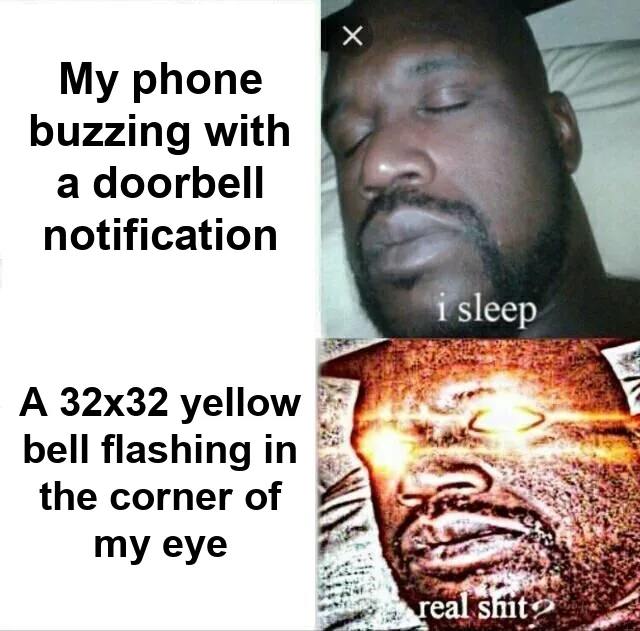
- Doorbell and package at the door. I’m usually wearing headphones at my desk, and a flashing yellow bell in the corner of my eye works better than a phone buzz.
- Laundry done, washer and dryer.
- Front door opened.
- National Weather Service warnings and St. Paul snow emergencies, because a car left on the wrong side of the street gets towed.
- A critical homelab alert, from the same alert pipeline that pings my phone.
Weather, music, meetings and the homelab
Between the GIFs, the playlist has live scenes: a clock, the weather, what’s playing in my office, a countdown to my next meeting, and a six-page homelab dashboard that cycles through host CPU, NAS space, network and the UPS. Each one is animated: the weather cloud rains, the calendar icon rings when a meeting is close, and the homelab gauges fill up. Home Assistant pushes the data for all of them every 10 minutes, and right away whenever something changes.
Each scene draws whatever Home Assistant last pushed to it.
A scene with nothing to show skips itself. If no music is playing, there’s no now-playing scene. If my next meeting is more than 12 hours away, the countdown skips too. So when nothing’s going on in the house, it’s mostly showing art.
What’s next
Next on my list is a draw mode, a 32x32 canvas on the control page that paints the panel live. I’d also like a Pomodoro scene, and a Siri sentence to show a message on the board.
If you build one, the repo has the parts list, the printable grid, the installer and the Home Assistant setup. Write a plugin and send me a PR.

Joe Karlsson
Developer Marketing Engineer at CData, leading developer growth for the managed MCP platform that connects AI agents to live enterprise data. Writing about databases, self-hosting, and the things I build. Runs a 60+ container Proxmox homelab with AI-powered automations.
cat newsletter.md
Works on My Machine is my newsletter: thoughts and reactions on tech writing, AI, homelab builds and open source, plus whatever I'm working on. It goes out when I have something to say.
Free, no spam, unsubscribe anytime. Read past issues.
Related Posts

Apr 13, 2026
I Built a Fully Local Voice Assistant for Home Assistant (With GPU, No Cloud Required)
How I built a GPU-accelerated local voice pipeline for Home Assistant using faster-whisper, Piper TTS, and Ollama - zero cloud required, and the failures that got me here.
Sep 29, 2026
The Best Home Assistant Automations of 2026 (10 Years In)
The best Home Assistant automations after 10 years and 134 running: start with the basics, layer on context, go advanced, and keep them working.
Mar 22, 2026
How to get started with Home Assistant in 2026
Are you looking to turn your home into a smart home? With the help of Home Assistant, you can easily automate tasks and make your home more efficient.