PixelPane
Works A 32x32 LED pixel art frame on my shelf, driven by a Raspberry Pi.
On this page
Artist statement
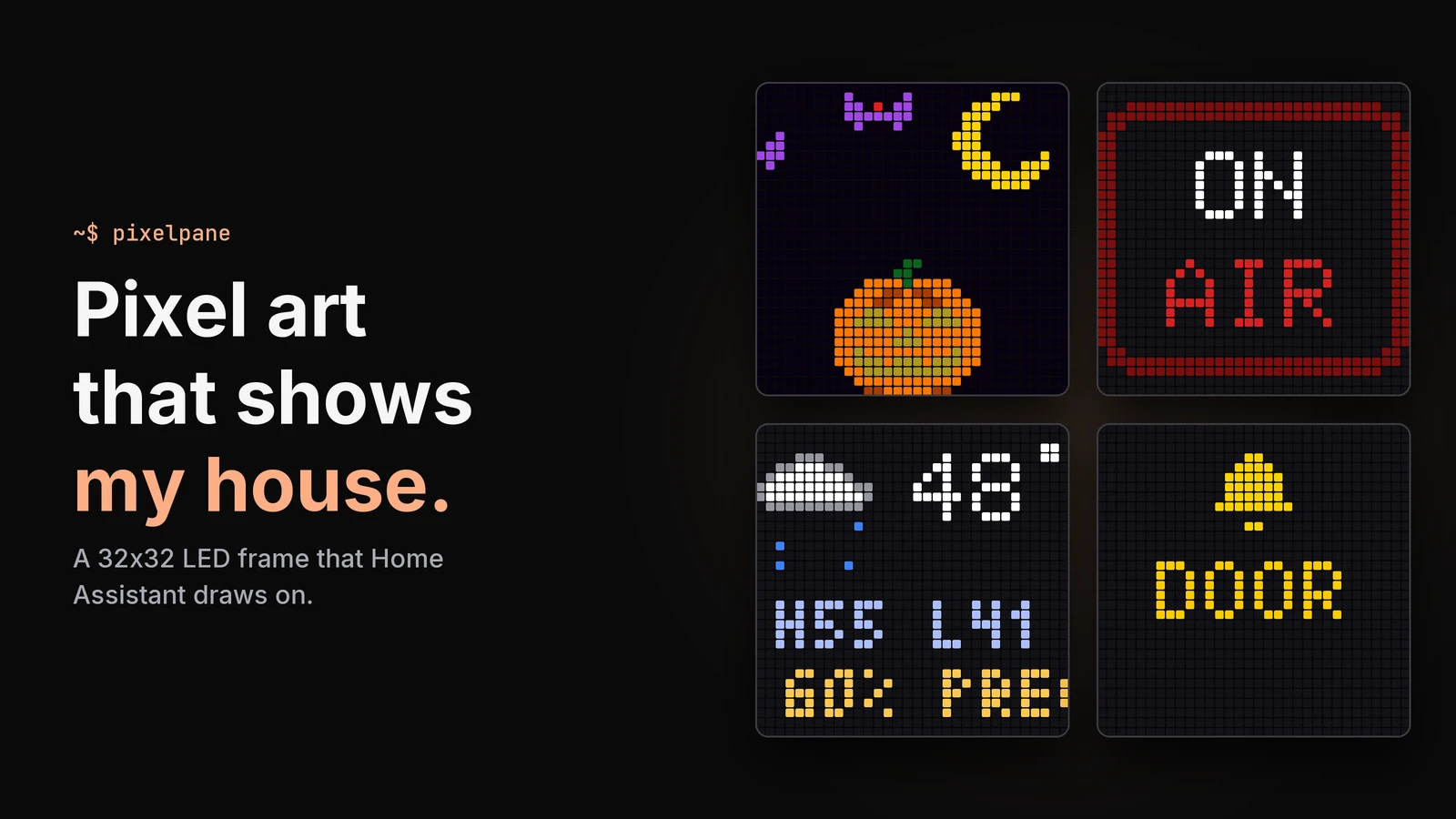 I built a 32x32 pixel art frame that shows what my house is doingThe build post: parts, the scene plugins, and how Home Assistant talks to it.
PixelPane is a dark mirror on the shelf next to my desk until its lights come on, and most of the time it just shows pixel art: a pumpkin in October, a snowman in December, tonight’s moon in its real phase. It’s an art project first1, born from the 8-bit and 16-bit games I’ve been playing on emulators.
 A tour of my recording setup in 2026, all on one standing desk that rollsThe camera is the one on my rolling recording desk.
What I love about that art is how much it does with almost nothing. There’s enough room for a pumpkin with a face or a rain cloud, and not enough to look like a phone. Only a few things get to interrupt it, like ON AIR when my camera turns on2 or a yellow flash for the doorbell, and I keep that list short on purpose so a flash still means something. Then the art comes back.
I pick everything that goes on it, and I only keep art someone drew at this size, because a video shrunk down to 32x32 turns to mush. Most of it comes from pixel artists who give their work away on OpenGameArt, itch.io and Kenney.
Tour
Clips
Recorded from the control page.
How it’s made
Python, Raspberry Pi, LED matrix, Home Assistant, 3D Printing
A 32x32 LED panel sits behind3 a 3D-printed grid and a two-way mirror4 in a shadow box, so every LED reads as a square pixel. A Raspberry Pi plays a Python playlist of GIFs and animated scenes, and every scene is a plugin, one Python file.
Home Assistant pushes alerts and data to the board, and the board never reads back, so it needs no Home Assistant token. The repo has the parts list, the printable grid and the installer.
Lineage
Works on My Machine
If you liked this project, you might like what I write: homelab builds, AI tools and open source, by email when I have something to say.
It’s free, and you can unsubscribe anytime. You’ll get an email to confirm first.
If you liked this project, consider sharing it on Hacker News, Bluesky, LinkedIn, or X.
Joe
Karlsson
I write about my homelab, AI tools, databases, and the weird stuff I build on the side.
More about me →