TL;DR
As of September 2026 (Home Assistant 2026.9), after 10 years and 128 running automations, these are the best Home Assistant automations worth building. Basic: motion lighting with a manual override, arriving and leaving, and leak, smoke, and CO2 alerts. Intermediate: one combined laundry notification, Meeting Mode from my Mac camera, modes that turn themselves off, and a nightlight that doubles as a status light. Advanced: local AI package detection and a night mode that shuts down part of my homelab. The biggest lesson from 10 years: automations break as devices change, so I run health checks to catch problems ahead of time and use continue_on_error so one broken step doesn't take down a whole automation.
I’ve been running Home Assistant since 2016. Today I have 128 automations, and the best Home Assistant automations I’ve built share a single trait: someone who has never been in my house can live with them. No app, no instructions, no “oh, don’t touch that switch.”
These are the automation ideas I actually run, basic to advanced, with the details that took me years to get right. And the biggest thing 10 years taught me isn’t an automation at all. Automations break, constantly and quietly, and keeping them working is its own job.
Quick context on the setup: Home Assistant 2026.9 runs as a VM on my Proxmox cluster, with 29 Zigbee devices on Zigbee2MQTT, Frigate and local LLMs on GPUs, and Ollama for the AI side. If you’re brand new, start with my Home Assistant getting-started guide and come back. And if you want the actual hardware, every device is listed in the smart home section of my uses page.
The guest test
I live alone. I’ve lived with partners in this house before, and I have guests over all the time. So every automation in this house gets held to one standard. I call it the guest test:
Could someone who has never been here, and doesn’t have my app, live in this house without noticing the automations or having to work around them?
That means a physical switch for everything. It means lights that turn on when you walk in and don’t turn off while you’re still sitting there. It means nobody has to learn a voice command to use the bathroom at night. If an automation fails the guest test, it’s not done.
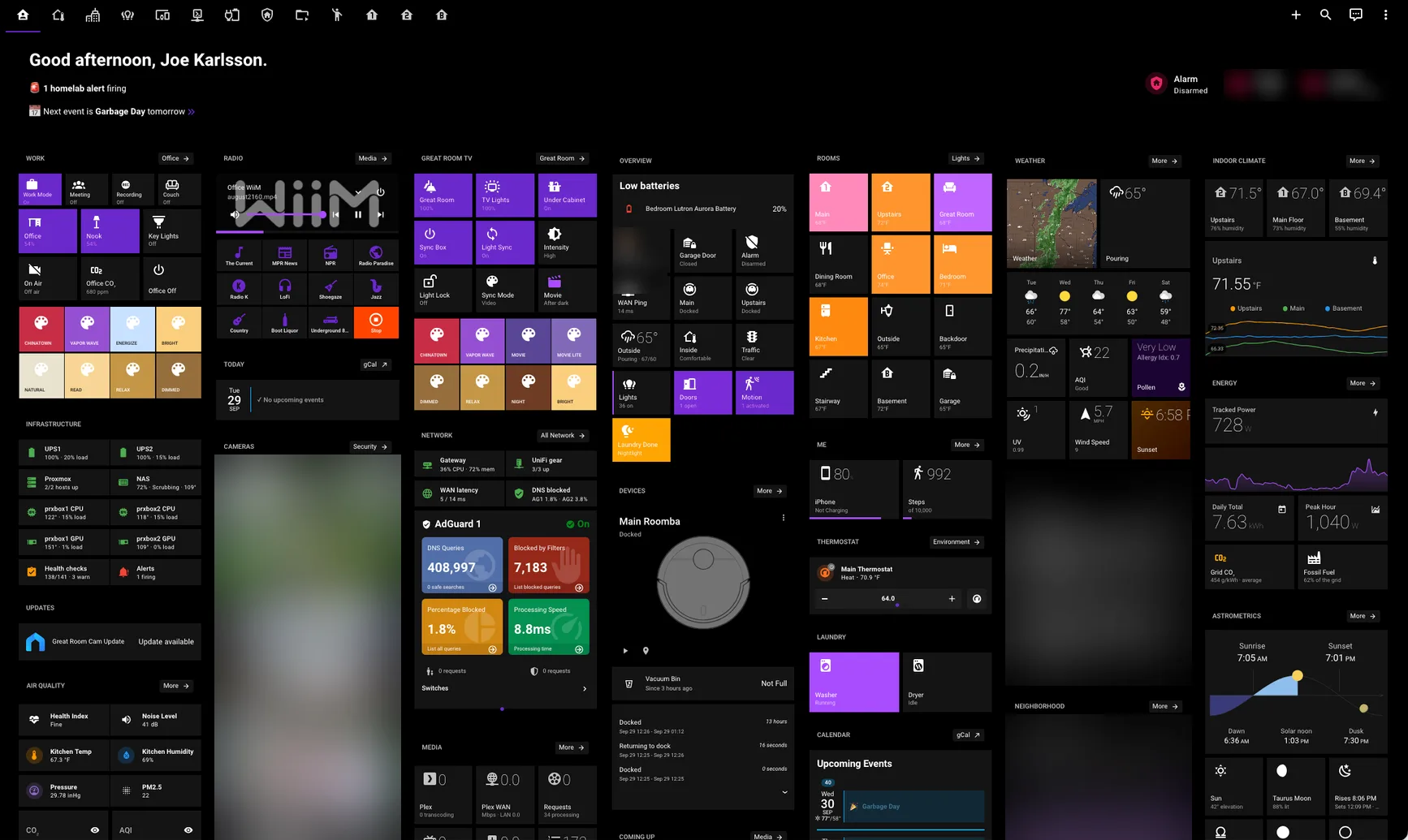
My main dashboard (cameras and a few personal panels blurred). Look for the Laundry Done nightlight tile and the Washer: Running status; both come up later.
The whole list, at a glance:
| Automation | Difficulty | Hardware |
|---|---|---|
| Motion lighting | Basic | Motion sensors or Hue MotionAware |
| Closet lights on a door sensor | Basic | Door contact sensor, smart bulb |
| Arriving and leaving | Basic | Phone, smart garage opener |
| Water leak, smoke, and CO2 alerts | Basic | Aqara leak, Heiman smoke, Aranet4 |
| Trash day reminder | Basic | Phone, speaker (optional) |
| Physical buttons and dimmers | Intermediate | Hue dimmers, Zigbee buttons |
| Laundry notifications | Intermediate | Door contact, vibration sensor |
| Movie lighting that follows Plex | Intermediate | Media player, lights with scenes |
| Meeting Mode from your Mac camera | Intermediate | Companion app on the Mac |
| Party and guest modes | Intermediate | None (helpers only) |
| Vacation mode and daily report | Intermediate | Alarmo, Presence Simulation |
| Nightlight status light | Intermediate | Color Zigbee nightlight |
| Pause music when someone’s at door | Intermediate | Frigate or a doorbell, speakers |
| 3D printer alerts and auto power-off | Intermediate | OctoPrint, smart plug |
| Local AI package and person detection | Advanced | Frigate, Ollama, AI Task |
| Night mode for a homelab | Advanced | Proxmox, SSH from Home Assistant |
Basic Home Assistant automations
The best Home Assistant automations for beginners are motion lighting, arriving and leaving, and safety alerts. They’re boring. They’re also the only ones everyone in the house uses every single day.
Motion lighting
I have motion lighting in 10 rooms. My first attempts had a habit of turning the lights off on people who were sitting still, so everyone learned to wave their arms like they were landing a plane. What fixed it:
- A manual override in every room. Hit a physical switch or dimmer, and a timer starts; motion stops touching that room until it expires. A human always wins. If I started over, this is the first thing I’d build.
- Dim instead of dark. After 30 minutes of stillness, the kitchen drops to a 5% nightlight instead of going dark. Move, and the lights come back.
- Time of day. After 10 PM the kitchen comes on at 30% and a warm 2200K instead of full daylight at 2 AM.
- Pause for the TV. The Great Room uses Frigate person detection, with Hue MotionAware as a fallback, and it stops entirely while the TV is on. Nothing kills a movie like the lights snapping on because you reached for popcorn.
One gotcha took me way too long to find. If a for: minutes: 30 timer is counting down and Home Assistant restarts, the timer is gone and the lights stay on until someone notices. My fix is a template trigger that asks “are the lights on, is nobody moving, and has nothing changed in 30 minutes?” That question has the same answer before and after a restart.
Show the YAML
- alias: On and no motion for 30 min (re-arms after restart)
  trigger: template
  value_template: >
    {% set lights = ['light.kitchen'] %}
    {% set sensors = ['binary_sensor.kitchen_motion_sensor_motion',
                      'binary_sensor.kitchen_motionaware_area'] %}
    {% set ns = namespace(last=0) %}
    {% for e in lights + sensors %}{% if states[e] is not none %}
      {% set ns.last = [ns.last, as_timestamp(states[e].last_changed)] | max %}
    {% endif %}{% endfor %}
    {{ lights | select('is_state', 'on') | list | count > 0
       and sensors | select('is_state', 'on') | list | count == 0
       and as_timestamp(now()) - ns.last > 1800 }}
- trigger: event
  event_type: automation_reloaded
If you’re starting today, Home Assistant 2026.7 made purpose-specific triggers the default in the visual editor, so “Motion detected in the kitchen” is a real trigger now, and it handles unavailable sensors for you. Use them for new automations. And my take on YAML vs the visual editor: draft in the editor, then keep the YAML in git so you can see what changed.
Build it yourself
- You need: any motion sensor, or Hue lights that support MotionAware
- Difficulty: Basic
- The one thing to get right: build the manual override before the motion trigger
Closet lights on a door sensor
This is the easiest automation in my house. A contact sensor on the bedroom and office closet doors turns the closet light on at 100% when the door opens and off when it closes. If the door gets left open, the light turns itself off after 10 minutes anyway.
It’s the purest version of the guest test. Nobody has to know it’s there. You open a door, and the light is on.
Build it yourself
- You need: a Zigbee door contact sensor and a smart bulb in the closet
- Difficulty: Basic
- The one thing to get right: add a timeout, because someone will leave the door open
Arriving and leaving
When the house goes from nobody home to someone home, an im_home script runs. When it goes back to nobody, im_leaving runs: the alarm arms (unless guest mode is on), and the Roombas start, because the best time to vacuum is when nobody is there to trip over them.
The garage door is the one to be careful with. An automation that opens a door to your house needs to be paranoid, so mine won’t open just because my phone entered the home zone. It also needs evidence that I’m in a car: either I crossed a 1.5-mile “approaching” zone in the last 10 minutes, or my iPhone reports its activity as Automotive. Walking past the house doesn’t open the garage. Pulling into the driveway does. And a midnight routine closes the garage no matter what.
Build it yourself
- You need: the Home Assistant companion app on your phone, plus a smart garage opener if you want the garage part (mine is a Meross)
- Difficulty: Basic
- The one thing to get right: never open a door on zone entry alone. Require a second signal.
Water leak, smoke, and CO2 alerts
If you own a leak sensor and it isn’t wired to an automation, you own an expensive coaster. Every safety sensor I have does one thing, loudly:
- Water: 4 Aqara leak sensors send a critical push that breaks through Do Not Disturb, plus a spoken announcement on the speakers.
- Smoke: the kitchen smoke detector does the same.
- Heat: if the thermostat turns off between November and March, or when it’s under 50°F outside, Home Assistant forces the heat back on at 62°F. Minnesota pipes don’t care that someone bumped the thermostat.
- CO2: above 1000 ppm, the office pushes me after 5 minutes and announces after 10. I keep an Aranet4 on my desk because I start getting foggy before I notice why.
One catch: these alerts fire when a sensor changes state, and a dead sensor never changes state. My kitchen smoke detector read “off” for 45.7 hours in September 2026 because it had stopped reporting entirely. More on catching that in the section on keeping automations working.
Build it yourself
- You need: any leak, smoke, or CO2 sensor Home Assistant can see
- Difficulty: Basic
- The one thing to get right: use a critical notification that breaks through Do Not Disturb, and announce it out loud for anyone in the house without the app
Trash day reminder
Every Tuesday at 6 PM, my phone tells me the bins go out tonight, with “Done” and “Remind in 1hr” buttons right on the notification. If I’m home, the kitchen speaker says it out loud too, at a volume that doesn’t make me jump. It’s also the “Garbage Day tomorrow” line at the top of my dashboard.
It’s a calendar reminder with better manners, and it’s hard to ignore.
Build it yourself
- You need: the companion app on your phone, and a speaker if you want it announced
- Difficulty: Basic
- The one thing to get right: put Done and Remind me later buttons on the notification so it gets out of your way
Intermediate Home Assistant automations
These take more setup, usually a helper or two and some templating, and they’re where Home Assistant stops being a fancy light switch.
Physical buttons and dimmer switches
The guest test says there’s a physical switch for everything, so buttons are an automation category in my house, not an afterthought.
Most of my lights are Philips Hue, and here’s the thing I’d tell anyone with Hue bulbs: let the Hue bridge handle the basic switch-to-bulb stuff. Pairing a Hue dimmer straight to the Hue bridge is faster, with fewer round trips than sending every button press through Home Assistant and a Zigbee coordinator. When someone hits a switch, the light should respond instantly, every time, even if Home Assistant is restarting.
Then I layer custom actions on top in Home Assistant. One automation handles every Hue and Lutron Aurora dimmer in the house, so special behavior like long presses lives in one place. In the bedroom, a Zigbee button does different things depending on the time of day:
- Single press: good night in the evening, good morning in the morning.
- Double press: a red light before noon, nap mode in the afternoon, good night in the evening.
- Long press: turn off the whole bedroom.
One button, six jobs, and a guest who presses it once still gets something sensible.
Build it yourself
- You need: Hue dimmer switches or any Zigbee button
- Difficulty: Intermediate
- The one thing to get right: keep the basic on and off on the Hue bridge for speed, and use Home Assistant only for the extras
Laundry notifications
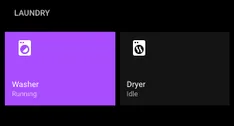
Most laundry automations watch a smart plug’s power draw and notify when it drops. Mine skips the plugs entirely:
- Washer: a door contact sensor. The door closes, the cycle starts, and 70 minutes later it’s done.
- Dryer: a vibration sensor. 5 minutes of continuous shaking means it started; 9 minutes of stillness means it’s finished.
No power thresholds, and no false finishes when the washer pauses mid-cycle.
The detail I’m proudest of: if both finish within 15 minutes of each other, I get one notification instead of two. There’s a 15-minute cooldown between announcements, a “Snooze 15 min” button on the push, and a progress bar on my phone’s lock screen while each cycle runs. If a cycle finished while I was out, I get a reminder when I walk in the door.
How it works: each machine saves its finish time in an input_datetime helper. Once the timestamps live somewhere, “did the other one just finish?” is a one-line template.
Show the YAML
triggers:
  - trigger: state
    entity_id: binary_sensor.basement_washing_machine_contact
    to: 'off'
    for: { minutes: 70 }
    id: washer_done
  - trigger: state
    entity_id: binary_sensor.basement_dryer_vibration_sensor_vibration
    from: 'on'
    to: 'off'
    for: { minutes: 9 }
    id: dryer_done
actions:
  # ...washer_done branch:
  - variables:
      dryer_recent: >
        {% set ts = state_attr('input_datetime.dryer_cycle_complete', 'timestamp') | float(0) %}
        {{ ts > 0 and (as_timestamp(now()) - ts) < 900 }}
      cooldown_passed: >
        {% set ts = state_attr('input_datetime.laundry_last_announced', 'timestamp') | float(0) %}
        {{ ts == 0 or (as_timestamp(now()) - ts) / 60 >= 15 }}
Build it yourself
- You need: a door contact sensor on the washer and a vibration sensor on the dryer
- Difficulty: Intermediate
- The one thing to get right: store each finish time in an
input_datetimehelper, then combine alerts that land within 15 minutes of each other
Movie lighting that follows Plex
When the Great Room TV turns on, the lights fade into a movie scene over 10 seconds. When I press play in Plex, they step down to almost nothing over a few seconds. Pause or stop, and a lighter movie scene fades back in so you can find your drink. Turn the TV off, and the room goes back to a normal dimmed scene.
Getting there took a lot of tuning. The fade times, the pause and stop behavior, and which scene lands when all took real trial and error. But once I locked it in, it’s been incredible.
The piece that makes it livable is a Light Lock. Flip it on and the automation stops touching the Great Room lights, for when you want the lights your way. It clears itself at 3 AM, because every mode needs an expiration date.
Build it yourself
- You need: a media player Home Assistant can see (mine is Plex on an onn 4K Pro) and lights with scenes
- Difficulty: Intermediate
- The one thing to get right: add a lock toggle that turns the automation off, and have it reset itself overnight
Meeting Mode from your Mac camera
This is my favorite automation, and it has no button. When my work MacBook’s camera turns on, Meeting Mode starts. When the camera turns off, Meeting Mode ends. A second automation turns on my Elgato Key Light when the camera goes live and turns it off 30 seconds after it stops.
The trigger is a camera_in_use binary sensor from the Home Assistant companion app on the Mac. It’s the most useful sensor I didn’t know existed. I never think about my lighting on calls anymore.
Show the YAML
triggers:
  - trigger: state
    entity_id: binary_sensor.macbook_pro_2_camera_in_use
    to: 'on'
    id: camera_on
  - trigger: state
    entity_id: binary_sensor.macbook_pro_2_camera_in_use
    to: 'off'
    id: camera_off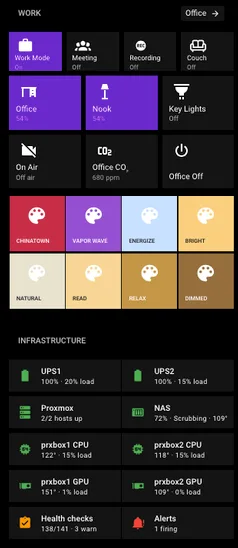
The Work panel: every mode is a tile, and Meeting turns on by itself when the Mac camera does. Below it, the health checks tile, which comes up in the maintenance section.
Build it yourself
- You need: the Home Assistant companion app on your Mac, and a light you want on during calls
- Difficulty: Intermediate
- The one thing to get right: trigger on both camera on and camera off, so the mode always ends itself
Party and guest modes that turn themselves off
Party Mode turns on guest mode and disables 7 automations that would be annoying with a crowd, like doorbell announcements, package alerts, the midnight shutdown, and night mode. The motion lights skip their auto-off too, so nobody gets plunged into darkness mid-conversation. Guest Mode disarms the alarm, puts the indoor camera in privacy mode, and stops Frigate recording.
Both expire on their own. That’s the whole trick. Party Mode turns off at 4 AM. Guest Mode turns off after 24 hours. A mode you have to remember to turn off will eventually get left on, and then your motion lights mysteriously stop working three weeks later.
Build it yourself
- You need: an
input_booleanfor each mode, nothing else - Difficulty: Intermediate
- The one thing to get right: give every mode an automatic off time
Vacation mode
When I turn on Vacation Mode, the Presence Simulation integration replays realistic light patterns so the house looks lived in, and Alarmo arms in vacation mode. If the alarm fails to arm, I get a critical push, because an alarm that silently didn’t arm is worse than no alarm.
What I use every trip is a daily report. At 9 AM every morning I’m away, one notification tells me the indoor temperature, the alarm state, any leaks, how many times the doorbell rang, packages detected, doors opened, when the pet sitter came by, and any National Weather Service alerts. One push, and I stop wondering about my house.
Build it yourself
- You need: the Presence Simulation and Alarmo integrations from HACS, plus whatever sensors you already have
- Difficulty: Intermediate
- The one thing to get right: send one daily summary instead of a notification for every event
A nightlight that doubles as a status light
There’s a small Zigbee nightlight in my Great Room. At night it glows when you walk by in the dark, and its color tells me what’s going on:
Great Room nightlight, decoded:

  RED ............ garage open more than 1 hour
                   a door left open late
                   water leak or smoke
                   my homelab is down
  ORANGE ......... washer finished
  BLUE (breathing) it just started raining
  (normal) ....... everything is fine, go to bed
It’s the best dashboard in my house because it isn’t a dashboard. A guest walking to the kitchen at midnight sees a nightlight. I see “the garage is still open” without unlocking my phone.
Build it yourself
- You need: any color Zigbee bulb or nightlight (mine is a Third Reality)
- Difficulty: Intermediate
- The one thing to get right: keep it to 3 colors, and only show them when there’s motion in the dark
Pause the music when someone’s at the door
When the doorbell sees a person at the front door between 6 AM and 10 PM, all six self-hosted music players in the house pause, so you can hear the door and talk to whoever is there. It’s a tiny automation, and nobody knows it exists until the moment it helps them.
Build it yourself
- You need: a doorbell or camera with person detection, and speakers Home Assistant can control
- Difficulty: Intermediate
- The one thing to get right: limit it to the hours someone might actually be at the door
3D printer alerts and auto power-off
My Prusa runs through OctoPrint, and Home Assistant sends a push when a print starts, finishes, or fails. When a print finishes, the printer turns itself off once the bed cools below 95°F, and the notification has a “Keep On” button in case I’m about to start another one. No more printers idling overnight because I forgot.
Build it yourself
- You need: OctoPrint and a smart plug on the printer
- Difficulty: Intermediate
- The one thing to get right: wait for the bed to cool before cutting power, and put a Keep On button on the notification
Advanced Home Assistant automations
These need more hardware or more trust in your setup: a GPU, local AI, or Home Assistant reaching into other machines and turning them off. What could go wrong. They still have to pass the guest test: a guest should never know the AI or the homelab is involved, and when either one fails, the house falls back to something sensible.
Local AI package and person detection
My honest take after months of running local AI in my automations: it’s worth it when it answers a yes-or-no question. Free-text descriptions are a novelty.
The stack: Frigate 0.18 runs object detection and face recognition on a Quadro RTX 4000. Ollama runs qwen3-vl:8b for vision on an RTX A4000. Home Assistant calls it through the AI Task integration, which sends a camera snapshot to the model and gets structured data back. I wrote up the voice side of this stack in my post on a fully local voice assistant on a GPU, which I built after replacing Alexa with Voice Preview Edition.
The two that earn their keep:
- Package detection. When a person stands at the front door for 10 to 60 seconds without ringing, the AI returns
has_package: trueorfalse. - Person or pet. When there’s motion in the Great Room while I’m away, the AI returns
is_personandis_animal. A person gets a real alert, a pet gets a quiet note, and if Frigate recognized my face in the last 60 seconds, it doesn’t bother asking.
Both change what happens next based on the answer. That’s the difference. Here’s the package flow:
person at the front door 10-60 s, no ring   (doorbell person detection)
        |
        v
AI offline for the night? --yes--> skip AI, assume there's a package
        | no
        v
snapshot -> ai_task.generate_data            (qwen3-vl:8b)
        |      ...AI errors? keep going, assume there's a package
        v
package, or nobody home?  --yes-->  push with the snapshot
        | no
        v
   stay quiet
The novelty ones: the doorbell describes who’s there (“A delivery driver in a brown uniform is holding a package”), and I can ask what’s at the front door. Both work. I’d barely notice if they disappeared.
My AI automations talk to Ollama directly, not through a cloud fallback, so camera snapshots never leave my network. The trade-off: no AI overnight, because Ollama is one of the things my house shuts off at 11 PM.
Build it yourself
- You need: a camera in Frigate, a GPU for Ollama with enough VRAM for an 8B vision model, and the AI Task integration
- Difficulty: Advanced
- The one thing to get right: ask the model for a structured yes-or-no answer, and decide what happens when it doesn’t answer at all
Night mode for a homelab
At 11 PM, Home Assistant SSHes into one of my Proxmox hosts and stops 11 containers nobody needs at night: Ollama, Paperless, Kometa, Lyrion, SearXNG, and a handful of media tools. At 6 AM it brings them back. The notification says “Saving ~175W,” and the script estimates about $60 a year (an estimate, not something I’ve metered).
Party Mode pushes night mode back to 4 AM, and there’s a manual “override until” time for nights I’m working late. I wrote about the original night mode system in my homelab post.
Build it yourself
- You need: a
shell_commandin Home Assistant with SSH access to your hypervisor - Difficulty: Advanced
- The one thing to get right: only stop things nobody needs at night, and give yourself an override
Keeping 128 Home Assistant automations working
Automations break. That’s the one lesson 10 years of Home Assistant beat into me. Devices go offline. You replace a phone and every notification target changes. An integration update renames an entity. You delete a script and forget a dashboard button still calls it. Home Assistant keeps running, and the automation just quietly stops doing its job.
A few from September 2026 alone:
- 60 automations were sending notifications to my old iPhone after I replaced it.
- My smoke detector read “off” for 45.7 hours because it had stopped reporting.
- An automation that translates server alerts into plain English had received nothing for eight months. Eight. I never noticed.
Two fixes: catch problems ahead of time, and make sure one broken step can’t take down a whole automation.
Find broken Home Assistant automations with health checks
Every 6 hours, a health check script pulls all my automations, scripts, and dashboards off the Home Assistant server and checks every entity, device, service, and notify target they reference. Anything that points at something that no longer exists shows up in a report and on my dashboard (that “Health checks 138/141” tile above). A separate check flags safety sensors that haven’t reported in too long, which is how the smoke detector got caught. It’s the same approach I use across the rest of my homelab, where 86 health check scripts watch every container.
The first time I ran it, it found 12 dead references nothing else had flagged. Home Assistant’s Repairs page didn’t flag any of these for me. It doesn’t look inside templates, dashboards, or notify targets, which is where most of the breakage hides. If you don’t want to write your own script, the Watchman integration does a lighter version of the same job (it scans your config files for missing entities and actions), and it’s a great place to start once you’re past about 30 automations.
Use continue_on_error so one failure doesn’t stop everything
By default, when one action in a Home Assistant automation fails, the whole automation stops right there. Every step after it never runs. So if a bedtime routine turns off the lights and then tries to pause a speaker that happens to be offline, that one offline speaker stops everything that was supposed to come after it.
I’d much rather one step fail quietly than have my whole bedtime routine die at 1 AM. So any step that talks to something outside Home Assistant, like a device, a server, or an AI model, gets continue_on_error: true. My automations file has 148 of them.
- action: ai_task.generate_data
  # ...snapshot attached, asks for has_package true/false...
  continue_on_error: true
The health checks are what make that safe. continue_on_error keeps the routine running tonight, and the next health check report tells me what’s broken so I can fix it tomorrow. On its own, continue_on_error just hides failures. The health checks are how I hear about them.
Using Claude to write Home Assistant automations
I use Claude a lot for Home Assistant, mostly the way I’d use a friend who’s good at YAML. I describe out loud how I want something to work (“when the dryer stops shaking for 9 minutes, it’s done, and if the washer finished in the last 15 minutes, send one notification”), and Claude Code drafts it against my real entity names, using the Home Assistant rules in my Claude Code skills repo.
Then I read every line before it ships. My rule: if I can’t explain what an automation does when it misfires at 2 AM, it doesn’t go in. Claude is great at getting something off the ground and at tedious work like repointing 60 notification targets. It doesn’t know my house, though. What my house should do is still my call.
While I was writing this post, Claude also audited my setup and found three real problems: the missing webhook behind the alert translator’s eight months of silence, AI steps that would crash instead of carrying on when the model was offline, and a watchdog that only alerted inside Home Assistant. All three are fixed.
Where I’d start with Home Assistant automations
- Motion lighting with a manual override. A human should always win.
- One loud alert per safety sensor, plus a check that the sensor is still reporting.
- Modes that turn themselves off.
- Local AI only for yes-or-no answers.
- Health checks and
continue_on_erroronce you pass about 30 automations.
Ten years in, and I’m not done
My 10 years with Home Assistant haven’t been a straight line. They’ve been stops and starts. I’d go months without touching anything, then see someone’s setup on Reddit and get inspired all over again. Or a new device or integration would show up and unlock an idea I’d been sitting on for years.
Lately, the goal has changed. I still want to automate as much as I possibly can, but what I care about most now is reliability: a house that’s as simple as possible for guests, with as few errors as possible. So I use things out of the box whenever I can, and I’m a lot less likely to reach for third-party custom components or custom code than I used to be. Every custom piece is one more thing that can break on an update. The few in this post, like Alarmo, Presence Simulation, and my health check script, stayed because nothing built in does their job, and the health checks are there to tell me when one of them breaks.
I’m also trying to make the house more sustainable, and part of that is avoiding batteries wherever I can. Keeping batteries fresh across a house full of sensors sucks, and the battery-powered devices are usually the finicky ones. Most of the sensors in this post still run on batteries, which is exactly why my health checks watch for the ones that go quiet. I’m staying on Zigbee, and I’m not planning to migrate to Matter anytime soon.
And honestly? I’ve been extremely happy with Home Assistant. It’s an incredible project, and I’m planning to use it for another 10 years. I can’t wait to see what this list looks like then.

Joe Karlsson
Developer Marketing Engineer at CData, leading developer growth for the managed MCP platform that connects AI agents to live enterprise data. Writing about databases, self-hosting, and the things I build. Runs a 60+ container Proxmox homelab with AI-powered automations.
cat newsletter.md
I write a weekly newsletter about databases, self-hosting, and whatever I'm building.
Subscribe on Substack →Related Posts
Apr 12, 2026
I Built a Fully Local Voice Assistant for Home Assistant (With GPU, No Cloud Required)
How I built a GPU-accelerated local voice pipeline for Home Assistant using faster-whisper, Piper TTS, and Ollama - zero cloud required, and the failures that got me here.
Mar 21, 2026
How to get started with Home Assistant in 2026
Are you looking to turn your home into a smart home? With the help of Home Assistant, you can easily automate tasks and make your home more efficient.
Mar 21, 2026
Self-Hosted Music Still Sucks in 2026
The *arr ecosystem perfected video automation but music remains stuck with album-centric workflows. Current tools like Lidarr force complete album downloads when users want individual tracks.