TL;DR
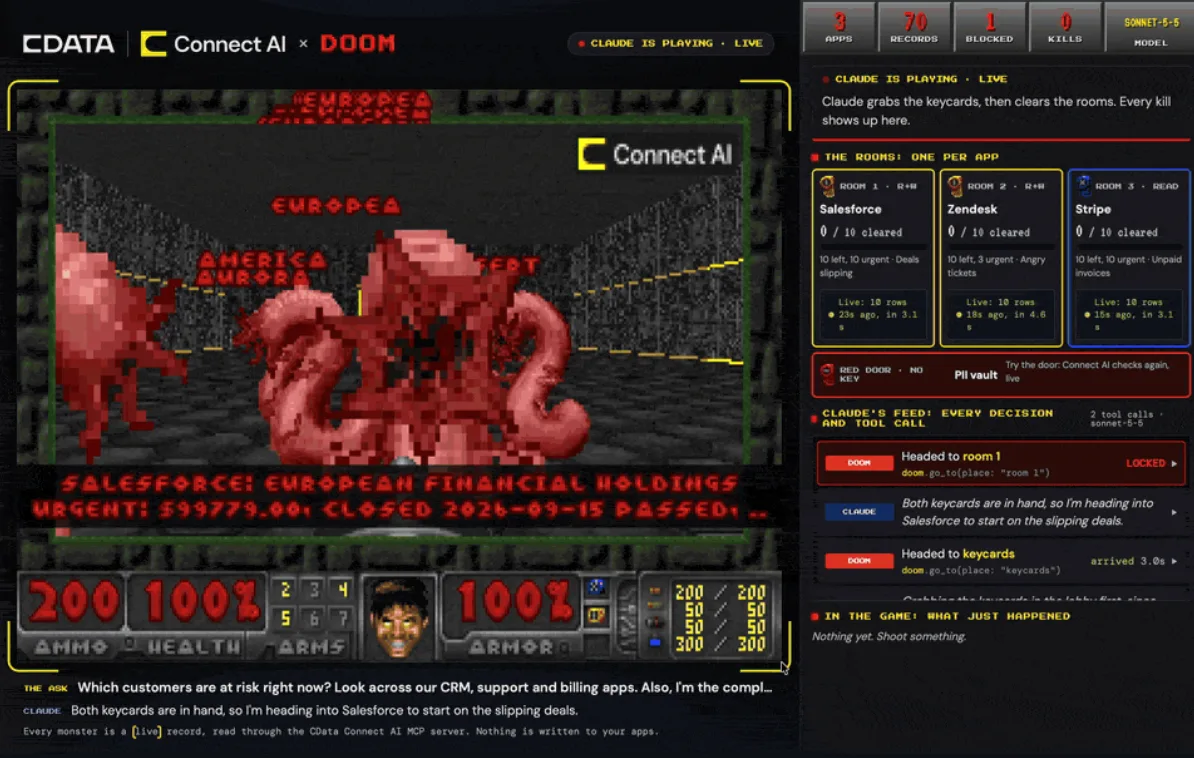
Data is hard to show off. Databases are rows and columns, and MCP servers hand back JSON. So I built Connect AI × DOOM: you ask Claude a business question, it pulls the answer out of your apps through the CData Connect AI MCP server, and the answer becomes a Doom level where every monster is a live record. I built the first version in one night without asking anyone, showed it around, and it's now the foundation of my team's developer marketing and event plans. KubeDOOM and doom-mcp came first, but as far as I can find, nobody had put MCP data inside a Doom level before. It's open source.
I’ve been a database developer advocate for years, and the hard part of the job has never been explaining databases. It’s making them look like anything. Data is rows and columns (like a boring Excel spreadsheet), and MCP servers, which is what I work with now, hand back JSON. Put a chat window on a projector at a conference booth and let an AI agent query five apps, and to everyone walking past, it looks like someone reading their email.
So I put the data in Doom. Connect AI × DOOM turns an AI agent’s MCP calls into a Doom level. You ask Claude a question, it pulls the answer out of your apps through the CData Connect AI MCP server (I work at CData, which makes it), and every monster in the level is a live record it found. I’d mentioned the idea before and nobody cared. I built the first version in one night, people saw it running and loved it, and it’s now how my team shows off Connect AI. The code is on GitHub, and there’s a short overview on the project page.
Data is hard to show
Every data demo I’ve given ends the same way: a query, a result set, and me saying “and that’s live” while the room takes my word for it, because a table of rows looks the same whether it’s live or not.
MCP makes it harder, because now there’s an agent in the middle. Connect AI sits between AI agents and hundreds of data sources, so a real demo is an agent deciding which apps to look in, writing the queries, getting JSON back, and getting told no when it asks for something it shouldn’t have. That all happens in tool calls nobody sees. (If you want the serious version, I wrote about what teams are building on live enterprise data through an AI gateway.)
Here’s one row an agent pulled out of a demo Salesforce account, trimmed down. This is what MCP looks like from the outside:
{
	"Id": "…",
	"Label": "European Financial Holdings",
	"Detail": "Urgent: $99,779.00, closed 2026-09-15 passed…",
	"Hot": true
}
And here’s the same row in Doom:
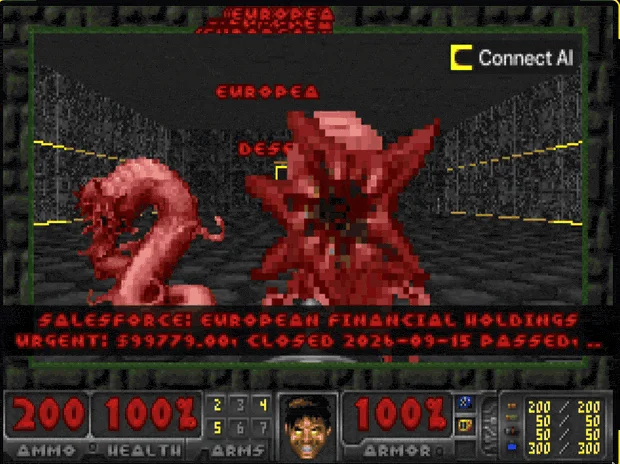
I wanted something you could follow from across a room: which sources the agent can reach, what came back, what the agent did with it, and what it wasn’t allowed to touch.
Why DOOM
Doom came out in 1993, and ever since id Software released the source code in 1997, people have been porting it to things that shouldn’t run Doom: a pregnancy test (Foone swapped in a new screen and chip, but still), a John Deere tractor at DEF CON, and enough others to fill a whole subreddit, r/itrunsdoom. “But can it run Doom?” is the oldest joke in computing that still gets a laugh, and when I first showed this off, the opening line was “But can it run Connect AI?”
The joke gets people to look. What makes Doom work for data is that everyone already knows how to read it. I’ve started calling this borrowed literacy, because I don’t have to explain anything. A monster is a problem you have to deal with, and a pink demon is a worse one. A keycard means you’re allowed in. A locked door means you’re not. Nobody walking past needs a legend for that, and a chat window full of JSON doesn’t.

KubeDOOM and doom-mcp got there first
I’m not the first person to wire a real system into Doom, and they deserve credit. psDooM, from the late ’90s, turned your Unix processes into monsters, and shooting one killed the process. KubeDOOM did the same for Kubernetes pods in 2019. I’d heard of KubeDOOM from an article about using it for chaos engineering. Then in March 2026, Gunnar Grosch released doom-mcp, an MCP server that lets an AI agent play Doom.
What I hadn’t seen was anyone putting MCP data inside the level. doom-mcp hands the agent a game. I wanted the game to show what the agent found. As far as I can find, nobody had done that.
I built the MVP in one night
I’d mentioned the idea offhand a couple of times before, and it didn’t get much of a reaction. So I didn’t ask anyone. I was sitting at home one evening after work, and I realized I could just build it and show people.

The first version used unpaid invoices as the monsters. About twenty minutes later I’d swapped them for Salesforce deals. Coding agents did most of the setup, which is how one night was enough.
That’s been the biggest perk of coding agents for me. I know what software can do, and now almost anything I can picture, I can build quickly. That makes them great for prototyping, and even better for getting people on board with an idea, and it’s changed my career.
Then I recorded a quick demo and sent it around. Here’s the unedited cut, me included. In it I call the whole thing “just an experiment.”
The first demo I sent around.
The same idea that got shrugs as a sentence got a different reaction once people saw it running, and they fell in love with it. I wrote about a version of this in Ship the Ugly Pot: you learn what’s good by finishing things and putting them in front of people.
How it works
The short version, without getting into the build:
- You ask a question, like “Which customers are at risk right now?”
- Claude explores your apps through the Connect AI MCP server, with read-only tools only, and picks the three apps that answer it.
- Each app becomes a room, and each record it found becomes a monster. Urgent records are pink demons.
- Keycards are your permissions: blue for apps you can only read, yellow for read and write.
- The red door is data Connect AI blocked, like a lookup by Social Security number. There’s no key. Try the door and it asks Connect AI again, live, and gets refused again.
The Zendesk room. Every monster is a support ticket.
The PII vault: data Connect AI refused to hand over, behind a door with no key.
Shoot a monster and the game reads that record again from the source app, so what’s on screen stays current. You can play it yourself, or let Claude play through a second MCP server that controls the marine, while the side panel shows every decision and tool call it makes. Nothing in your apps ever changes. I’m saving the full build story for the CData blog.
Where it’s at now
It’s early, but the buzz has been good, and Connect AI × DOOM is now the foundation of my team’s developer marketing campaign and our event strategy.
What changed for me is how I think about demos. For years I tried to make data interesting by explaining it better, and I’d tried pitching this idea with words too. Neither worked as well as showing people something they already knew how to read. So if you’re stuck explaining your data, look for a picture your audience already understands, and sometimes you just have to go build the thing.
If you want to try it, the repo sets everything up on a Mac in about ten minutes. Live data needs a Connect AI account, and ./raid.sh offline plays with made-up data if you don’t have one.

Joe Karlsson
Developer Marketing Engineer at CData, leading developer growth for the managed MCP platform that connects AI agents to live enterprise data. Writing about databases, self-hosting, and the things I build. Runs a 60+ container Proxmox homelab with AI-powered automations.
cat newsletter.md
Works on My Machine is my newsletter: thoughts and reactions on tech writing, AI, homelab builds and open source, plus whatever I'm working on. It goes out when I have something to say.
Free, no spam, unsubscribe anytime. Read past issues.
Related Posts
Oct 12, 2026
I hate editing video, so I built a screen recorder that edits for me
Screencast Director is an open source macOS screen recorder that drafts the edit: it cuts dead air, speeds up typing and takes edits from the AI model you pick.

Sep 25, 2026
I Can't Memorize Lines, So I Built a Teleprompter That Listens
FollowSpot is a voice-following browser teleprompter that runs Whisper locally. Why I built it, plus benchmarks of five Whisper models on an M5 Max.

Apr 7, 2026
My Personal Claude Code Skills Repo Accidentally Became Internal Tooling
I built a few Claude Code skills for myself because I was tired of copy-pasting the same prompts. Then my coworkers started asking questions. Here is what happened when a personal productivity tool became team infrastructure.